
- ↓ Free Download
- 📋 Core Budgets (10)
- 👥 By Audience (7)
- 🏠 Lifestyle (9)
- 📊 Dashboards (5)
- 🔗 Budget+Tracker Combos (6)
- ⚙ Tools (3)
- 📄 Formats (4)
- 🌟 Popular Variants (4)
- 📊 Compare
- 📖 What Is a Monthly Budget?
- ❓ FAQ
- 💬 Comments
Managing your finances effectively is crucial for achieving financial stability and reaching your financial goals. Looking for a monthly budget template Excel free download? You’re in the right place — every Excel budget template free download on this page is an instant .xlsx with income tracking, expense categories, savings goals, and automatic summaries — the web’s largest free collection of monthly budget templates Excel users can get — 50 monthly budget spreadsheet designs across 8 categories. Works in Excel 2016–365 and Google Sheets.
Monthly Budget Template Excel Free Download
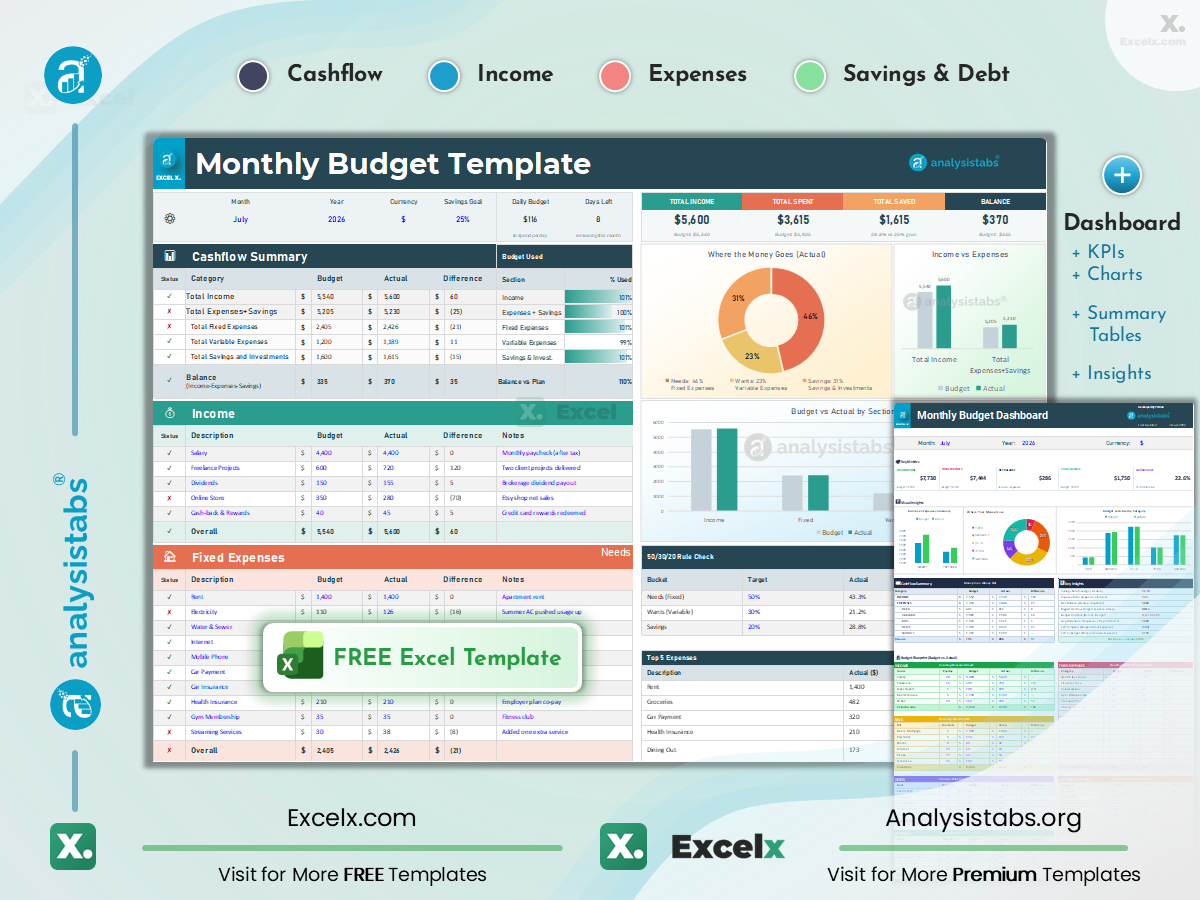
Start with our 2 featured templates below — featuring a currency selector, live KPI strip, and 50/30/20 Rule Check — then browse 48 more free monthly budget templates across 8 categories including core budgets, audience-specific layouts, lifestyle budgets, dashboards, combos, tools, and format variants.
- Cashflow Summary with Status Ticks: Total Income, Fixed Expenses (Needs), Variable Expenses (Wants), and Savings — each with Budget vs Actual, auto-calculated Difference, and ✓/✗ status indicators.
- “Where the Money Goes” Chart: Automatic donut chart showing your Needs / Wants / Savings split — instantly see if you’re near the 50/30/20 ideal.
- Smart Highlights: Red highlights when over budget, green when under — edit the blue cells only, everything else calculates automatically. Month, year, and currency selectable in the top bar.
📑 On this page
📋 Core Monthly Budgets (10)
👥 Audience & Income Type (7)
🏠 Lifestyle & Category Budgets (9)
📊 Dashboards & Reports (5)
🔗 Budget + Tracker Combos (6)
⚙ Trackers & Tools (3)
📄 Format Variants (4)
🌟 Popular Variants (4)
📊 Template Comparison
📖 What Is a Monthly Budget Template
✅ What to Include
🔍 Template Walkthrough
🚀 How to Use
🧮 Budgeting Methods
💵 Budget Examples
⚙ Create Your Own
🚀 How to Budget Monthly
❓ FAQs
Core Monthly Budget Templates for Excel
The essential monthly budget template Excel picks for everyday money management — from simple starters to household, student, senior, roommate, and newlywed layouts. Every card is a complete monthly budget spreadsheet with working formulas.

Simple Monthly Budget Template
Meet the classic simple monthly budget template — basic income and expense sections with automatic totals, the easiest way to start budgeting. No advanced Excel skills needed.
Income + Expenses · Auto Totals · Beginner-Friendly

Monthly Budget Planner (Excel)
Our most popular monthly budget planner Excel free download — income, expenses, and savings sections with planned vs actual columns, variance tracking, and monthly summary.
Planned vs Actual · Variance · Most Popular

Personal Monthly Budget Template
Single-person budget with rent, subscriptions, dining, and personal savings goals — streamlined for individual finances.
Individual Categories · Multiple Income Streams

Couple Monthly Budget Template
Built for couples — two incomes with shared vs individual expenses, contribution split tracking, and joint savings goals for partners.
Two Incomes · Shared vs Individual · Split Tracking

Family Budget Template
Designed as the family monthly budget template — childcare, school expenses, groceries, and family activities with per-member tracking.
Childcare · School · Groceries · Dual Income
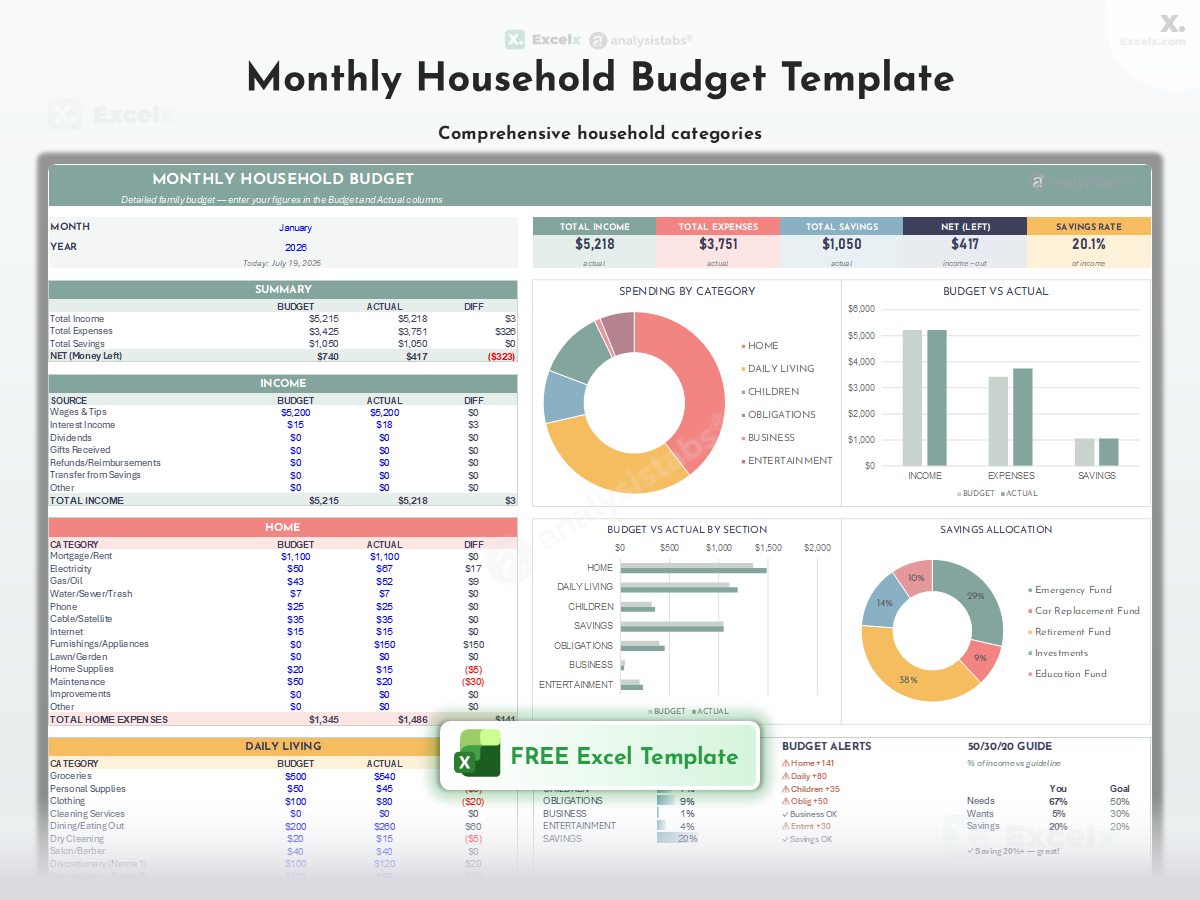
Monthly Household Budget Template
A free household budget spreadsheet for the whole home — utilities, maintenance, groceries, and family costs in one monthly view.
Home Operations · Utilities · Maintenance

Student Budget Template
Built for student life — tuition, books, part-time income, and meal plans with semester-based planning.
Tuition · Books · Part-Time Income · Semester

Senior Monthly Budget Template
Designed for seniors on fixed income — pension and social security income against healthcare and living expenses.
Fixed Income · Healthcare · Simplified Layout

Roommate Monthly Budget Template
Split shared apartment costs fairly — rent, utilities, and groceries divided per roommate with settlement summary.
Shared Costs · Per-Person Split · Settlement

Newly Married Monthly Budget Template
Merge two financial lives — combined income, his/hers/ours expense structure, and joint goal planning for newlyweds.
Combined Income · His/Hers/Ours · Joint Goals
Monthly Budget Templates by Audience & Income Type
Budgets built for your situation — retirement, low income, single parents, variable earnings, teens, digital nomads, and India-specific.

Retirement Budget Template
Plan life on fixed income — pension, social security, and investment income against healthcare, housing, and lifestyle.
Pension · Social Security · Healthcare

Low Income Budget Template
For low income households, this budget template keeps every dollar prioritized with an essentials-first structure and community resource categories.
Essentials First · Priority Order · Tight Budgets

Single Parent Budget Template
One income, kids covered — childcare, school, and support payment categories with emergency buffer planning.
One Income · Childcare · Emergency Buffer

Variable Income Budget Template
Budget on irregular earnings — lowest-month baseline planning with surplus allocation rules for good months.
Baseline Planning · Surplus Rules · Irregular Pay

Teen Allowance Tracker
Simple money management for kids and teens — allowance income, spending log, and savings goals in a friendly layout.
Allowance · Spending Log · First Budget

Digital Nomad Budget Template
Multi-country living costs — accommodation, coworking, travel, and visa expenses with per-city comparison.
Multi-Country · Coworking · Per-City Costs

India Monthly Budget Template (₹)
This is the monthly budget template India users ask for — rupee (₹) format with India-specific categories — rent, EMIs, domestic help, utilities, and festival planning.
₹ Format · EMIs · Festival Planning · India Categories
Get all free budget templates delivered to your inbox
Lifestyle & Category Monthly Budget Templates
Focused budgets for one spending area — rent, mortgage, utilities, groceries, vacations, weddings, holidays, and entertainment.

Monthly Expenses Template (Living Costs)
A monthly expenses template Excel users love — housing, food, transport, and utilities isolated from discretionary spending in one monthly expenses spreadsheet.
Cost of Living · Essentials Only

Monthly Rent Budget Template
Rent affordability planning — rent-to-income ratio, utilities, renter insurance, and move-in cost tracking.
Rent-to-Income Ratio · Renter Costs

Monthly Mortgage Budget Template
Homeowner payment planning — principal, interest, taxes, insurance (PITI), and extra payment tracking.
PITI · Extra Payments · Homeowner

Monthly Utility Budget Template
Track every utility — electricity, water, gas, internet, and phone with seasonal variation planning.
All Utilities · Seasonal Variation

Monthly Grocery Budget Template
Food spending control — grocery categories, per-week breakdown, and dining-out vs home-cooking split.
Per-Week Breakdown · Dining Out Split

Monthly Vacation Budget Template
Save monthly toward travel — trip cost estimation with monthly contribution plan and countdown tracker.
Trip Savings · Monthly Contributions

Monthly Wedding Budget Template
Save toward your wedding month by month — total cost target with per-category contribution planning.
Wedding Savings · Category Targets

Monthly Holiday Budget Template
Spread holiday costs across the year — gift budgets per person with monthly set-aside tracking.
Gift Budgets · Monthly Set-Aside

Monthly Entertainment Budget Template
Fun money with limits — streaming, dining, events, and hobbies with per-category caps.
Fun Money · Category Caps · Guilt-Free
Monthly Budget Dashboards & Reports
Visual budgets with KPI cards, charts, graphs, forecasts, and month-end reports — see your money, not just numbers.

Monthly Budget with Dashboard
A monthly budget template Excel dashboard — KPI cards, spending breakdown charts, savings rate donut, and category comparison bars — see your money at a glance.
KPI Cards · Spending Charts · Savings Donut

Monthly Budget Report
Month-end reporting layout — summary tables and variance analysis formatted for printing or sharing.
Month-End Summary · Print-Ready

Monthly Budget Forecast
Project future months — trend-based forecasting from your actual spending history with projection charts.
Trend Forecasting · Future Projection

Monthly Budget with Charts
Chart-first layout — pie, bar, and comparison charts front and center with the data table behind them.
Pie + Bar Charts · Visual First
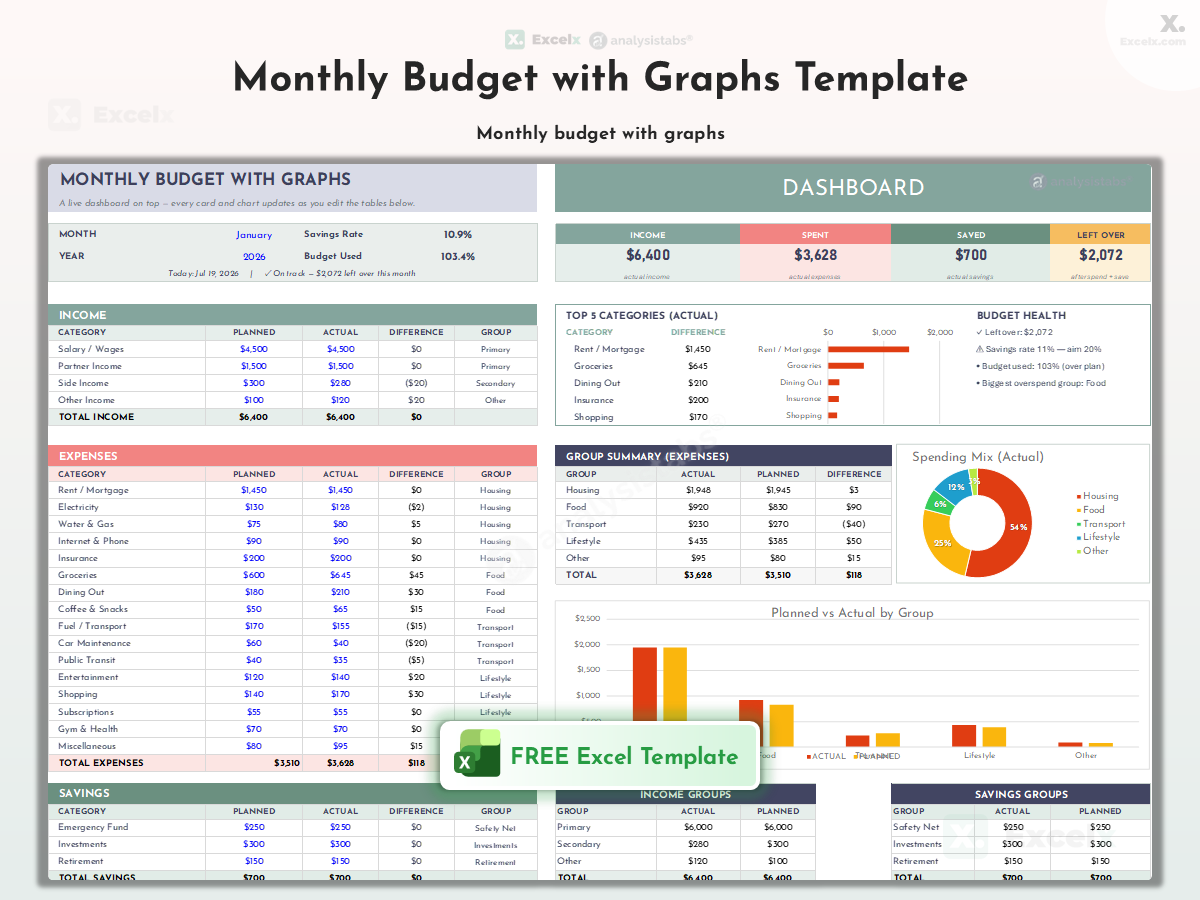
Monthly Budget with Graphs
Trend-line focused — income and spending graphed over weeks to reveal patterns at a glance.
Trend Lines · Weekly Patterns
Monthly Budget + Tracker Combo Templates
Two tools in one file — your monthly budget combined with expense logs, bill checklists, savings goals, debt payoff, or analytics.

Budget with Expense Tracker
Plan and log in one file — monthly budget sheet plus daily transaction log that feeds actuals automatically.
Budget + Daily Log · Auto Actuals

Budget with Bills Tracker
Budget plus bill checklist — due dates, paid status, and auto-pay flags alongside your monthly plan.
Budget + Due Dates · Paid Status

Budget with Savings Tracker
Budget plus goal progress — savings goals with progress bars built into your monthly budget view.
Budget + Goal Progress Bars

Budget with Debt Tracker
Budget plus payoff plan — debt balances, minimums, and extra payments tracked beside monthly spending.
Budget + Debt Balances · Payoff

Budget with Sinking Funds
Budget plus future-expense funds — monthly set-asides for annual costs tracked in dedicated fund columns.
Budget + Set-Aside Funds

Budget with Category Analysis
Budget plus deep analytics — category trends across months with percentage-of-income analysis.
Budget + Trend Analytics · % of Income
Monthly Budget Trackers & Tools
Practical monthly tools — cash flow projection, bill calendar, and an instant budget calculator.

Monthly Cash Flow
A monthly cash flow template — money in vs out week by week, with projected account balance to spot cash crunches before they happen.
Weekly Inflows/Outflows · Balance Projection

Budget Calendar
Bills mapped to a monthly calendar — see exactly which day each payment is due with paycheck overlays.
Calendar View · Due Dates · Paycheck Overlay

Monthly Budget Calculator
Enter income, get instant category recommendations — guideline percentages calculated automatically.
Instant Recommendations · Guideline %
Monthly Budget Template Formats — Excel, Google Sheets, Printable & PDF
Your monthly budget template Excel, Google Sheets, printable, and PDF options — desktop Excel, Google Sheets, printable, and PDF-ready layouts.
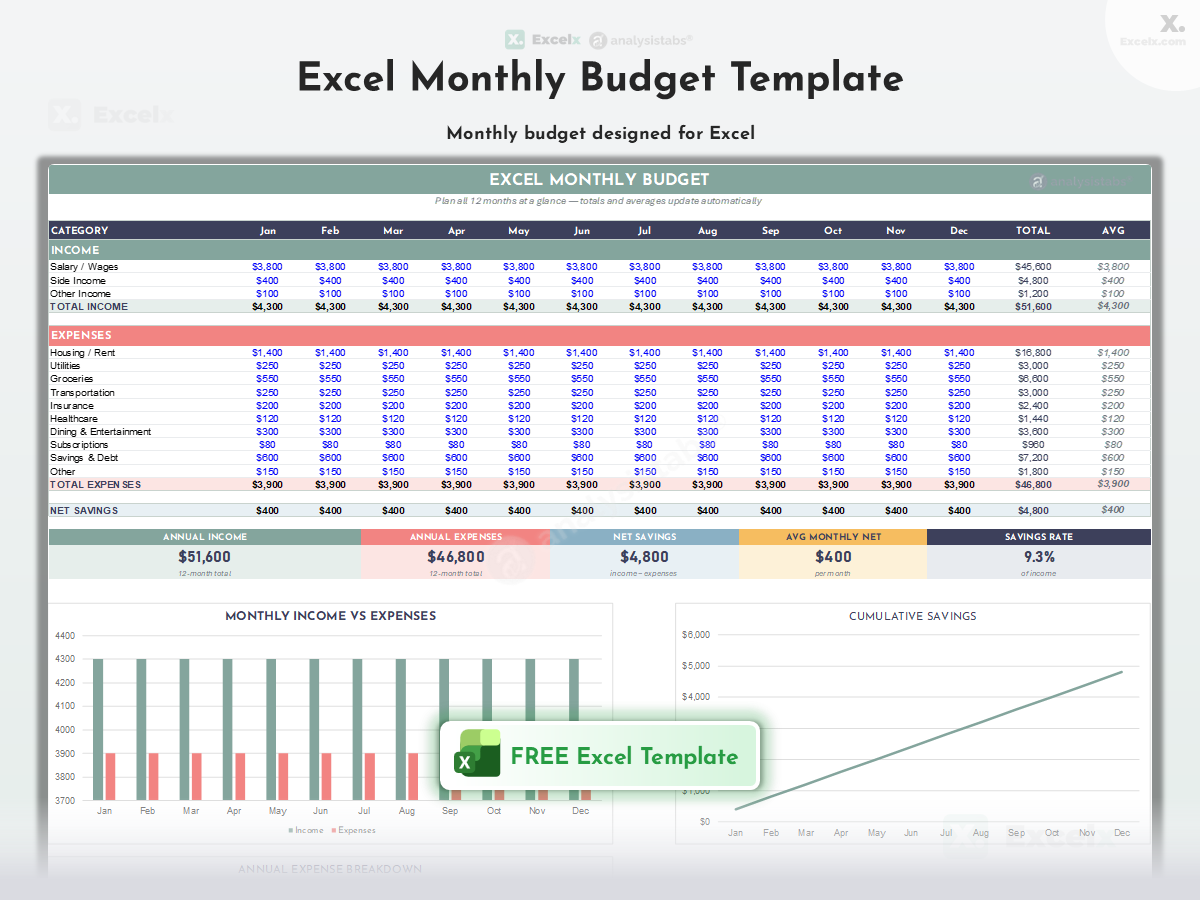
Excel Monthly Budget Template
The classic .xlsx monthly budget optimized for desktop Excel — full formulas and conditional formatting.
Desktop Excel · Full Formulas

Google Sheets Monthly Budget Template
Prefer the cloud? This is the monthly budget template Google Sheets version — a free Google Sheets budget template with cloud-friendly formulas that work perfectly in your browser. Also the answer to “google sheets monthly budget template” and “google spreadsheet budget template” searches.
Cloud-Ready · Sheets-Optimized

Printable Monthly Budget Template
Clean print-ready layout to fill in by hand — perfect for a budget binder or the fridge.
Print-Ready · Fill by Hand · Binder

Monthly Budget Template PDF
Need PDF? This monthly budget template PDF option offers — print-perfect formatting to share or archive your monthly budget as PDF.
PDF Export · Share & Archive
Popular Monthly Budget Template Variants
High-demand variations — multi-income, single person, whole-home, and complete financial planning layouts.

Multi-Income Budget Template
Track unlimited income streams — salary, freelance, rental, and investments totaled with per-source analysis.
Unlimited Streams · Per-Source Analysis

Single Person Budget Template
Solo finances simplified — one-income layout with individual-scale categories and personal goals.
One Income · Solo Categories

Home Budget Template
Whole-home finances — household bills, maintenance, and family costs in one home-focused layout.
Household Bills · Home-Focused

Monthly Financial Planning
Beyond budgeting — monthly plan covering spending, saving, investing, and net-worth checkpoints.
Spending + Saving + Investing
Which Monthly Budget Template Should You Use?
Use this quick-reference table to pick the right budget template for your situation, income structure, and financial goals.
| Template | Best For | Key Feature | Level |
|---|---|---|---|
| ★ Featured Templates — Start Here | |||
| Monthly Budget Template ★ | Everyone — best all-rounder | Currency Selector · 50/30/20 Check | ★★ |
| Monthly Budget Dashboard ★ | Visual learners | Currency Selector · Charts · Blueprint | ★★ |
| 📋 Core Monthly Budgets | |||
| Simple Monthly Budget | First-time budgeters | Income + Expenses · Auto Totals | ★ |
| Monthly Budget Planner | Everyday planning | Planned vs Actual · Variance | ★ |
| Personal Monthly Budget | Individuals | Custom Categories · Multi-Income | ★ |
| Couple Monthly Budget | Couples, joint finances | Two Incomes · Shared vs Individual | ★ |
| Family Budget | Families with kids | Childcare · School | ★ |
| Monthly Household Budget | Whole-home costs | Home Operations · Utilities | ★ |
| Student Budget | College students | Tuition · Books | ★ |
| Senior Monthly Budget | Seniors, fixed income | Fixed Income · Healthcare | ★ |
| Roommate Monthly Budget | Roommates, shared rent | Shared Costs · Per-Person Split | ★ |
| Newly Married Monthly Budget | Newlyweds merging money | Combined Income · His/Hers/Ours | ★ |
| 👥 Audience & Income Type | |||
| Retirement Budget | Retirees | Pension · Social Security | ★★ |
| Low Income Budget | Tight budgets | Essentials First · Priority Order | ★★ |
| Single Parent Budget | Single parents | One Income · Childcare | ★★ |
| Variable Income Budget | Irregular earners | Baseline Planning · Surplus Rules | ★★ |
| Teen Allowance Tracker | Kids & teens | Allowance · Spending Log | ★★ |
| Digital Nomad Budget | Nomads, multi-country | Multi-Country · Coworking | ★★ |
| India Monthly Budget (₹) | India — ₹ budgets | ₹ Format · EMIs | ★★ |
| 🏠 Lifestyle & Category Budgets | |||
| Monthly Living Expenses Budget | Cost-of-living tracking | Cost of Living · Essentials Only | ★ |
| Monthly Rent Budget | Renters | Rent-to-Income Ratio · Renter Costs | ★ |
| Monthly Mortgage Budget | Homeowners | PITI · Extra Payments | ★ |
| Monthly Utility Budget | Utility tracking | All Utilities · Seasonal Variation | ★ |
| Monthly Grocery Budget | Food spending control | Per-Week Breakdown · Dining Out Split | ★ |
| Monthly Vacation Budget | Travel savers | Trip Savings · Monthly Contributions | ★ |
| Monthly Wedding Budget | Engaged couples | Wedding Savings · Category Targets | ★ |
| Monthly Holiday Budget | Holiday planners | Gift Budgets · Monthly Set-Aside | ★ |
| Monthly Entertainment Budget | Fun-money control | Fun Money · Category Caps | ★ |
| 📊 Dashboards & Reports | |||
| Monthly Budget with Dashboard | Visual learners | KPI Cards · Spending Charts | ★★ |
| Monthly Budget Report | Month-end reviews | Month-End Summary · Print-Ready | ★★ |
| Monthly Budget Forecast | Future planning | Trend Forecasting · Future Projection | ★★ |
| Monthly Budget with Charts | Chart lovers | Pie + Bar Charts · Visual First | ★★ |
| Monthly Budget with Graphs | Trend watchers | Trend Lines · Weekly Patterns | ★★ |
| 🔗 Budget + Tracker Combos | |||
| Budget with Expense Tracker | Plan + daily log | Budget + Daily Log · Auto Actuals | ★★ |
| Budget with Bills Tracker | Bill management | Budget + Due Dates · Paid Status | ★★ |
| Budget with Savings Tracker | Goal savers | Budget + Goal Progress Bars | ★★ |
| Budget with Debt Tracker | Debt payoff | Budget + Debt Balances · Payoff | ★★ |
| Budget with Sinking Funds | Sinking-fund savers | Budget + Set-Aside Funds | ★★ |
| Budget with Category Analysis | Budget plus deep analytics | Budget + Trend Analytics · % of Income | ★★ |
| ⚙ Trackers & Tools | |||
| Monthly Cash Flow | Cash-crunch spotting | Weekly Flows · Balance Alert | ★★ |
| Budget Calendar | Bill-calendar planning | Calendar View · Due Dates | ★★ |
| Monthly Budget Calculator | Quick recommendations | Instant Recommendations · Guideline % | ★★ |
| 📄 Format Variants | |||
| Excel Monthly Budget | Desktop Excel users | Desktop Excel · Full Formulas | ★ |
| Google Sheets Monthly Budget | Optimized for Google Sheets | Cloud-Ready · Sheets-Optimized | ★ |
| Printable Monthly Budget | Paper budgeters | Print-Ready · Fill by Hand | ★ |
| Monthly Budget PDF | PDF sharing | PDF Export · Share & Archive | ★ |
| 🌟 Popular Variants | |||
| Multi-Income Budget | Track unlimited income streams | Unlimited Streams · Per-Source Analysis | ★★ |
| Single Person Budget | Solo finances simplified | One Income · Solo Categories | ★★ |
| Home Budget Template | Whole-home finances | Household Bills · Home-Focused | ★★ |
| Monthly Financial Planning | Beyond budgeting | Spending + Saving + Investing | ★★ |
In short: if you’re unsure, start with the featured Monthly Budget Template. However, if you already know your situation — for instance a family, a student, or variable income — jump straight to that template above. Meanwhile, visual thinkers should begin with the Dashboard instead.
What Is a Monthly Budget Template in Excel?
A monthly budget template is a pre-built Excel spreadsheet that provides the structure for tracking income, planning expenses by category, monitoring actual spending, and calculating savings — so you can manage your money immediately instead of building a budget from scratch.
A monthly budget itself is a plan for how you’ll spend and save your income during one month. It lists expected income from all sources, allocates money to expense categories (housing, food, transportation, and so on), and shows whether you’ll end the month with a surplus or deficit.
Budgeting monthly — rather than weekly or annually — matches how most bills, paychecks, and subscriptions work, making it the most practical planning cycle for personal finances.
Template, Spreadsheet, Sheet, or Planner — What’s the Difference?
Whatever you call it — a monthly budget template Excel file, a monthly budget spreadsheet, budget sheet template, budget planner template, monthly budget worksheet, or budget format Excel file — every download on this page is the same thing: a ready-made .xlsx you can start typing into. Prefer the cloud? Every file doubles as a monthly budget template Google Sheets users can import in one step (File → Import in Sheets), and there’s a dedicated Google Sheets monthly budget template below. Looking for a printable monthly budget template or a personal monthly budget template? Both are in the grid.
What Does a Monthly Budget Template Include
Every monthly budget template on this page includes these built-in components:
- Income Section: Rows for salary, side income, and other sources — with planned vs actual columns.
- Expense Categories: Organized groups like Housing, Transportation, Food, Utilities, Insurance, Entertainment, and Savings — each with customizable line items.
- Automatic Calculations: Total income, total expenses, amount saved, and remaining balance calculate instantly with built-in formulas.
- Planned vs Actual Columns: Enter your plan at the start of the month, log actuals as you spend, and the Difference column shows variance automatically.
- Graphical Summaries: Automatic monthly summary with spending breakdown visuals so you can see where your money went.
- Sample Data: Every template includes a pre-filled example month so you can see how it works before entering your own numbers.
What to Include in a Monthly Budget
Whether you use a template from this page or build your own, a complete monthly budget covers these eight elements:
- Total Income: All sources of income — salary, freelance work, side business, benefits — to establish how much money you have to work with.
- Fixed Expenses: Recurring costs that stay the same each month, such as rent or mortgage, car payments, insurance premiums, and subscriptions.
- Variable Expenses: Spending that fluctuates — groceries, utilities, fuel, dining out, and entertainment.
- Savings Goals: Specific amounts for short- and long-term savings — emergency fund, retirement, vacations, or large purchases.
- Debt Payments: Monthly debt obligations — credit cards, student loans, personal loans — to monitor progress and avoid missed payments.
- Spending Categories: Clear expense groups (housing, transportation, food, personal care) that make the budget easier to manage and analyze.
- Planned vs Actual Amounts: What you expect to spend versus what you actually spend — to spot trends and adjust future budgets.
- Balance / Leftover Funds: What remains after subtracting expenses and savings from income — for extra savings, investments, or discretionary spending.
Every template on this page includes these elements pre-built, so you only need to enter your numbers.
Inside the Free Monthly Budget Template (Excel Walkthrough)
Our featured Monthly Budget Template is built with five key sections — a Cashflow Summary, Income table, Expense tables (Needs & Wants), Savings & Investments, and a Monthly Overview chart. Set your month and year in the top bar and pick your currency from the selector ($, €, £, ₹, and more — no manual formatting needed), then edit only the blue cells — everything else calculates automatically.
Cashflow Summary
The summary at the top gives you the complete month at a glance — updating live as you type.
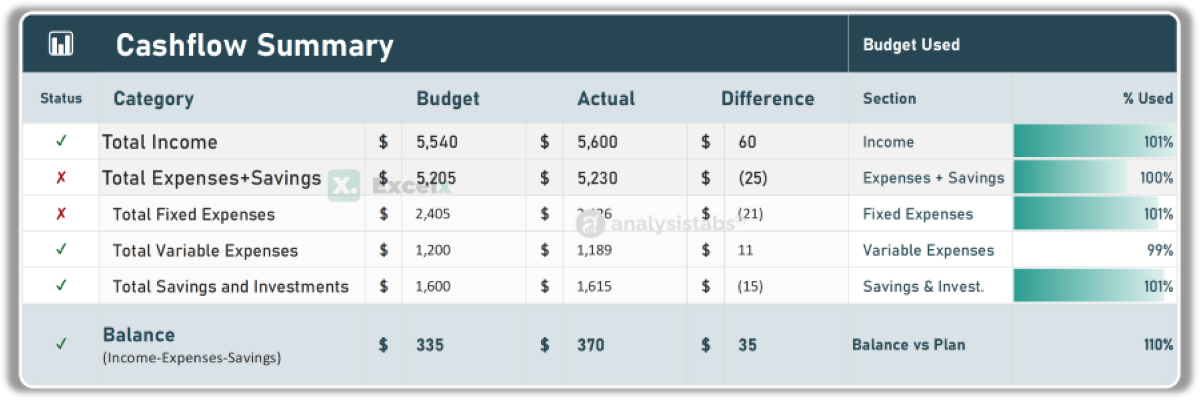
- Total Income: Auto-summed from the Income table — Budget, Actual, and Difference side by side.
- Total Expenses + Savings: Broken into Fixed Expenses, Variable Expenses, and Savings & Investments rows.
- Balance: Income − Expenses − Savings — your true month-end position, positive (surplus) or negative (deficit).
- Status Ticks: Every row shows ✓ (on/under budget) or ✗ (over budget) automatically — spot problems in one glance.
Income Section
The income table captures all money coming in during the month. Fill this in first before planning expenses.
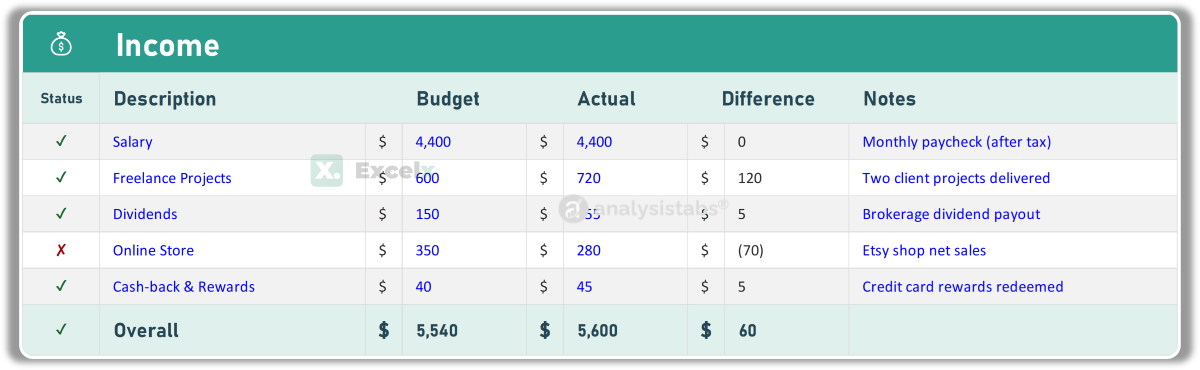
- Description: Salary, freelance projects, dividends, online store, cash-back — rename any row to match your income streams.
- Budget: Expected amount at the start of the month.
- Actual: The amount actually received — update when payments arrive.
- Difference & Status: Auto-calculated variance with a ✓/✗ indicator per source.
- Notes: Context for each row — “Monthly paycheck (after tax)”, “Two client projects delivered”.
Expense Tables — Needs & Wants
Expenses are split into two tables that map directly to the 50/30/20 framework: Fixed Expenses (Needs) and Variable Expenses (Wants).
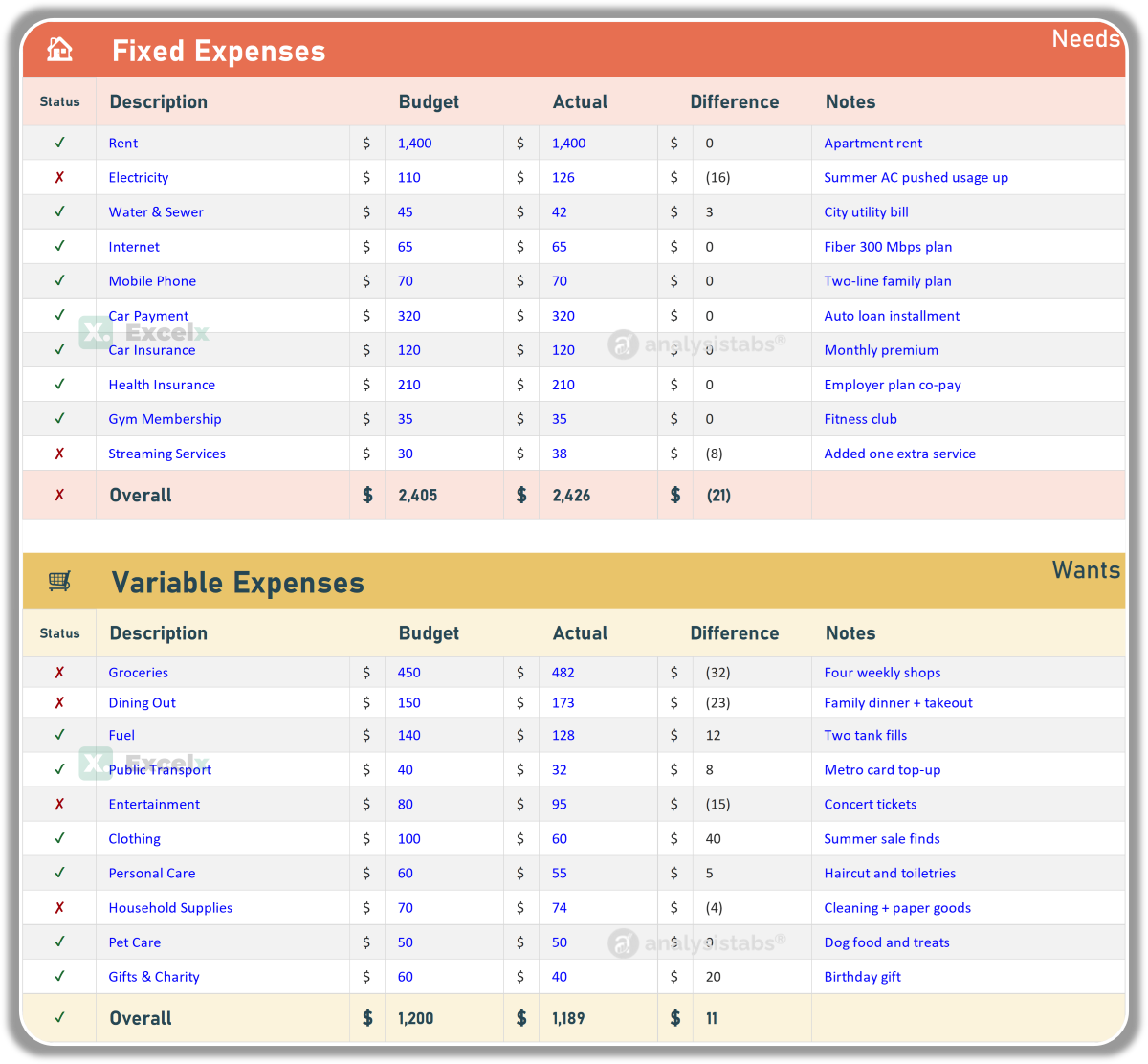
- Fixed Expenses (Needs): Rent, electricity, water, internet, mobile — recurring essentials that stay similar each month.
- Variable Expenses (Wants): Groceries, dining out, fuel, transport, entertainment — flexible spending you control.
- Red / Green Highlights: Over-budget rows highlight red, under-budget green — no need to read the numbers.
- Overall Rows: Each table auto-totals with its own status tick feeding the Cashflow Summary.
Savings & Investments
Savings is treated as a first-class section — not what’s left over. Pay yourself first.
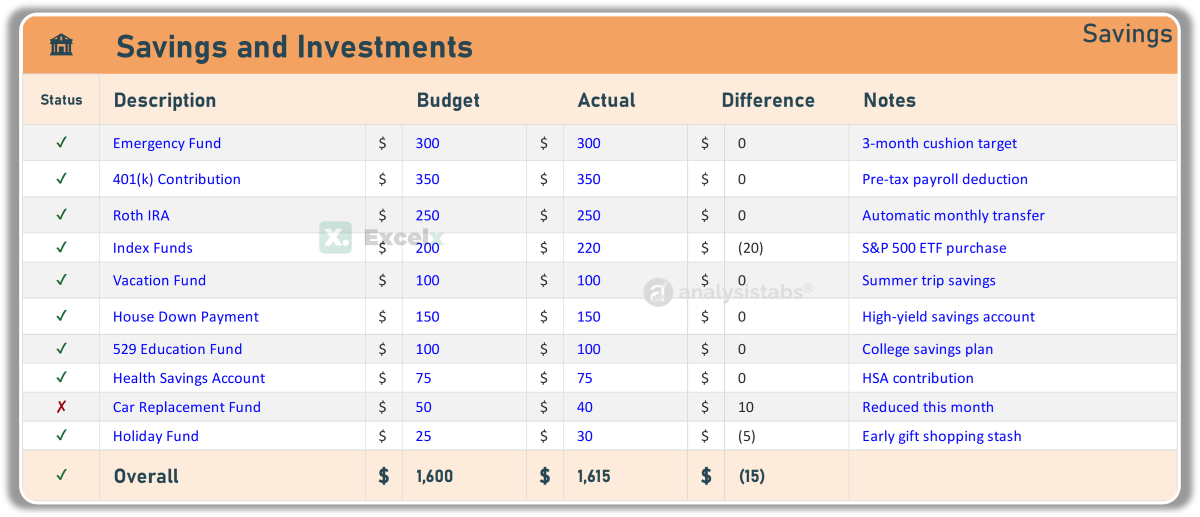
- Goal Rows: Emergency fund, 401(k) contribution, Roth IRA, index funds, vacation fund — track every savings destination.
- Budget vs Actual: Planned contribution against what you actually transferred, with variance.
- Notes: Targets and automation notes — “3-month cushion target”, “Automatic monthly transfer”.
Monthly Overview Chart
The “Where the Money Goes” donut updates automatically from your actuals.
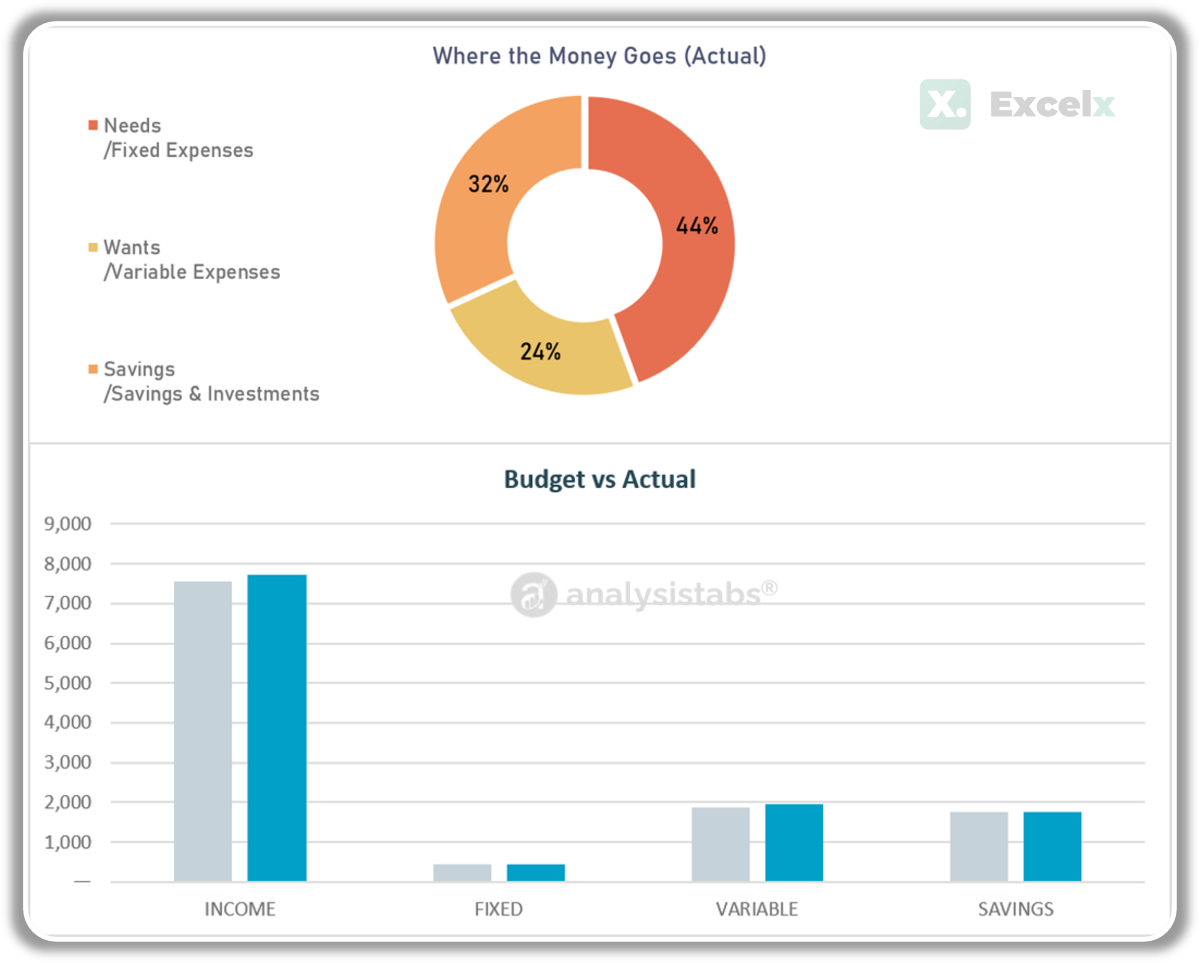
- Needs / Wants / Savings Split: Your actual spending percentages across the three buckets — compare against the 50/30/20 ideal instantly.
- Auto-Updating: The chart recalculates as you enter actuals — no manual chart editing.
- Notes Panel: A dedicated space for action items — “Cancel unused streaming service before the 15th.”
Prefer a chart-first layout? The Monthly Budget Dashboard flips this structure — Budget vs Actual bar chart and spending donut on top, with a four-quadrant Budget Blueprint (Income, Savings, Fixed, Variable) below.
Get all free budget templates delivered to your inbox
How to Use This Monthly Budget Template
Using Excel budget templates can significantly simplify the process of managing your finances. Follow these steps to set up and manage your budget effectively:
-
Choose the right templateIdentify your budgeting need — core, audience-specific, lifestyle, or dashboard. Use the comparison table to decide, then download and open in Excel (2016 or later) or Google Sheets.
-
Customize your categoriesAdjust the income and expense categories to match your specific financial situation. Add, remove, or rename categories freely — the formulas adjust automatically.
-
Enter your incomeList all income sources with expected amounts in the Planned column — salary, freelance work, investments, or any other sources. Be as thorough as possible.
-
Plan your expensesGo through each category and enter planned amounts based on your bills, past spending, and goals. Include both fixed expenses (rent, utilities) and variable expenses (groceries, entertainment).
-
Track actuals regularlyOnce or twice a week, update the Actual column with real spending. The Difference column, totals, and charts update automatically.
-
Review at month-endCompare planned vs actual for every category. Use overspent categories to set more realistic amounts next month — then duplicate the sheet for the new month and repeat.
For tracking across the whole year, transfer each month’s totals into our Income and Expense Tracker or use the Annual Budget Templates for a 12-month overview.
Budgeting Methods: 23 Ways to Budget
Not all budgets work the same way. The right method depends on your personality, income stability, and financial goals. We’ve built dedicated templates for 23 budgeting methods — from the classic 50/30/20 rule to zero-based budgeting, envelope systems, Kakeibo, and our original PNRao Velocity Method.
| Method | How It Works | Best For |
|---|---|---|
| Traditional | Plan amounts per category, track actuals | Most people, stable income — use the Budget Planner |
| Zero-Based | Assign every dollar until income − allocations = 0 | Detail-oriented, total control |
| 50/30/20 | 50% needs, 30% wants, 20% savings | Beginners, simplicity seekers |
| Envelope | Fixed amount per spending envelope, stop when empty | Overspenders, cash discipline |
| Pay Yourself First | Save a fixed % first, spend the rest freely | Savers who hate tracking |
| Kakeibo | Japanese mindful journaling in 4 categories | Mindful spenders, journalers |
Explore All 23 Budgeting Method Templates →
Why Use an Excel Budget Template?
Easy to Use
Excel’s user-friendly interface makes it easy to input and organize financial data. No accounting software needed — just enter your numbers and the template handles the calculations automatically.
Fully Customizable
Templates can be tailored to fit your unique financial situation. Adjust categories, add income sources, and modify expense types to match your exact needs. No two budgets are the same.
Automatic Calculations
Excel formulas automate totals, balances, and variance calculations — saving time and reducing errors for a faster, more accurate budgeting experience.
Data Visualization
Built-in charts and graphs make your spending trends clear and easy to understand. See where your money goes without reading every line item.
Accessible Anywhere
Excel is widely available and compatible with various devices. Google Sheets compatibility means cloud access from any device, anytime, anywhere.
Organization Powerhouse
All income, expenses, savings, and goals in a single file. No more scattered receipts, bank statements, or mental math.
Why Budgeting Matters
Budgeting is a crucial aspect of financial management that can significantly impact your financial well-being. It involves planning and tracking your income and expenses to ensure you are living within your means and working towards your financial goals. Without a budget, your finances become a confusing, potentially expensive journey — a budget template acts as your GPS, providing structure and direction.
Budgeting gives you a clear picture of where your money is going. By tracking expenses, you can see exactly how much you’re spending and on what, allowing informed financial decisions. A budget helps avoid overspending by keeping expenses in check with category limits.
With a budget, you can prioritize needs over wants. This helps curb impulse purchases and avoid unnecessary debt. By allocating funds to essential expenses first, you ensure basic needs are met before spending on discretionary items.
Whether you’re saving for a vacation, a new car, a home, or retirement, a budget helps you set realistic financial goals and create a plan to achieve them. Budgeting also helps build an emergency fund — a financial cushion for unexpected expenses.
A budget ensures consistent allocation towards savings goals. By treating savings as a fixed expense, you build wealth over time. Knowing every penny’s purpose brings peace of mind and financial stability.
Monthly Budget Examples by Income Level
Here’s how a 50/30/20 monthly budget breaks down at different income levels (after-tax). Get the dedicated 50/30/20 template on our Budgeting Methods page.
$3,000/month
- Needs (50%): $1,500 — rent $950, groceries $300, utilities $130, transport $120
- Wants (30%): $900 — dining $250, entertainment $150, shopping $200, subscriptions $60, misc $240
- Savings (20%): $600 — emergency fund $400, retirement $200
$5,000/month
- Needs (50%): $2,500 — rent/mortgage $1,500, groceries $450, utilities $180, insurance $200, transport $170
- Wants (30%): $1,500 — dining $400, travel fund $300, entertainment $250, shopping $350, subscriptions $80, misc $120
- Savings (20%): $1,000 — emergency $300, retirement $500, goals $200
$8,000/month
- Needs (50%): $4,000 — mortgage $2,300, groceries $600, utilities $250, insurance $400, transport $450
- Wants (30%): $2,400 — dining $600, travel $500, entertainment $350, shopping $500, subscriptions $120, misc $330
- Savings (20%): $1,600 — retirement $900, investments $400, goals $300
Best Ways to Visualize Income and Expenses
The best chart depends on what insight you’re seeking. All dashboard-style templates on this page include these visuals pre-built.
Pie / Donut Chart
Breaks down expenses by category — instantly see what percentage of spending goes to housing, food, transport, and so on. Best for answering “where does my money go?” Found in the Budget Dashboard and Budget with Charts.
Bar Chart
Compares planned vs actual side-by-side for every category — overspending stands out immediately. Best for answering “am I sticking to my plan?” Built into the Budget Planner and Budget Report.
Line Graph
Tracks income, expenses, or account balance over time — reveals trends and future projections. Best for answering “is my situation improving?” Featured in the Budget with Graphs, Forecast, and Cash Flow templates.
How to Create a Monthly Budget in Excel
-
Set up your spreadsheetOpen a new workbook in Excel. Title your sheet with the month name (e.g., “July 2026”) and create columns for: Category, Description, Planned, Actual, Difference, and Notes. See our creating workbooks guide.
-
Add income rowsList income sources at the top with Planned, Actual, and Difference columns.
-
Add expense categoriesCreate category groups (Housing, Food, Transport, Utilities, Personal, Savings) with line items under each. Adjust based on your financial situation.
-
Add formulasDifference:
=Planned-Actual. Totals:=SUM()for each group. Balance:=Total Income - Total Expenses. See our Excel Formulas guide. -
Apply formatting and validationUse conditional formatting to highlight overspending in red and under-budget in green. Add Data Validation dropdowns for consistent category entry. Excel Features guide.
-
Add charts for visualizationInsert a pie chart for expense breakdown by category and a bar chart comparing planned vs actual. Visual summaries make spending trends obvious at a glance.
-
Save as a reusable templateSave as an Excel Template (.xltx) so you can reuse it every month. See our saving workbooks guide. Backup regularly to cloud storage.
Common Budgeting Mistakes to Avoid
- Forgetting irregular expenses: Annual insurance, car registration, holiday gifts — divide yearly costs by 12 and budget monthly, or use the Budget with Sinking Funds.
- Budgeting to zero without a buffer: Leave 5–10% unallocated for surprises, or the first unexpected expense breaks the budget.
- Setting unrealistic targets: Cutting dining out from $400 to $50 overnight fails. Reduce gradually — $400 → $300 → $200.
- Not tracking actuals: A budget without actual spending recorded is a wish list, not a plan. Update at least weekly with the Budget with Expense Tracker.
- Ignoring small purchases: $6 coffees and $3 app purchases add up to hundreds monthly. The Category Analysis combo catches leaks.
- Giving up after one bad month: Overspending happens. Adjust next month’s plan and continue — consistency beats perfection.
- No savings line item: Treat savings as a mandatory expense, not what’s left over. Pay yourself first.
How to Budget Monthly (Step by Step)
Wondering how to make a monthly budget that actually sticks? The process is the same in every monthly budget template Excel file above:
-
List your monthly incomeSalary, side income, benefits — everything that arrives in a typical month. Use take-home (after-tax) amounts.
-
List fixed expenses firstRent/mortgage, utilities, insurance, subscriptions, loan payments — the bills that don’t change much.
-
Set targets for variable spendingGroceries, fuel, dining, fun — give each a monthly cap based on the last 2–3 months of actuals.
-
Assign savings before you spendEven 5–10% — the templates’ savings sections and 50/30/20 checks make the target visible.
-
Track actuals weekly and adjustEnter real spending against plan; the planned-vs-actual columns show exactly where the month is drifting.
Monthly Budget Example (50/30/20 Split)
A quick monthly budget example: on a $4,000 take-home income, a 50/30/20 split means $2,000 needs, $1,200 wants, $800 savings and debt — the featured template calculates your own split automatically.
Frequently Asked Questions
Choosing & Using the Templates
Is an Excel template better than a budget app?
Apps automate bank syncing but lock your data into their service and often charge monthly. An Excel monthly budget template is free forever, fully customizable, private, and works offline — and for most people, manually entering spending builds the awareness that makes budgets work. Many people use both: an app for tracking, a spreadsheet for planning.
Which is the best budget template here?
For most people, the featured Monthly Budget Template (Best Overall) — currency selector, 50/30/20 check, and savings KPIs. Visual thinkers should grab the Monthly Budget Dashboard. Use the comparison table to match a template to your exact situation.
Currency, Formats & Compatibility
What currency do these templates use? Can I change it?
All templates default to US Dollars ($). The two featured templates — Monthly Budget Template and Monthly Budget Dashboard — include a built-in currency selector: choose $, €, £, or ₹ from the dropdown and every amount, KPI, and chart updates instantly. For all other templates, changing currency takes 10 seconds with Excel’s number formatting: select the amount columns, press Ctrl+1 → Number → Currency, and pick your symbol (₹, €, £, ¥, or any of 100+ currencies). Formulas and calculations work identically in every currency.
What is a monthly budget template?
A pre-built spreadsheet that provides the structure for tracking income, planning expenses by category, and monitoring your actual spending. Download, enter your numbers, and the totals, variance, and charts calculate automatically. All 50 templates on this page include an income section, expense categories, and automatic summaries.
Is there a free monthly budget template for Excel?
Yes — All 50 templates on this page are completely free — no signup, no email required. Download the .xlsx file directly and open it in Excel 2016 or later.
Can I use these templates in Google Sheets?
Absolutely — Every template is a standard .xlsx file that opens in Google Sheets — we even have a dedicated Google Sheets-optimized version. Formulas, formatting, and charts work across both platforms.
Can I change the currency in these templates?
The two featured templates include a built-in currency selector — choose $, €, £, ₹, or any symbol from the top bar and every amount updates instantly. The other 48 templates use US$ formatting by default; change it via Excel’s number formatting (select the amount cells → Ctrl+1 → Currency → choose your symbol).
Which monthly budget template is best for beginners?
Start with the Simple Monthly Budget (essential categories only). Move to the full Budget Planner once you’re comfortable tracking, or try the Monthly Budget Dashboard if you prefer visuals.
How do I make a monthly budget in Excel?
Download any template from this page — each one has income rows, expense categories, and automatic calculations ready to use. Or build your own following our step-by-step guide above: list income, add expense categories, and use SUM formulas for totals.
How often should I update my budget?
Ideally, update transactions as they happen or at least weekly. Review summaries at month-end to identify trends and adjust next month’s plan.
Can I customize the categories?
Definitely — All templates have customizable income and expense categories. Add, rename, or remove categories to match your specific financial situation. The formulas adjust automatically.
What is the 50/30/20 budget rule?
A simple budgeting method: allocate 50% of after-tax income to needs (housing, groceries, utilities), 30% to wants (dining, entertainment, hobbies), and 20% to savings and debt payoff. See our income-level examples above, and download the dedicated 50/30/20 template from our Budgeting Methods page.
How do I choose budget categories?
Start with 8–10 broad categories: Housing, Transportation, Food, Utilities, Insurance, Health, Shopping, Entertainment, Debt Payments, and Savings. Add subcategories only after you have a few months of data. Simpler categories maintained consistently beat precise categories abandoned after a week.
How do I budget when I’m paid biweekly?
Assign each bill and expense to a specific paycheck instead of planning by calendar month. Our Budget by Paycheck template is built for this — in months with three paychecks, direct the extra one to savings or debt.
How do I budget with irregular income?
Base your budget on your lowest expected monthly income, not your average. In higher-income months, direct the surplus to savings and a buffer fund. The Variable Income Budget is designed exactly for this.
How much should I budget for groceries each month?
A common guideline is 10–15% of take-home pay — roughly $300–450/month for a single person or $800–1,200 for a family of four. Track your actual spending with the Monthly Grocery Budget to find your realistic baseline.
Should I budget before or after taxes?
Budget with after-tax (take-home) income — the amount that actually hits your bank account. If you’re self-employed, first set aside your estimated tax percentage, then budget the remainder.
What’s the difference between a budget template and a budgeting app?
A budgeting app follows the company’s category system and rules — and your data lives on their servers. An Excel budget template lives in your own file: you own the data, control the categories, and can customize every formula and chart. Apps are faster to set up; templates give you more control and privacy at zero cost.
Can I track a full year with these templates?
These templates are designed for one month per sheet — duplicate the sheet tab for each new month. For a year-at-a-glance view, use our Annual Budget Templates or Income and Expense Trackers.
How do I track income from multiple sources?
Add a row for each income source (salary, freelance, investments, rental income). The Multi-Income Budget is purpose-built for this with per-source analysis.
Related Budget Templates and Resources
All Budget Templates
The complete hub — life events, occasions, and every category.
Budgeting Methods (23)
50/30/20, zero-based, envelope, Kakeibo, PNRao Velocity & more.
Weekly Budget Templates
Weekly, biweekly, and grocery meal planning budgets.
Annual Budget Templates
Yearly, quarterly, rolling, and forecast budgets.
Savings & Debt Trackers
Emergency funds, challenges, debt payoff, net worth.
Income & Expense Trackers
Daily, weekly, and specialty expense tracking.
Ready for Complete Financial Control?
Love the free templates? Upgrade to the Monthly Budget Excel Template (Premium) — the premium version with unlocked dashboards, KPIs, automation, and multi-month tracking. Prefer everything in one purchase? The Life OS Bundle includes it all.
Can I add new categories and columns to the Student Budget Template without affecting its formulas?
Hi Alexander, the free template lets you edit the designated input cells, but its rows, columns, categories, and formulas are protected. For fully unlocked customization, please use the premium version, which also includes additional dashboards, summaries, and insights.
The Monthly Budget Template is easy to use and makes monthly planning much clearer.
Thank you so much for the wonderful feedback! We designed our Monthly Budget Template to remove the complexity so you can plan your expenses clearly and effectively. We wish you great success with your budgeting goals! – PNRao