

- Free Download
- Simple
- Weekly
- Monthly
- Annual
- Personal
- Family
- Student
- Event
- Project
- Business
- Life Events
- Google Sheets
- Collections
- FAQ
- Comments
A budget spreadsheet helps you see where your money goes and plan what comes next. Download 20 free Excel budget templates plus a bonus Monthly Budget Dashboard covering everyday needs and major expenses — a simple starter sheet, weekly and monthly planners, yearly planning, personal and family budgets, student, event, project and business budgets, plus 10 budgets for life events such as moving, a new baby or a renovation. Every download is an Excel .xlsx file. You can also import the files into Google Sheets; check the layout and calculations after importing. If you need something more specific, six specialist collections are linked at the bottom of the page.
Budget Template Excel — Free Download
Start with the Monthly Budget Template for everyday planning or the Simple Budget Template for a basic introduction. Then browse the other 18 budget templates on this page, including 10 life-event budgets, plus the bonus Monthly Budget Dashboard.
- Monthly Budget Template (Best Overall): currency selector ($, €, £, ₹), planned vs actual columns, live savings KPIs and a 50/30/20 rule check. Our recommended starting point if you are unsure.
- Simple Budget Template (Best for Beginners): income, expenses, a running balance and your savings rate. A straightforward layout with no advanced Excel skills required.
- Every file is free: instant .xlsx download, no signup and no email address required. Open in Excel, or import into Google Sheets and check the result.
↓ Browse 20 free budget templates + the bonus dashboard below
📑 On this page
Simple Budget
Weekly Budget
Monthly Budget
Annual Budget
Personal Budget
Family Budget
Student Budget
Event Budget
Project Budget
Business Budget
Life Events & Occasions (10)
Use in Google Sheets
All Collections
Template Comparison
Why Use Excel
How to Use
Build Your Own
Why Budget
Budgeting Tips
FAQs
Simple Budget Template Excel
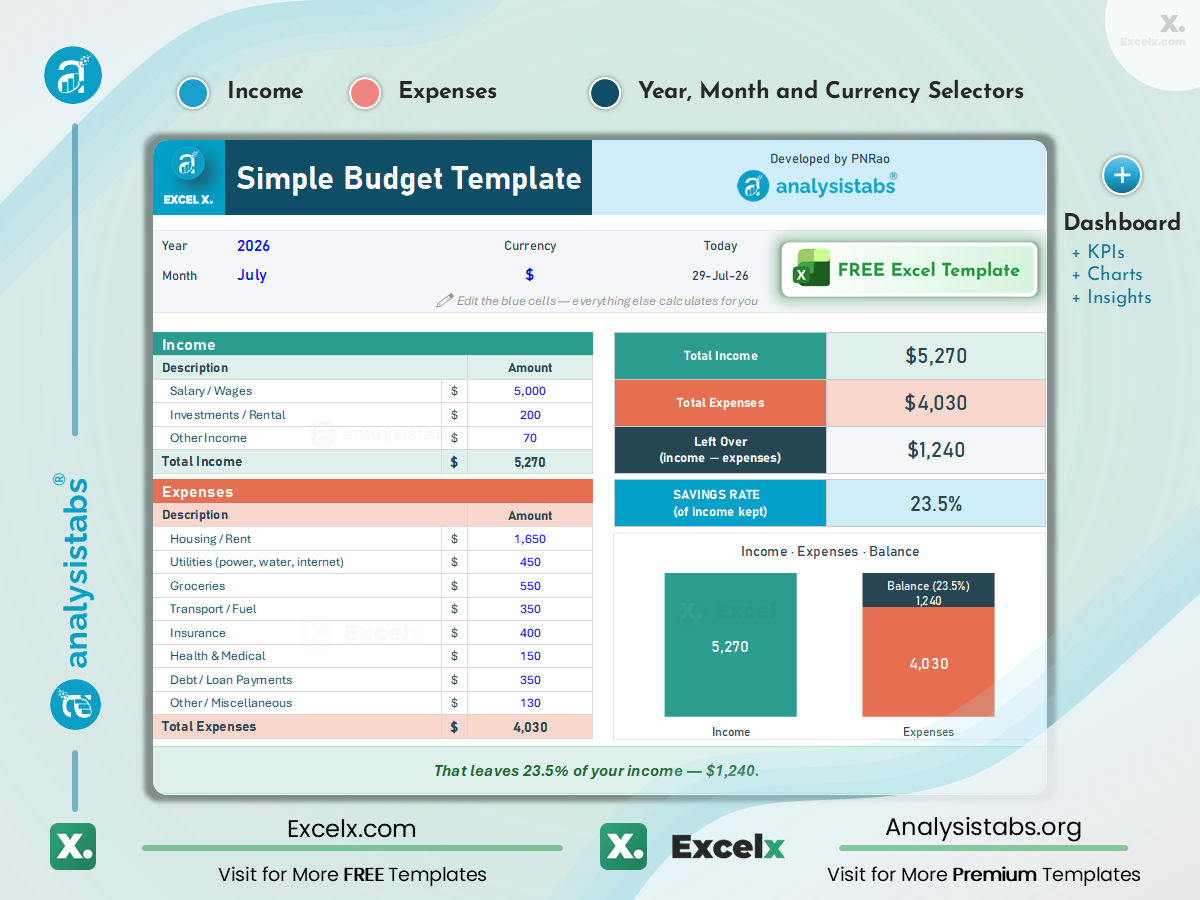
The starting point if you have never kept a budget before. One screen: what came in, what went out, what is left. Replace the example values in the input cells with your own amounts, then review the calculated totals. If you find yourself wanting to plan ahead rather than record what already happened, move up to the Monthly Budget Planner.
What is in the file
An income list and an expense list side by side, with totals, money remaining and a savings rate percentage. Use the currency control if provided, or adjust number formatting where the worksheet allows it. One chart compares income against expenses.
Why people pick it
Its simple layout keeps data entry manageable. Review the remaining balance and savings rate together to understand how the month is progressing.
Who it suits
Anyone budgeting for the first time, and anyone who has abandoned a budget before because the sheet was too much work to maintain. Also a good fit for a single person with one income and predictable bills.
Weekly Budget Template

A month is a long time to wait to find out you overspent. This template works in seven-day blocks, so you can spot overspending and adjust the following week’s plan. Useful if you are paid weekly, and useful during any stretch where spending needs closer attention than usual.
What is in the file
A seven-day grid with income and expense rows, editable category names, and a weekly summary to review before planning the next week.
Why people pick it
Weekly reviews help you spot spending changes sooner than a single review at the end of the month.
Who it suits
Weekly pay cycles, shift and hourly work, or a weekly spending review between biweekly paychecks, and anyone getting through a tight period — a gap between jobs, a month with an unusual bill — where week-by-week visibility matters more than the annual picture.
Monthly Budget Planner
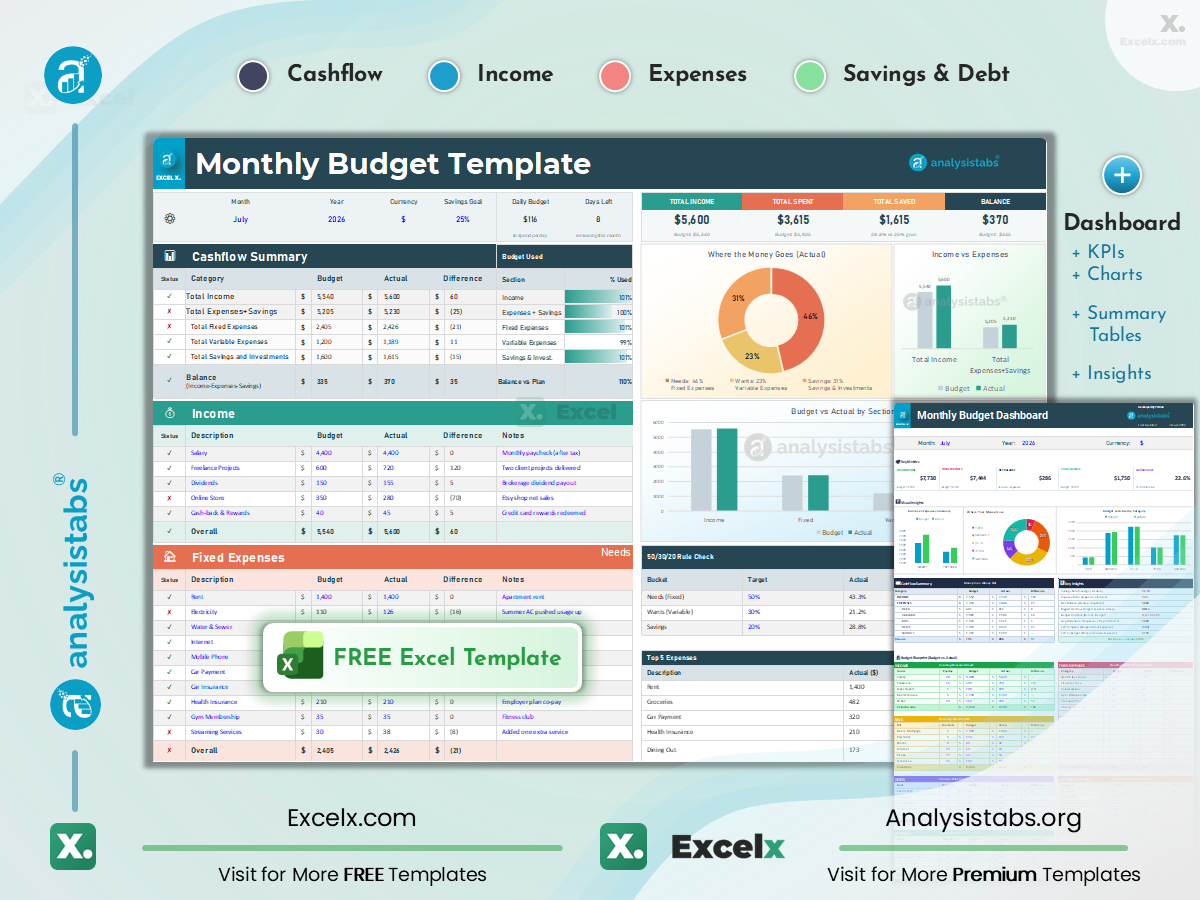
Our recommended starting point for a monthly budget. It plans the month before it starts and then tracks what actually happened against that plan. Prefer a chart-first layout? The Dashboard edition is below. For other versions — retirement, low income, single parent, and more — see all 50 monthly budget templates.
What is in the file
Currency selector ($, €, £, ₹). Separate income, expense and savings sections with planned and actual columns. A live KPI strip showing Savings Goal %, Daily Budget and Days Left. A 50/30/20 rule check and a Top 5 Expenses view.
Why people pick it
Daily Budget and Days Left help you review spending through the month. Check upcoming bills before treating the daily amount as available to spend. Use the 50/30/20 check as a reference and Top 5 Expenses to identify your largest categories.
Who it suits
The default choice for regular monthly income and monthly bills. Also the right file if you have tried a simple tracker and want to set targets in advance rather than only record what already went out.
Annual Budget Template

Twelve months on one grid. This is the file for the costs that do not arrive monthly — insurance premiums, annual subscriptions, vehicle registration fees, and vacations — that are easy to overlook in a monthly plan.
What is in the file
A twelve-column grid across all months, with per-month breakdowns feeding an annual total. Use the remaining months to plan expected costs and revise the year ahead.
Why people pick it
Irregular annual costs become visible months ahead so you can plan for them. Seeing all twelve columns together also makes seasonal patterns obvious — the winter energy bill, the December spike.
Who it suits
Anyone planning a full year: setting savings targets, budgeting for annual renewals, or working toward something twelve months out. Pair it with the monthly planner rather than choosing between them.
Personal Budget Template

A personal budget for keeping different income sources and living costs organized. Salary, freelance invoices, dividends and rental income each get their own row, and the monthly and yearly summary sheets let you see both the immediate month and the longer trend without rebuilding anything.
What is in the file
Separate rows for each income type and editable expense categories. Two summary sheets — one monthly, one yearly — that populate automatically from the entry sheet.
Why people pick it
Multiple income streams stay separated rather than collapsing into one figure, so you can see how each source contributes to your available income. The yearly sheet needs no extra data entry.
Who it suits
Freelancers, contractors, anyone with a side income alongside a salary, and people whose spending categories do not match a standard template and need a more personal set of labels.
Family Budget Template

A family budget brings shared costs together: childcare, school expenses, kids’ activities, and groceries for the household. This template starts with those categories already in place, and supports two or more incomes so both earners can see the same picture.
What is in the file
Multiple household income rows. Pre-built categories for childcare, groceries, school expenses, medical costs and extracurriculars alongside the usual housing and utilities. Charts breaking down where household spending goes.
Why people pick it
A shared record gives everyone the same starting point for discussing household spending. The pre-built categories also surface costs households routinely forget to budget for — field trips, clubs, and school clothing.
Who it suits
Households with children, dual-income couples splitting bills, and families saving toward something specific like a car, a move or a college fund.
Optional: new templates by email
Downloads never require an email address. If you would like to hear when we publish new free templates, you can subscribe below.
Student Budget Template

Student funding may arrive as financial aid, scholarships, family support, or part-time pay. Use this budget to plan how available funds will cover tuition and living costs over the semester. Keep borrowed funds separate from earnings in your records.
What is in the file
Income rows for part-time work, allowances, scholarships and financial aid. Expense rows for tuition, books, housing, food and transportation. Monthly summaries that roll up across a semester.
Why people pick it
Planning how long a payment needs to last helps you set a weekly spending allowance and prepare for upcoming school costs.
Who it suits
Undergraduate and graduate students, in dorms or renting, whether funded by loans, family support, part-time work or a combination.
Event Budget Template

Small changes to vendor quotes and guest counts can increase an event’s total cost. This template holds an estimate and an actual figure side by side for every line, so the gap is visible as vendor quotes come in.
What is in the file
Income rows for ticket sales, sponsorship and registrations. Expense rows for venue, catering, AV, marketing and decorations. An estimated-versus-actual column pair with a running variance on every line.
Why people pick it
The variance column shows the overspend accumulating while there is still time to cut something. It also keeps a record of what each vendor quoted, which matters when you are reviewing final invoices.
Who it suits
Weddings, birthdays, corporate events, product launches and conferences. Works whether the event is funded from your own pocket or expected to break even on ticket revenue.
Project Budget Template

Cost control for a piece of work with a defined start and end. Labor, materials, software and vendor costs are tracked against the budget you set at the outset, so an overrun shows up as a number during the project rather than a conversation after it.
What is in the file
Budgeted and actual columns across labor, materials, software, vendors and travel, with cost tracking by project phase and a summary showing committed spend against remaining budget.
Why people pick it
Phase-level tracking tells you whether you are over because of one bad line or a pattern across the whole project — which determines whether you renegotiate scope or absorb it.
Who it suits
Project managers, freelancers quoting fixed-price work, and consultants billing against a budget. Pairs with our Project Plan Template for schedule alongside cost, and the Multiple Project Tracker for a portfolio view.
Business Budget Template

Plan revenue, operating costs, and the amount left over for your business. Keep revenue sources visible and organize costs into categories you can review throughout the year.
What is in the file
Revenue rows by stream — sales, services, recurring. Operating expense rows for rent, payroll, marketing, supplies and insurance. Review monthly totals and use your estimates to plan the rest of the year.
Why people pick it
Separating revenue sources makes income easier to review. Consider related costs, cash flow, and payment timing before deciding whether to hire or increase marketing spending.
Who it suits
Small business owners, early-stage startups and freelancers who have outgrown a personal budget. For sector-specific versions — restaurants, construction, rentals, nonprofits — see the business collection.
Life Events & Occasions Budget Templates
Separate budgets for major purchases and life events. Compare estimated and actual costs so you can review the total before making further commitments.

Home Renovation Budget Template
Room-by-room remodel planning — materials, labor, permits — and a contingency allowance that you can adjust to the project’s scope and condition.
Per-Room · Materials · Labor · Contingency

Moving & Relocation Budget Template
Plan relocation costs — movers or truck rental, packing supplies, security deposits, utilities setup, cleaning, and storage.
Movers · Deposits · Utilities Setup · Storage

Baby & Nursery Budget Template
New-parent planning — nursery setup, gear, and medical costs plus first-year recurring expenses like diapers and childcare.
Nursery Setup · Gear · First-Year Costs

Car Purchase Budget Template
The full cost of buying a car — price, taxes, fees, insurance, and financing comparison so you see the real total before signing.
All-In Price · Taxes & Fees · Financing

Back-to-School Budget Template
Per-child school shopping — supplies, clothing, fees, and tech with budget caps per category.
Per-Child · Supplies · Clothing · Caps
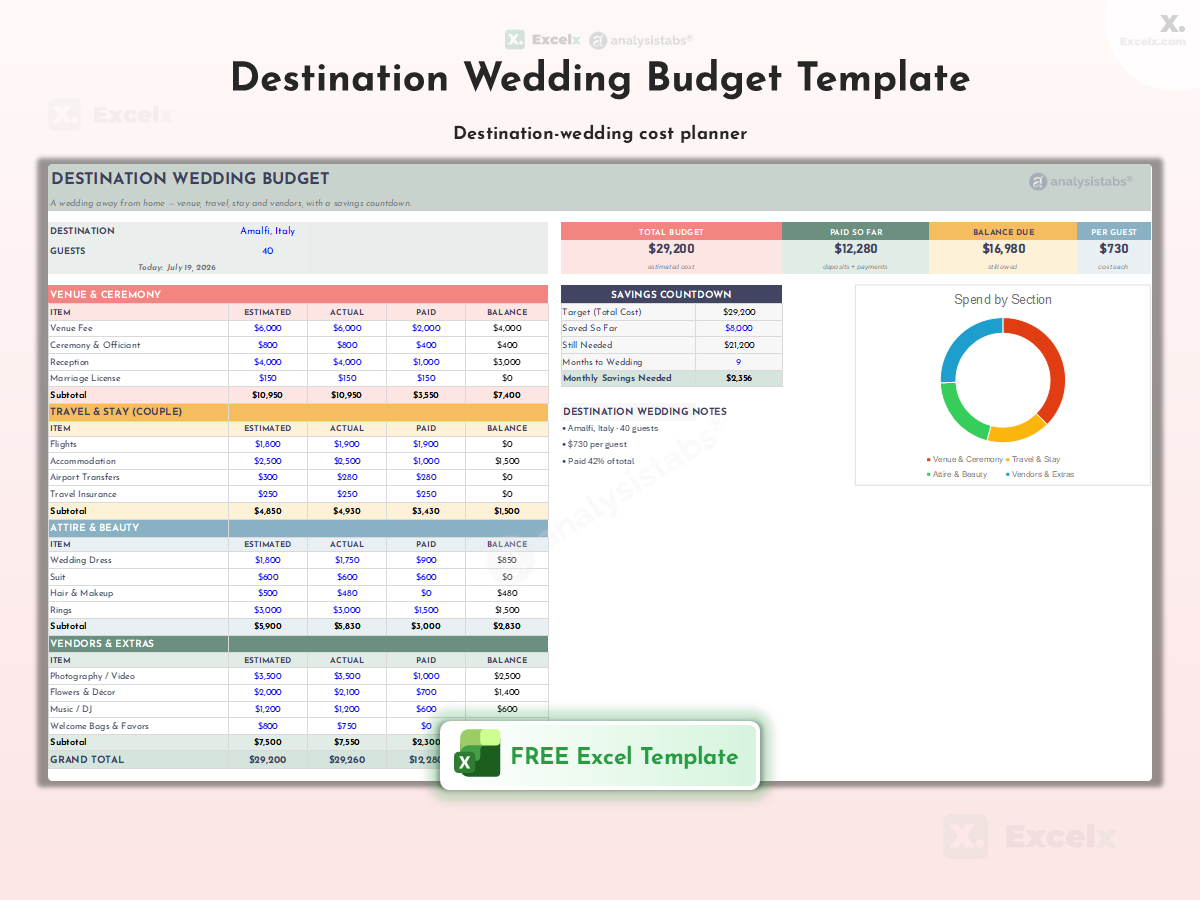
Destination Wedding Budget Template
Wedding abroad, planned properly — venue, travel, guest logistics, and currency-aware cost tracking.
Venue · Travel · Guest Logistics

First Apartment Budget Template
Move-out planning — deposits, furniture, kitchen setup, and your first real monthly budget in one file.
Deposits · Furniture · First Monthly Budget

Christmas Budget Template
Gift list per person with budgets, decorations, food and entertaining, travel, and cards — so you can see the total before shopping.
Gift List Per Person · Decorations · Travel

Home Maintenance Budget Template
Annual upkeep planning — seasonal task schedule and a repair reserve based on your home’s age, condition, and expected work.
Seasonal Tasks · Repair Reserve · Schedule
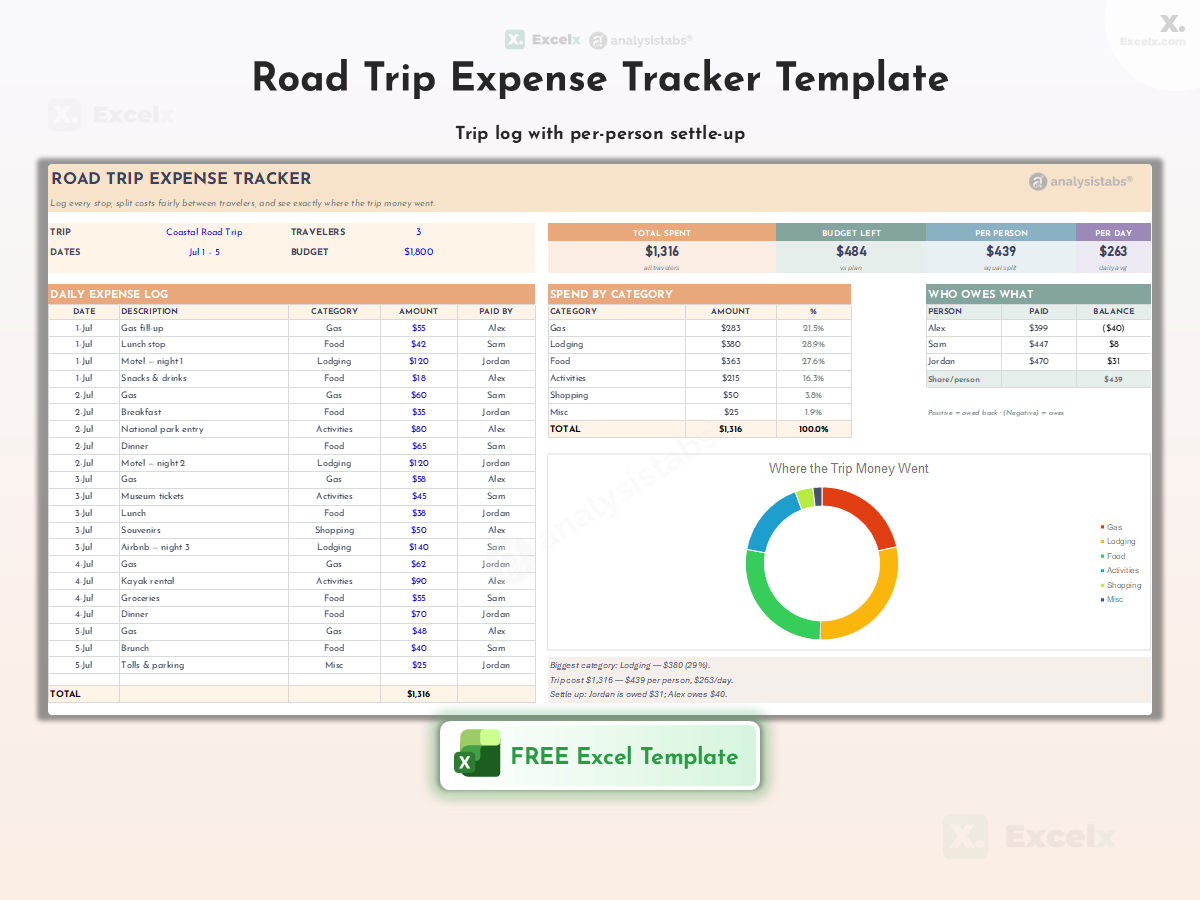
Road Trip Expense Tracker
A travel budget template for the open road — fuel, lodging, food, tolls, and attractions with per-day tracking, total trip cost, and cost-per-mile.
Fuel · Lodging · Per-Day Tracking
$5,000 Monthly Budget Template: US Budget Example
Planning a budget with $5,000 in monthly take-home pay? Use the example below as a starting point for your Excel budget. It covers common US expenses along with savings, debt payments, and a small checking buffer.
| Budget Category | Monthly Amount (USD) | Share of Take-Home Pay |
|---|---|---|
| Rent and renters insurance | $1,650 | 33% |
| Electricity, water, and gas | $200 | 4% |
| Phone and internet | $100 | 2% |
| Groceries and household supplies | $450 | 9% |
| Car payment | $350 | 7% |
| Auto insurance | $150 | 3% |
| Gas, parking, and transit | $180 | 3.6% |
| Out-of-pocket healthcare | $120 | 2.4% |
| Minimum payments on existing debt | $250 | 5% |
| Dining, entertainment, and subscriptions | $200 | 4% |
| Clothing and personal care | $100 | 2% |
| Annual bills, gifts, and maintenance fund | $200 | 4% |
| Vacation savings | $200 | 4% |
| Emergency savings | $300 | 6% |
| Additional retirement savings | $300 | 6% |
| Extra payment toward existing debt | $150 | 3% |
| Unassigned checking buffer | $100 | 2% |
| Total, Including Buffer | $5,000 | 100% |
What this budget shows
The plan assigns $4,900 to spending, savings, and debt payments, leaving $100 unassigned in checking. Savings and amounts set aside for future bills are allocations of income, not additional purchases.
How to make it your own
Replace the sample amounts with your actual bills. Add childcare, dependent expenses, or health insurance paid outside payroll where applicable. Adjust the other allocations so the full plan stays within your available income.
Which template to use
Use the Monthly Budget Template for planned versus actual tracking, the Simple Budget Template for fewer categories, or the Family Budget Template for shared household expenses.
How to Use the $5,000 Example in Excel
Download the Monthly Budget Template and enter your available take-home income. Copy or adapt the amounts above in the designated input cells, then record actual spending as the month progresses. The download is the existing monthly workbook; this example is provided here for you to enter.
Avoid counting payroll deductions twice. The additional retirement savings shown above come from take-home pay. The debt rows cover existing balances and exclude the car payment listed separately. If you record new credit card purchases under spending categories, do not count repayment of those same purchases as another expense.
Using This Budget With Biweekly Pay
If each take-home paycheck is $2,500, a two-paycheck month provides $5,000 and a three-paycheck month provides $7,500. Biweekly means every two weeks; semimonthly means twice a month. Check your actual pay dates and bill due dates before assigning money from an additional paycheck.
Using These Budget Templates in Google Sheets
Every download on this page is an Excel .xlsx file. Google Sheets supports opening and importing Excel files. These links provide Excel workbooks, not separate native Google Sheets copies.
How to open one
Download the .xlsx file, then in Google Drive choose New → File upload and select it. Double-click the uploaded file and pick “Open with Google Sheets”. Or from an open Sheets tab: File → Import → Upload.
What to expect
Google Sheets can import Excel data and formulas, but formatting and feature support can differ. Check totals, balances, charts, dropdowns, and conditional formatting before relying on the imported copy.
What to check
Review formula protection and print settings as well as the visible layout. Keep the original Excel file as a backup, and use Excel if the imported copy does not preserve a feature you need.
Once imported, the file lives in your Drive and syncs across devices, so you can update the budget from a phone on the way home rather than waiting to get back to a desktop. If you prefer to work entirely in Sheets, use the imported copy for updates and retain the original as a backup.
Explore All Budget Template Collections
The 20 main templates and bonus dashboard above cover a range of everyday needs. If you need something narrower — a specific budgeting method, a sector-specific business budget, or an audience-specific monthly layout — these six collections go deeper:
📅 Monthly Budgets (50)
The largest collection — core monthly budgets, audience-specific layouts (retirement, low income, single parent, India ₹), lifestyle budgets, dashboards, budget-plus-tracker combos and printable formats.
🧮 Budgeting Methods (23)
Explore different budgeting approaches — 50/30/20, zero-based, envelope, Kakeibo, FIRE, Dave Ramsey, and the exclusive PNRao Velocity Method.
📆 Weekly Budgets (6)
Short-cycle control — weekly, biweekly, weekly envelopes, printable layouts, and grocery and meal planning.
📈 Annual Budgets (9)
Year-level planning — 12-month grids, quarterly, rolling budgets, YTD vs actual, forecasts, and the sinking funds calendar.
🏢 Business Budgets (24)
From startup launch to industry operations — restaurants, construction, rentals, nonprofits, payroll, CapEx, cash flow, and quarterly taxes.
💰 Savings & Debt (13)
Goals with progress bars, the 52-week challenge, no-spend tracker, net worth, investment tracking, and snowball/avalanche debt payoff.
Which Budget Template Should You Use?
| Template | Best For | Key Feature | Level |
|---|---|---|---|
| 📋 Core by Time Period | |||
| Simple Budget | First-time budgeters | Basic income vs expenses | ★ |
| Weekly Budget | Weekly pay cycles | 7-day summaries | ★ |
| Monthly Planner | Everyday management | Planned vs actual | ★★ |
| Annual Budget | Long-term planning | 12-month + forecast | ★★★ |
| 👨👩👧 Life Situation | |||
| Personal Budget | Individuals | Custom categories | ★★ |
| Family Budget | Households with kids | Family categories | ★★ |
| Student Budget | College students | Semester planning | ★ |
| 🎯 Special Purpose | |||
| Event Budget | Any occasion | Estimated vs actual | ★★ |
| Project Budget | PMs, freelancers | Cost overrun alerts | ★★★ |
| Business Budget | Business owners | Revenue + P/L | ★★★ |
| 🎉 Life Events & Occasions | |||
| Renovation | Home remodels | Per-room + contingency | ★★★ |
| Moving | Relocations | Deposits + setup | ★ |
| Baby & Nursery | New parents | First-year costs | ★★ |
| Car Purchase | Car buyers | Financing comparison | ★★ |
| Back-to-School | Parents | Per-child caps | ★ |
| Destination Wedding | Couples marrying abroad | Travel + guests | ★★★ |
| First Apartment | First-time renters | Setup costs | ★ |
| Christmas | Holiday season | Gift list per person | ★ |
| Home Maintenance | Homeowners | Repair reserve | ★★ |
| Road Trip | Travelers | Per-day tracking | ★ |
Why Use an Excel Budget Spreadsheet?
Nothing to sign up for
No account or bank connection is required to download a template. A locally saved workbook can be used offline in desktop Excel. If you save a copy to OneDrive or Google Drive, that copy is stored in the cloud service.
Categories that match your life
Use the editable category cells to match how you spend. Adding or deleting rows depends on the worksheet’s protection settings; check formulas and chart ranges after any permitted structural changes.
Calculations already built
Excel formulas handle totals, balances, and variances. Enter values in the intended input cells and review the results, especially after changing the layout.
Charts without building them
Templates with built-in charts help you review spending visually. Use the chart alongside category totals to see which expenses need attention.
Works wherever you do
Open in Excel on the desktop or import into Google Sheets for phone and tablet access. Check the imported layout and calculations — see the Google Sheets section above.
Yours to keep
No service to shut down, no plan to lapse, no export required to get your history out. A budget you started in 2024 still opens in 2026.
How to Use These Excel Budget Templates
Six steps from download to a budget you will actually maintain.
-
Choose the right template Identify your budgeting need — personal, family, event, project or business — and download the matching file above. If you are unsure, take the Monthly Budget Template.
-
Set up and customize categories Open in Excel or Google Sheets. Adjust the income and expense categories to match your situation. Rename editable categories as needed. If you insert or remove rows, first check that the sheet allows it and verify the totals afterward.
-
Enter your income List every source: salary, freelance work, benefits, investments, allowances. Use net figures — what actually reaches your account — rather than gross.
-
List your expenses Enter fixed costs first (rent, utilities, insurance, subscriptions), then variable ones (groceries, fuel, entertainment). Working from three months of bank statements is more accurate than working from memory.
-
Track and update regularly Enter transactions as they happen, or set aside ten minutes weekly. A budget updated monthly tells you what went wrong; one updated weekly lets you fix it.
-
Analyze and adjust At month end, look at the charts and the largest categories. Update estimates that no longer match your bills or income, and choose specific spending changes where needed.
Why Budgeting Matters
Budgeting is planning and tracking income against expenses so you are living within your means and moving toward your goals. It gives you a shared reference for reviewing bills, spending decisions, and savings goals.
A budget makes recorded income and spending easier to review. Category limits give you a reference point for deciding where to adjust spending before the end of the month.
Set aside money for essential bills and commitments before planning discretionary spending. Review the remaining amount so everyday purchases fit the money available.
Plan monthly amounts for a vacation, car, down payment, retirement, or emergency fund. Reviewing those allocations helps you see how your spending plan supports your goals.
Give savings its own planned allocation and review it alongside bills and spending. A clear record can make financial decisions easier to discuss and help you identify what needs attention.
How to Create Your Own Budget Spreadsheet in Excel
Prefer to build from scratch? Six steps — or skip the work and download any template above.
-
Set up your spreadsheet Open a new workbook. Create columns for Date, Category, Description, Budgeted Amount, Actual Amount, Difference and Notes. See our creating workbooks guide.
-
Enter income and expense rows List income sources and expense categories with budgeted and actual amounts. Include recurring costs specific to you that a generic list would miss.
-
Add formulas for calculations Expense difference (using defined names):
=Budgeted-Actual. Total Income:=SUM(income range). Total Expenses:=SUM(expense range). Net Total:=Total Income - Total Expenses. See our Excel Formulas guide. -
Apply formatting and validation Use conditional formatting to flag overspending in red and under-budget in green. Add Data Validation dropdowns so category names stay consistent — inconsistent names break SUMIF totals. See our Excel Features guide.
-
Add charts for visualization Insert a pie chart for expenses by category and a bar chart comparing budgeted against actual. Charts update when their linked source cells change; review the source range if you add rows.
-
Save as a reusable template Clear sample input values, retain the formulas, and save as an Excel Template (.xltx) for future months. See our saving workbooks guide, and keep a backup in cloud storage.
Tips for Effective Budgeting with Excel
A backlog of transactions can make a budget harder to maintain. Enter purchases as you go or set aside time for a weekly update.
Look at which categories were wrong, not just by how much. A category that overruns three months running is a budget that needs rewriting, not willpower that needs improving.
Use 50% of take-home pay for needs, 30% for wants, and 20% for savings and extra debt repayment as a starting reference. Include required minimum debt payments with obligations. Adjust the proportions to your income, local costs, and goals.
Conditional formatting flags an overspend the moment you type it, which beats spotting it at month end. Keep the file in OneDrive or Google Drive so a lost laptop does not lose the history.
Frequently Asked Questions
Which budget template should I use?
For most people: start with the Monthly Budget Planner. For beginners who want fewer details: the Simple Budget Template. For families: the Family Budget Template. For students: the Student Budget. For business owners: the Business Budget. For event planning: the Event Budget.
Why is the template locked? What is the password?
The formula cells in the free templates are protected to reduce accidental changes — no password is needed to use them. Use the designated input cells for income, expenses, categories, and dates. Structural changes may be restricted. If you want to change the formulas themselves or rebuild the layout, the premium versions provide fully unlocked formulas and layouts. Compare the features included in the specific premium product.
Can I use these templates in Google Sheets?
You can open or import the .xlsx files in Google Sheets. Check formulas, formatting, and charts after importing because feature support can differ. See the Google Sheets section above for the import steps and checks.
Do I need to give my email address to download?
No. Every template on this page downloads instantly with no signup, no account and no email address. The optional subscribe box only exists if you want to hear about new templates.
How often should I update my budget?
Enter transactions as they happen, or at least weekly. Review the summaries monthly to spot trends and adjust the following month’s plan.
Can I customize the categories?
Use the editable category cells provided in the file. Inserting or deleting rows depends on sheet protection and formula design. Keep a backup and check totals after any structural edits.
What Excel formulas are useful for budgeting?
SUM for totals, IF for conditional logic such as flagging an overspend, SUMIF and SUMIFS for category-specific totals, and AVERAGE for monthly averages. See our complete formula reference.
How do I track income from multiple sources?
Use a separate available input row for each source — salary, freelance income, investments, or rental income — and review the total. The Personal and Business templates are built for this and keep each stream visible separately.
How do I add charts to visualize my budget?
Select your data range, go to Insert → Chart, and choose Pie for a category breakdown or Bar for budgeted against actual. The chart updates automatically as the data changes.
Are these templates really free?
Yes — every template on this page and across all six collections is free to download, with no signup. Premium versions with advanced automation are available separately at AnalysisTabs.
What currency do these templates use? Can I change it?
Choose the featured USD file for US dollars. Where a template includes a currency selector, use it to choose the display symbol. Otherwise, change number formatting with Ctrl+1 → Number → Currency where the sheet allows it. Changing the symbol does not convert amounts using an exchange rate.
How do I budget for big life events like weddings or renovations?
Use the Life Events templates — each uses estimated versus actual tracking with occasion-specific categories. For renovations, plan a contingency allowance based on the work involved; for holidays, set gift budgets before shopping.
Which collection should I explore first?
Most people start with Monthly Budgets (50). If you want a specific approach like 50/30/20 or zero-based, go to Budgeting Methods (23) instead.
Related Templates
Income & Expense Trackers
Detailed templates for tracking income and expenses.
Personal Finance Templates
Manage personal budgets, savings, and net worth.
Project Plan Templates
Combine budget tracking with task management.
PM Templates (100+)
Browse all project management templates.
Monthly Budgets (50)
The complete monthly collection — 50 free templates.
Budgeting Methods (23)
50/30/20, zero-based, Kakeibo & the PNRao Velocity Method.
Need Premium Financial Templates?
Need more flexibility? Explore the Life OS Budget, Finance & Planner Bundle — compare its unlocked finance tools, planners, and included features before choosing.
Optional: new templates by email
Downloads never require an email address. Subscribe only if you would like to hear when we publish new free templates.
Whats the password for it
Hi ayush. The formula cells are protected to prevent accidental changes, but you can enter your information in the unlocked input cells. If you need to modify the formulas or layout, the fully editable version is available at Analysistabs.org.
The budget template is very user-friendly and has made managing my finances much simpler. Thank you!
Thank you for your feedback!
Just what I needed! This budget template simplifies complex financial tasks. Great job!
Thanks for the kind words! I’m glad the template is helpful. Let me know if there’s anything else you need!
I found this Excel budget template intuitive and helpful for managing my finances.
Thank you so much for your kind words! I’m thrilled to hear that the Excel Budget Template has been so helpful for your financial management. If there are any specific features you particularly enjoy or if there’s anything else you’d like to see in future templates, please let me know. Your feedback is invaluable!
What template bundle do I have to buy to get the unlocked Home Yearly Budget?
J Berrios
Hi Juan — apologies for the long delay in replying. Worth clarifying first: the free Annual Budget Template is fully usable as it is. Only the formula cells are protected so the calculations aren’t broken by accident; every input cell is editable and no password is needed. You’d only need the premium version if you want to change the formulas or redesign the layout — that’s in the Life OS™ | Ultimate Excel Life Planner, Finance & ADHD Bundle (200+ Templates) on the Budget & Finance page. Bundle contents have changed since you asked, so contact me through support and I’ll confirm before you buy.
This template has been very helpful for organizing my finances. Thank you!
Thank you so much for your feedback! We are glad our budget template is helping you organize your finances. Stay tuned for more resources!
Regards
PNRao!
Does the student budget template include a section for scholarships?
Yes, Priyanka! It has a dedicated section for tracking scholarships and allowances.
I love how easy it is to use the weekly budget template. Great job!
Thanks, Thomas! We designed it with simplicity in mind to make financial tracking effortless.
Can the event budget template handle multiple events in one file?
Yes, Emily! You can customize the event budget template to track multiple events efficiently.
The annual budget template is perfect for tracking recurring expenses. Great tool!
Thanks, Jack! We’re glad it’s helping you stay on top of your recurring expenses.
Can I add additional income sources to the personal budget template?
Yes, The personal budget template is fully customizable for multiple income sources.
Can I use the project budget template for managing client projects?
Absolutely, Megan! The project budget template is customizable for client-specific projects.
How to unprotect the sheet? what is the password?
If you’ve already purchased it and lost access to the password, feel free to contact us through the support page!
Hi VSH. The formula cells are protected to prevent accidental changes, while the intended input cells remain editable. The fully 👉 editable version includes access to the protected structure. If you have already purchased it, please contact support so I can help you regain access.
These budget templates have made tracking my finances much easier. Thank you for sharing them!
Thanks so much! 🎉 Delighted the templates are helping you stay on top of your finances. If you ever need a specific tweak or have ideas for new budget tools, just let us know—we’re always improving the library!
The family budget template’s graphical summaries are so helpful. Great resource!
Thank you, JK! We’re glad the graphical summaries are making budgeting easier for you.
Does the project budget template include a section for unexpected expenses?
Yes, Jo! You can customize it to include a contingency section for unexpected costs.
The simple budget template is perfect for tracking my monthly expenses. Thank you!
Thank you, Anna! We’re glad the template is working well for you. Let us know if you need help customizing it!
The event budget template makes planning so much easier. Great tool!
Hi Reena! Thank you for your feedback, We’re happy to hear it’s making event planning stress-free.
Hello, and thank you for doing this. I downloaded the free monthly budget, but it stated it was “locked.” Please help lol
Hello! We appreciate you downloading the template. To keep the template working smoothly, we lock the complex formulas in the free version so they aren’t accidentally deleted—you just need to type in the blank input cells. If you are looking to fully customize the layout and edit the formulas, we highly recommend checking out our premium templates for unrestricted access!
The Simple Budget Template is straightforward and helped me organize the numbers quickly. The totals update clearly and the instructions are easy to follow.
Is there a way to carry the remaining balance automatically into the next month?
Hi Kaylin, the free template does not automatically carry the remaining balance into the next month. The premium version provides a fully unlocked structure with enhanced summaries and dashboards for more flexible month-to-month tracking.
This free Personal Budget Template gave me a practical starting point and saved me from building a spreadsheet from scratch. How to add Needs,Wants,Savings Split Pie/donut chart in the Overall summaray section (below the Income Expense Column Chart)?
Hi Eric,
Thank you so much! We are thrilled to hear that the Personal Budget Tracker gave you a practical head start.
Because the free template sheet is locked to protect core formulas and layout, you cannot add charts directly to that tab. However, you can easily build your Needs, Wants, and Savings analysis in a new worksheet:
We think this split view adds tremendous value, and we will definitely include a built-in Needs/Wants/Savings chart directly in our next version update of this template! – PNRao