

- ↓ Free Download
- 💸 Expense Tracker
- 📊 Income & Expense
- 👤 Personal
- 💼 Business
- 📆 Daily
- 🗓️ Weekly
- 📅 Monthly
- 📆 Daily I&E
- 🗓️ Weekly I&E
- 📅 Monthly I&E
- 👥 By Audience
- 🔁 Recurring
- 🐾 Specialty
- ❓ FAQ
- 💬 Comments
Managing your finances effectively is crucial for personal and business success. With our free Excel income and expense tracking templates, you can easily track your earnings and expenditures in one organized spreadsheet. These templates are designed to simplify financial tracking, providing a clear overview of your income and expenses over any time period — daily, weekly, or monthly. Whatever you call it — an expense tracker template, expense tracking spreadsheet, income and expense worksheet, income expense sheet, or monthly expenses template — every version is here as a free Excel download, and each works in Google Sheets too. Whether you need a personal budget tracker, a business expense tracker, or a comprehensive financial tracker, our collection of 26 templates covers every scenario — from core trackers to audience-specific income & expense sheets, recurring bill and subscription trackers, and specialty logs for pets, giving, healthcare, and more.
Income Tracking Template Excel: Download Now
The Income Tracking Template is designed to help you record and monitor all your income sources. Whether it’s your salary, freelance earnings, investments, or other sources, this Excel income tracker makes it easy to keep track of your earnings and ensure accurate financial planning.
Features
Date, description, source category, payment method, amount, and notes fields. Automatic total calculations. Customizable income categories for salary, freelance, investments, and more.
Benefits
Ensures accurate tracking of all income sources. Makes financial planning and budgeting more efficient. Provides a clear summary of total earnings by source and period.
Usage
Perfect for anyone looking to organize their financial inflow systematically — employees tracking salary, freelancers managing multiple clients, or investors monitoring returns.
📑 On this page
💰 Income Tracker
💸 Expense Tracker
📊 Income & Expense
👤 Personal Expenses
💼 Business Expenses
📆 Daily Expenses
🗓️ Weekly Expenses
📅 Monthly Expenses
📆 Daily I&E
🗓️ Weekly I&E
📅 Monthly I&E
👥 I&E by Audience (6)
🔁 Recurring & Category (4)
🐾 Specialty Trackers (5)
💡 Why Track
🚀 How to Use
❓ FAQs
Expenses Tracking Template

This Excel expense sheet is perfect for recording all your expenses, from daily expenditures to large purchases — an expense tracking sheet, expense worksheet template, and complete expense manager Excel solution in one. If you’ve been searching for an expenses Excel template, an expenses spreadsheet template, an expense sheet template, an Excel spreadsheet for expenses, or a simple setup of Excel for expense tracking, this is the one to grab. This Excel expense tracker helps you categorize spending and monitor your habits over time. Whether you’re looking to cut down on unnecessary spending or simply keep a record of where your money goes, this expense management tool ensures you stay within your budget.
Features
Date, description, category (groceries, housing, utilities, entertainment), payment method (credit card, cash, debit), amount, and notes fields. Automatic expense totals by category.
Benefits
Helps categorize and monitor all expenditures. Provides clear visibility into spending patterns. Useful for identifying areas where you can reduce costs and save money.
Usage
Essential for anyone who wants to track where their money goes. Ideal for individuals, families, or small businesses looking to control spending and stick to a budget.
Income and Expense Tracker Excel Template

This income expense template combines both income and expense tracking in a single, comprehensive tool — an income expense Excel template, income and expenditure template Excel users trust, and a clean income & expense worksheet in one file. Some call it an expense income Excel template or income expenditure Excel template; whichever name you use, it’s the same all-in-one income and expense sheet. This all-in-one financial tracker helps you maintain a balanced budget by providing a clear overview of your complete financial situation. Ideal for both personal and business use, this combined tracker allows you to keep detailed records of all financial transactions and easily identify areas where you can save more and optimize your spending.
Features
Date, description, type (income/expense), category/source, payment method, amount, and notes. Automatic calculations for total income, total expenses, and net balance.
Benefits
Provides a complete financial overview in one place. Helps maintain a balanced budget with income vs expense comparison. Useful for identifying savings opportunities and spending optimization.
Usage
Ideal for individuals and business owners who want to track all financial transactions in a single spreadsheet. Works as a comprehensive daily income and expense Excel sheet for complete financial management.
Personal Expense Tracker Excel (Free Download)

This personal expenses spreadsheet is designed to help individuals keep detailed track of their personal spending — a track spending spreadsheet for everyday money. This template helps you categorize and monitor personal expenses effectively, giving you insights into your spending habits. Whether you’re saving for a big purchase, paying off debt, or simply trying to stick to a personal budget, this expense management spreadsheet is an essential tool for responsible financial management.
Features
Personal spending categories (housing, food, transport, entertainment, health, subscriptions). Date and amount tracking. Payment method recording. Notes for additional context on each transaction.
Benefits
Gain insights into personal spending habits. Identify areas where you can cut costs. Ensures responsible personal financial management with clear spending visibility.
Usage
Ideal for individuals managing personal finances — track rent, groceries, dining, subscriptions, and discretionary spending. Use alongside our Personal Budget Template for complete financial control.
Business Expense Tracker — Small Business Spreadsheet

This business expense spreadsheet is ideal for entrepreneurs, freelancers, and small business owners — a complete small business spreadsheet for income and expenses. It helps you keep track of all business-related expenses, ensuring you stay on top of your company’s financial health. This template is particularly useful for monitoring cash flow, managing operating budgets, and maintaining detailed records for tax preparation. By keeping organized business expense records, you can make data-driven decisions and optimize your spending.
Features
Business expense categories (payroll, rent, marketing, supplies, travel, insurance, software). Vendor/client reference fields. Tax-deductible expense flagging. Automatic totals by category.
Benefits
Streamlines business expense management. Supports tax preparation with organized records. Helps monitor cash flow and ensure the business remains financially viable.
Usage
Essential for small business owners, startups, and freelancers. Track operating costs, vendor payments, and client-related expenses. Pairs well with our Business Budget Template for complete business financial planning.
Get all free templates delivered to your inbox
Daily Expenses Template

The daily expenses template allows you to record and monitor your daily expenditures with precision. This daily expense tracker is perfect for those who want to keep a close eye on their day-to-day spending, tracking every purchase to see exactly where money goes each day. This level of detail is essential for anyone on a strict daily budget or working to reduce daily spending habits.
Features
Day-by-day expense recording. Category and payment method tracking. Daily totals with running balance. Notes field for transaction context.
Benefits
Provides maximum spending visibility. Helps identify and eliminate unnecessary daily expenses. Perfect for building financial discipline one day at a time.
Usage
Ideal for individuals on strict budgets, cash-flow sensitive periods, or anyone wanting to build awareness of micro-spending habits like coffee, snacks, and impulse purchases.
Weekly Expenses Template

The weekly expenses template is designed to help you track expenses on a weekly basis. This weekly expense tracker is great for those who prefer to review spending habits in seven-day cycles, making it easier to spot patterns, identify weeks where you may be overspending, and adjust your budget accordingly. Weekly tracking strikes a balance between daily granularity and monthly overview.
Features
Week-by-week expense layout. Category breakdown per week. Weekly totals and averages. Comparison across weeks to spot trends.
Benefits
Helps identify weekly spending patterns. Provides enough detail without daily tracking overhead. Useful for adjusting budgets on a rolling weekly basis.
Usage
Suitable for individuals and families who prefer weekly financial reviews. Especially useful for those with weekly pay cycles or variable weekly expenses like groceries and entertainment.
Monthly Expense Tracker Excel Template

This monthly expense tracker Excel template — the classic Excel sheet for monthly expenses — helps you record and analyze your spending with a clear overview for the entire month. It works as an Excel spreadsheet for monthly expenses with a proven monthly expenses format in Excel, and ships with a monthly expenses list sample (30+ pre-filled categories) so you never start from a blank sheet. This monthly expense tracker is ideal for those who want to see the broader picture of their financial health and make month-over-month adjustments. By summarizing monthly expenses, you can make informed decisions about where to cut costs and how to allocate funds more effectively.
Features
Monthly expense summary by category. Comparison to previous months for trend analysis. Automatic totals and averages. Budget vs actual tracking per category.
Benefits
Provides a comprehensive monthly financial overview. Helps identify spending trends over time. Essential for monthly budget reviews and financial planning.
Usage
Best for anyone who wants a monthly snapshot of expenses — renters tracking bills, families monitoring household costs, or professionals managing recurring subscriptions and memberships.
Daily Income and Expense Excel Sheet — Free Download

The daily income and expense template combines both income and expense tracking on a daily basis. This comprehensive daily financial tracker is ideal for individuals who want to monitor their finances closely every day, maintaining detailed and up-to-date records of all financial activities. Particularly useful for freelancers, gig workers, and small business owners with variable daily income and expenses — the daily expenses Excel sheet that captures everything.
Features
Combined daily income and expense recording. Transaction type indicators (income/expense). Running daily balance. Category and payment method tracking for every entry.
Benefits
Provides the most detailed financial view possible. Tracks both inflows and outflows in real-time. Essential for cash-flow management when income and expenses vary daily.
Usage
Ideal for freelancers, gig economy workers, market vendors, and small business owners with daily transactions. Use this daily income and expense Excel sheet for maximum financial visibility.
Weekly Income and Expense Template

The weekly income and expense tracking template provides a detailed overview of your weekly finances. Track both your income and expenses on a weekly basis to maintain a balanced budget and understand your financial situation in short-term increments. This template makes it easier to set weekly financial goals, monitor progress, and adjust spending and saving habits on a rolling basis.
Features
Combined weekly income and expense sections. Weekly net balance calculation. Category breakdowns for both income sources and expense types. Week-over-week comparison.
Benefits
Provides balanced weekly financial overview. Helps set and track weekly financial goals. Useful for identifying income and spending patterns across weeks.
Usage
Best for individuals with weekly pay cycles, freelancers invoicing weekly, or anyone who prefers short-cycle financial reviews. Manage your weekly finances efficiently with this combined tracker.
Monthly Income and Expense Excel Sheet — Free Download

The monthly income and expense template provides a comprehensive overview of your monthly finances. Track both income and expenses for the month to maintain a balanced budget and see the bigger picture of your financial situation. This template helps you plan for the future and ensure you’re living within your means by comparing monthly income against total expenses. Set financial goals, track progress, and adjust your spending and saving habits on a month-by-month basis. Need it as a monthly income and expense excel sheet free download PDF? Open the file and use File → Save As → PDF for a print-ready copy.
Features
Combined monthly income and expense sections. Net monthly balance with surplus/deficit indicator. Category breakdowns for income sources and expense types. Month-over-month trend comparison.
Benefits
Provides the most comprehensive monthly financial overview. Helps plan long-term by tracking monthly cash flow. Essential for budgeting, tax preparation, and financial goal setting.
Usage
Ideal for anyone who wants to manage finances on a monthly cycle — salaried employees, families, business owners, and anyone working with a monthly income and expense Excel sheet for financial planning.
Income & Expense Trackers by Audience
Complete income-and-expense tracking tailored to your situation — plus the full-year tracker and visual dashboard. Each is a full income and expense Excel template and expense tracking spreadsheet with automatic totals — an income expenses spreadsheet ready for your numbers.
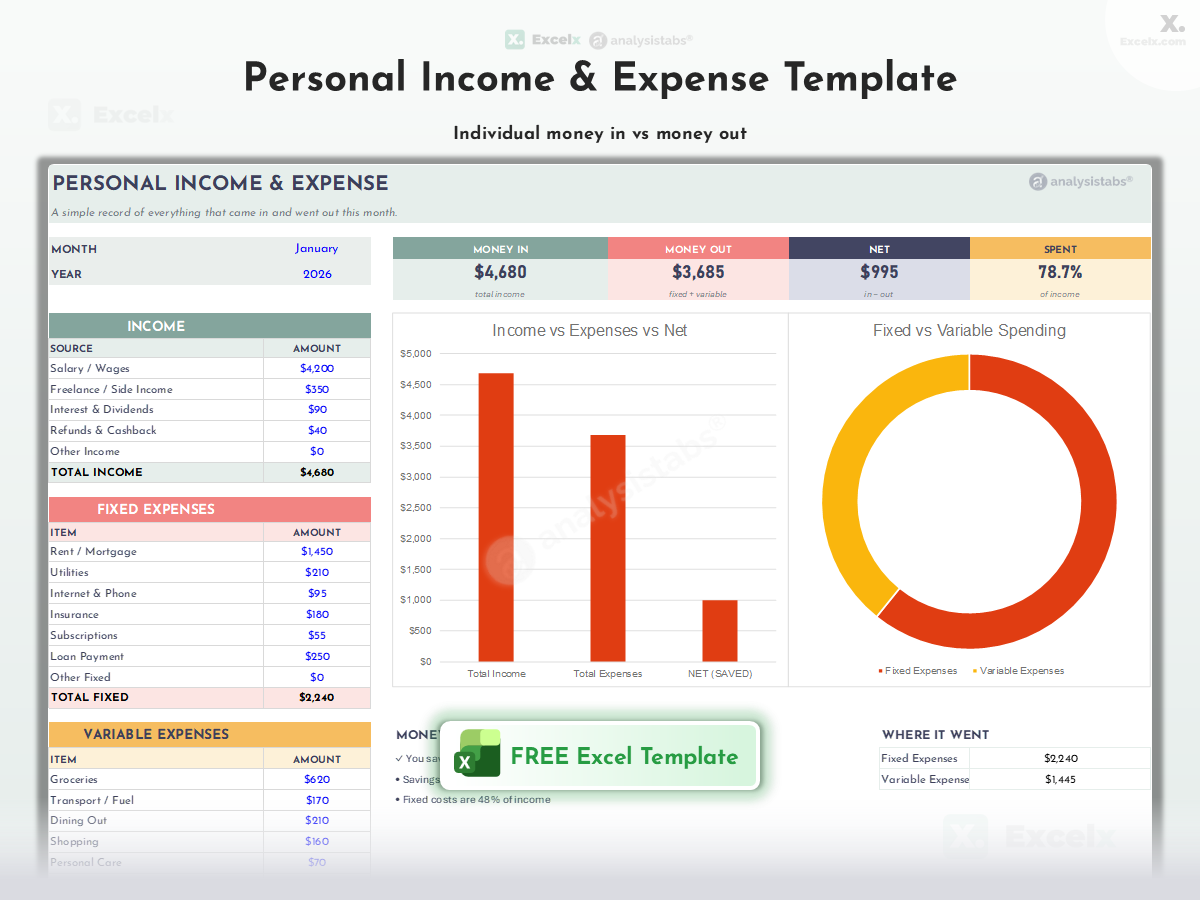
Personal Income & Expense Template
Individual income and spending in one clean monthly log — all sources, all categories, automatic totals.
Individual · All Sources · Category Totals

Household Income & Expense Template
A household expenses spreadsheet for whole-home money tracking — household bills, shared costs, and per-member contributions with monthly summary. Works as a home expenses spreadsheet or house expenses spreadsheet for any living setup.
Household Bills · Shared Costs · Per-Member

Family Income & Expense Template
Family finances — dual incomes, kids’ costs, and family categories with monthly summaries.
Dual Income · Kids’ Costs · Summaries

Business Income & Expense Template
Simple business bookkeeping — income and expense log with tax-ready categories and monthly P/L.
Bookkeeping · Tax Categories · Monthly P/L
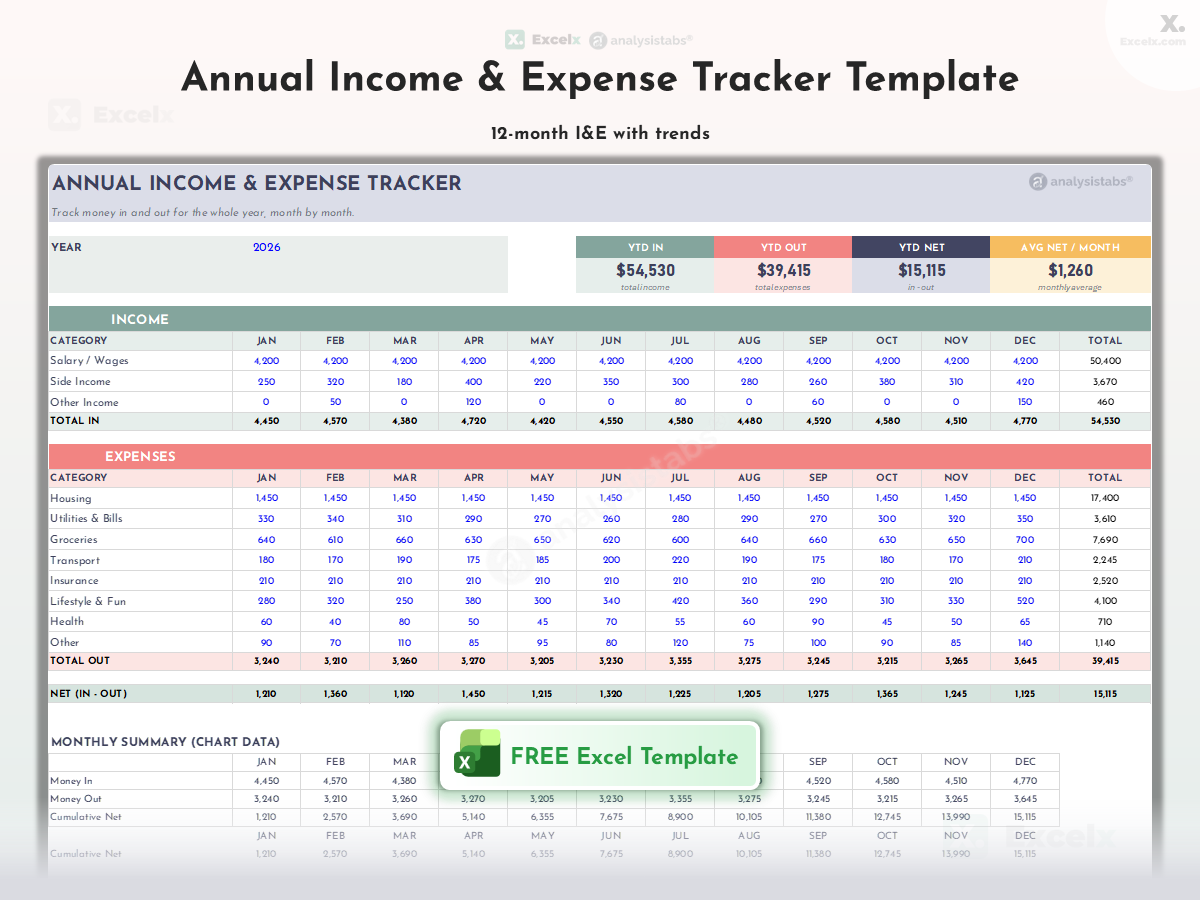
Annual Income & Expense Tracker
A yearly expenses spreadsheet with a full-year view — monthly income and expense totals across all 12 months with trend analysis.
12-Month Totals · Trends · Year View

Income & Expense Dashboard
Visual I&E — income vs expense charts, category breakdown, and monthly trends on one screen.
Charts · Category Breakdown · One Screen
Recurring & Category Expense Trackers
Focused trackers for the expenses that repeat — subscriptions, bills, transport, and healthcare. Together they cover every monthly expenses spreadsheet need: a monthly expenses template Excel file, monthly expenses sheet, and monthly expenses worksheet in one place.

Monthly Subscription Tracker
Every recurring subscription — cost, billing date, renewal, and cancel-by flags. Find and stop the subscription creep.
Renewals · Cancel Flags · Creep Finder

Monthly Bills Tracker
The monthly bills template that ends missed due dates — every bill with amount, due date, paid status, and auto-pay flag in a monthly checklist.
Due Dates · Paid Status · Auto-Pay Flags

Transportation Budget Tracker
All transport costs — fuel, maintenance, insurance, transit passes — with per-month comparison.
Fuel · Maintenance · Transit · Monthly

Healthcare Expense Tracker
Medical spending — premiums, appointments, prescriptions — with deductible progress tracking.
Premiums · Prescriptions · Deductible
Specialty Expense Trackers
Purpose-built trackers for specific spending areas — pets, giving, wardrobe, hobbies, and bank reconciliation.

Pet Care Expense Tracker
Everything your pet costs — food, vet, grooming, insurance — with per-pet and annual totals.
Per-Pet · Vet · Grooming · Annual Total

Charity & Donation Tracker
A tax-ready giving log and expense sheet for taxes — organization, date, amount, and receipt status for deduction season.
Tax-Ready · Receipts · Deduction Season

Wardrobe & Clothing Budget Template
Clothing spending by person and season — with cost-per-wear insight for smarter purchases.
Per-Person · Seasonal · Cost-Per-Wear

Hobby & Crafting Budget Template
Hobby spending under control — supplies, tools, and projects with per-hobby budgets.
Per-Hobby · Supplies · Projects

Bank Reconciliation Statement
Match your records to the bank — outstanding checks, deposits in transit, and adjusted balance calculation.
Outstanding Items · Adjusted Balance
Why Use an Excel Income and Expense Tracker?
Monitor Income
Keep track of various income sources and amounts across salary, freelance, investments, and more. Know exactly how much money is coming in and from where.
Track Expenses
Record and categorize all your expenditures with precision in one monthly spending spreadsheet. Understand your patterns with a clear income and expenses spreadsheet view and spot where you’re overspending.
Analyze Finances
Evaluate your financial health with automatic summaries and comparisons. Make informed decisions based on real data instead of guesswork.
Budget Effectively
Plan and adhere to your budget, ensuring financial stability. Compare actual spending against budgeted amounts to stay on track.
Fully Customizable
Excel workbooks and worksheets can be customized to fit your specific needs. Create categories, add columns, and use formulas tailored to your situation.
Save Time
Using an Excel tracker saves time compared to manual tracking on paper. With templates and automated formulas, enter data quickly and let Excel do the calculations.
How to Use These Templates
-
Download the templateChoose the template that matches your tracking needs from the list above. All templates are free .xlsx files that work in Excel 2016–365 and Google Sheets.
-
Customize categoriesModify the income sources, expense categories, and payment methods to suit your specific financial situation. Add, remove, or rename fields as needed.
-
Enter your transactionsRecord each income receipt and expense payment as it happens. Include the date, description, category, payment method, and amount for every entry.
-
Review summaries regularlyUse the automatic summary sections to evaluate your financial health. Compare income vs expenses, review category breakdowns, and identify trends.
-
Adjust and optimizeBased on your analysis, adjust your spending habits and budget allocations. Set savings goals, reduce unnecessary expenses, and reallocate funds to priority areas.
-
Update consistentlyKeep your tracker up-to-date by entering transactions daily or weekly. Consistency is key — the more current your data, the more useful your financial insights.
All 26 Templates — Quick Download
- Excel Income Tracker Template
- Excel Expense Tracker Template
- Income and Expense Tracker Template
- Personal Expenses Tracker Template
- Business Expense Tracker Template
- Daily Expense Tracker Template
- Weekly Expense Tracker Template
- Monthly Expense Tracker Template
- Daily Income & Expense Template
- Weekly Income & Expense Template
- Monthly Income & Expense Template
- Personal Income & Expense
- Household Income & Expense
- Family Income & Expense
- Business Income & Expense
- Annual Income & Expense Tracker
- Income & Expense Dashboard
- Monthly Subscription Tracker
- Monthly Bills Tracker
- Transportation Budget Tracker
- Healthcare Expense Tracker
- Pet Care Expense Tracker
- Charity & Donation Tracker
- Wardrobe & Clothing Budget
- Hobby & Crafting Budget
- Bank Reconciliation Statement
Frequently Asked Questions
What’s the difference between the expense tracker and the income & expense tracker?
The expense tracker focuses only on recording and categorizing spending. The income & expense tracker combines both sides — tracking money coming in and going out — providing a complete financial picture with net balance calculations.
Which template should I use for personal finances?
Start with the Personal Expense Tracker for spending-only tracking, or the Monthly Income and Expense Template for a complete monthly financial overview. For budgeting alongside tracking, pair with our Budget Templates.
Can I use these for business expense tracking?
Yes. The Business Expense Tracker is specifically designed for business use with categories for payroll, rent, marketing, and more. It’s ideal for small businesses, freelancers, and startups needing organized financial records for tax preparation.
Should I track daily, weekly, or monthly?
It depends on your needs. Daily tracking gives maximum visibility (best for variable income). Weekly tracking balances detail with convenience. Monthly tracking provides the big picture. You can use multiple templates simultaneously — daily for entry, monthly for review.
Can I use these in Google Sheets?
Yes. All templates are standard .xlsx files that open in Google Sheets — each one works as an expense tracker Google Sheets can run natively, a full Google Sheet expense tracker with formulas, formatting, and automatic calculations intact. If you want a Google Sheets expense tracker template, import any file in one step (File → Import); expense tracking Google Sheets setup takes under a minute, and Sheets adds real-time collaboration.
How do I customize the categories?
Open the template and modify the category cells directly. You can add, rename, or remove categories to match your specific income sources and expense types. The SUM formulas adjust automatically.
Can I combine these with budget templates?
Yes. Use these templates to track actual income and expenses, then compare against your budgeted amounts using our Budget Templates. The combination gives you both tracking (what happened) and planning (what should happen).
What Excel formulas are useful for financial tracking?
SUM for totals, SUMIF for category-specific totals, COUNTIF for transaction counts, AVERAGE for monthly averages, and IF for flagging overspending. See our complete formula reference.
How do I find and cancel unused subscriptions?
List every recurring charge in the Monthly Subscription Tracker — including billing dates and renewal terms. Most people find 2–4 forgotten subscriptions in the first pass. Use the cancel-by flags to act before the next renewal.
How do I do a bank reconciliation?
Compare your own records against the bank statement: mark matched transactions, list outstanding checks and deposits in transit, then calculate the adjusted balance. The Bank Reconciliation Statement walks through each step with automatic calculation.
Can I track medical expenses for taxes or insurance claims?
Yes — the Healthcare Expense Tracker logs premiums, appointments, and prescriptions with deductible progress. The Charity & Donation Tracker does the same for tax-deductible giving with receipt status.
Do you have an expense report template?
Yes — for employee expense reports with approval sign-off, use the Travel & Expense (T&E) Report on our Business Budget page. For general expense reporting, the Monthly Expense Tracker Excel template doubles as a monthly expenses report template Excel users can print with category summaries.
Related Templates
Budget Templates (150+)
The complete budget hub — every category, method, and occasion.
Personal Finance Templates
Manage personal budgets, savings, and net worth.
Project Plan Templates
Combine budget tracking with task management.
PM Templates (100+)
Browse all project management templates.
Monthly Budgets (50)
The complete monthly collection — 50 free templates.
Savings & Debt (13)
Goals, challenges, net worth, and debt payoff.
Need Premium Financial Templates?
Tracking the whole family’s money? Upgrade to the Income & Expense Excel Template (Family Budgeting) — the premium version with unlocked dashboards, KPIs, automation, and multi-month tracking. Prefer everything in one purchase? The Monthly Bill Payment Calendar includes it all.
can i unprotect excel because i dont use dollar as currency
We will provide customized templates and let you know.
Can I unprotect the sheet? If so, please share me password. Thanks.
You can get all our unprotected templates here.
The weekly income and expense tracker is helping me budget better. Great template!
Thank you! We’re glad it’s making weekly budgeting easier for you.
Can I add a category for savings in the income and expense tracker template?
Yes, you can customize the template by adding a savings category for better tracking.
The daily income and expense template is perfect for tracking my variable income. Thank you!
You’re welcome! We’re glad it’s working well for tracking your daily finances.
how to unprotected the sheet as I don’t use dollar currency?
You can get the unprotected version here: https://analysistabs.org/
Can I track both gross and net income in the income tracker?
Yes, you can add columns for both gross and net income for detailed tracking.
The personal expense tracker is simple yet effective. Thanks for this resource!
Thank you! We’re glad it’s meeting your needs for personal expense tracking.
Can I include payment due dates in the expense tracker?
Yes, you can add a column for payment due dates for better financial planning.
The monthly template provides a great overview of my spending. Thanks for sharing!
Thank you! We’re happy to hear the monthly template is giving you a clear financial picture.
please can you share the password if like the unprotected version
Unprotected Template: You get our Premium Income and Expense Template here, which is un protected with bundle of features.
Thanks
PNRao