
- ↓ Free Download
- 💯 Percentage (5)
- 🎯 Allocation (4)
- 🏆 Goal-Based (3)
- 🧘 Mindful & Modern (5)
- 🚀 Advanced (6)
- 📊 Compare
- 🤔 Which Method?
- ❓ FAQ
- 💬 Comments
The best budget isn’t the most detailed one — it’s the one you’ll actually stick with. From the 50 30 20 budget template to a zero based budget template, a Dave Ramsey budget template, a paycheck to paycheck budget template, or a Kakeibo template — every method here is a working Excel file, not just theory. Download free Excel templates for 23 budgeting methods, from the classic 50/30/20 rule and zero-based budgeting to Kakeibo, FIRE, and our original PNRao Velocity Method. Every method includes a ready-to-use template with automatic calculations.
Free Budgeting Method Templates: Download Now
Choose from 23 budgeting methods below — each with a dedicated, ready-to-use Excel template. Not sure which fits? Use the method chooser.
- Every Major Method: Percentage rules, allocation systems, goal-driven, mindful, and advanced strategies — all as working templates, not just theory.
- PNRao Velocity Method ★: Our exclusive original — track how fast income converts to savings with weekly velocity scores.
- Auto Calculations: Each template computes its method’s splits, targets, and alerts automatically — just enter your income.
Percentage Budget Templates — 50/30/20, 70/20/10 & 80/20
Free percentage-rule budget templates — split your income automatically with a proven rule; the fastest way to start budgeting.
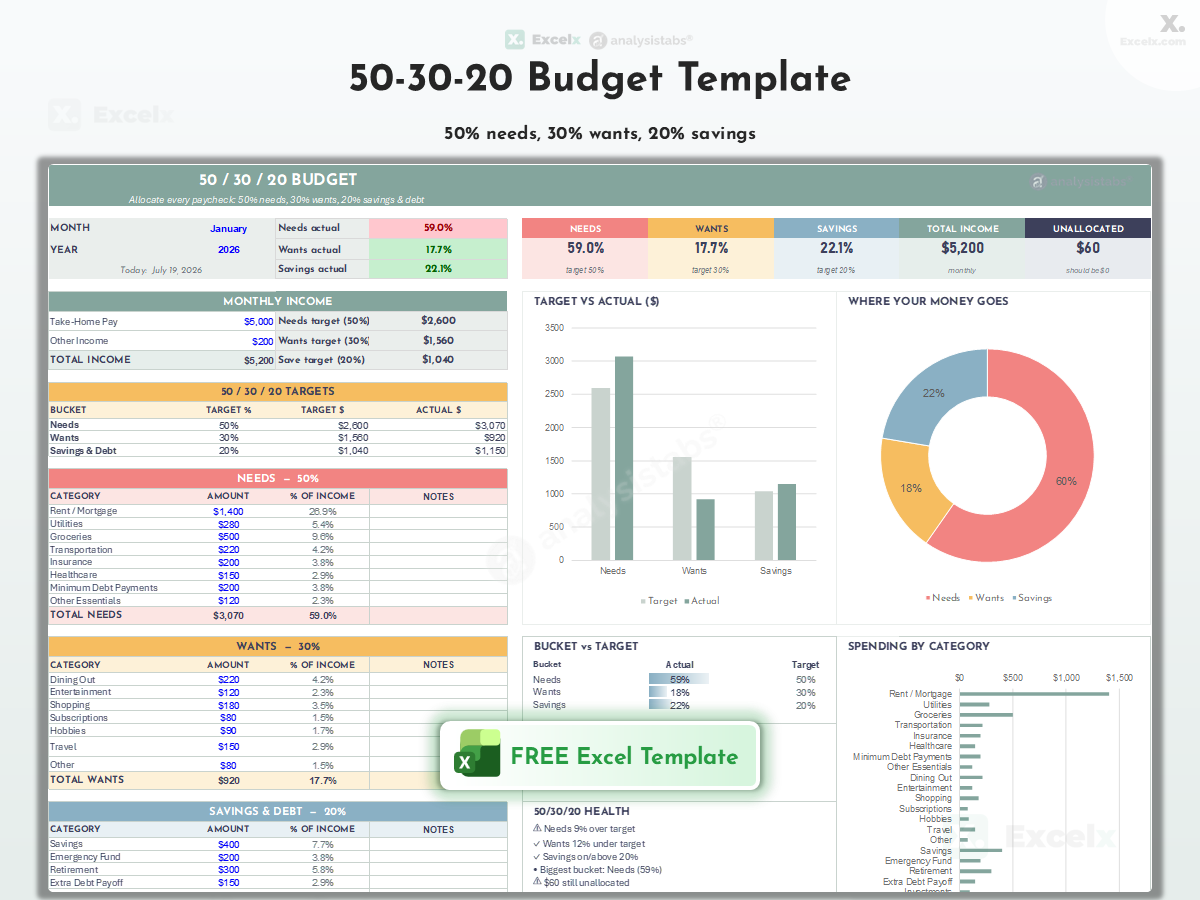
50/30/20 Budget Template
The most popular rule — 50% needs, 30% wants, 20% savings, split automatically from your income with color-coded target alerts.
Auto Income Split · Needs/Wants/Savings · Most Popular

70/20/10 Budget Template
A forgiving split for tighter budgets — 70% living expenses, 20% savings, 10% debt or giving with auto-calculated targets.
70% Living · 20% Savings · 10% Debt/Giving

80/20 Budget Template
The simplest rule that works — save 20% first, spend the remaining 80% freely without category tracking.
Save 20% First · Spend 80% Freely · Minimal Tracking

The 60% Solution Budget Template
Richard Jenkins’ method — 60% to committed expenses, with 10% each to retirement, long-term savings, short-term savings, and fun money.
60% Committed · 4×10% Buckets

Proportional Income Budget Template
Set your own percentages — fully customizable proportional split when standard rules don’t fit your situation.
Custom Percentages · Your Own Rule
Get all free budget templates delivered to your inbox
Zero-Based, Envelope & Paycheck Budget Templates
Free zero-based, envelope, and paycheck budget templates — assign money deliberately and know where every dollar goes before the month begins.

Zero-Based Budget Template
Give every dollar a job — income minus all allocations equals zero, with an unassigned balance alert so nothing slips through.
Every Dollar Assigned · Unassigned Alert

Envelope Budget Template
Digital envelope system — allocate cash to spending envelopes and watch per-envelope balances through the month.
Digital Envelopes · Per-Envelope Balance

Priority-Based Budget Template
Fund what matters first — rank your priorities, allocate from the top down, and see where the money runs out.
Ranked Priorities · Top-Down Funding

Budget by Paycheck Template
Plan around each paycheck instead of the calendar month — assign every bill to Paycheck 1 or 2. Perfect for biweekly pay.
Per-Paycheck Allocation · Biweekly Pay
Savings Goal & Debt Payoff Budget Templates
Free savings goal and debt payoff budget templates — budgets built around outcomes, where targets and debt freedom drive the structure.

Pay Yourself First Budget Template
Savings comes off the top — automatic transfer to savings on payday, then live on the remainder without guilt.
Savings First · Automatic · Guilt-Free Spending
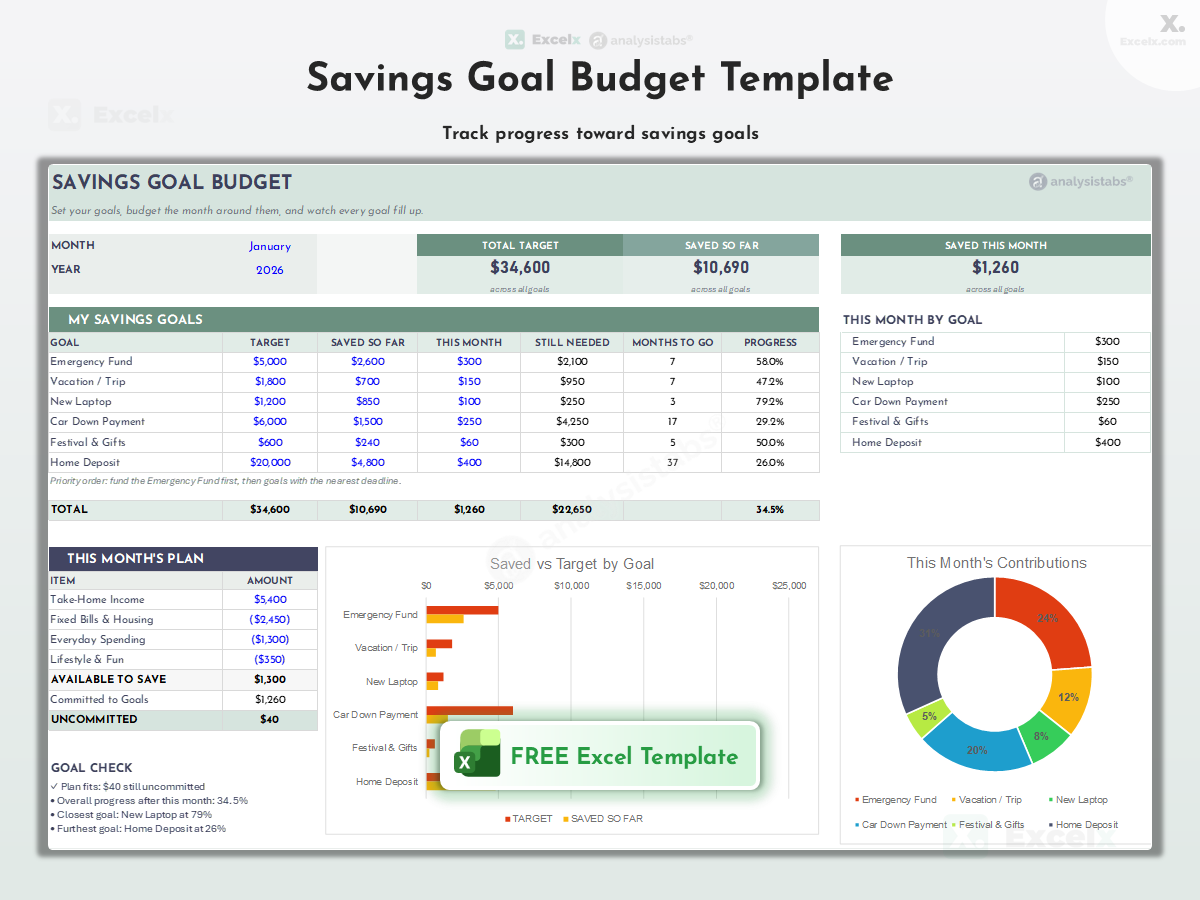
Savings Goal Budget Template
Budget built around goals — emergency fund, vacation, down payment — each with target, progress bar, and monthly contribution.
Multiple Goals · Progress Bars · Targets

Debt Payoff Budget Template
Budget with debt elimination built in — snowball or avalanche ordering, minimums, extra payments, and projected payoff dates.
Snowball & Avalanche · Payoff Dates
Kakeibo, Anti-Budget & Modern Budget Templates
Newer approaches for real life — mindfulness, minimal effort, AI assistance, and neurodivergent-friendly design.

Kakeibo Budget Template
The Japanese art of mindful budgeting — four simple categories with reflection prompts on needs, wants, culture, and unexpected costs.
Japanese Method · 4 Categories · Mindful

Bare Bones Budget Template
Survival mode budgeting — absolute essentials only, for job loss, emergencies, or aggressive saving sprints.
Essentials Only · Crisis Mode · Minimum Viable

Anti-Budget Template
For people who hate budgets — skim savings off the top, spend the rest however you want. One number to remember.
No Categories · One Rule · Zero Maintenance

AI-Assisted Budget Template
Budget smarter with AI — includes ready-to-use ChatGPT/Claude prompts for analyzing your spending and optimizing categories.
AI Prompts Included · Spending Analysis

ADHD Visual Budget Template
Designed for ADHD brains — high-contrast visuals, minimal fields, instant feedback, and friction-free weekly check-ins.
Visual-First · Low Friction · Instant Feedback
FIRE, Dave Ramsey & Velocity Budget Templates
Power-user strategies — including the exclusive PNRao Velocity Method, only on Excelx.com.

PNRao Velocity Method Template ★
Our original method by PNRao — accelerate financial goals by tracking money velocity: how fast income converts to savings and investments, with weekly velocity scores and momentum tracking.
★ Excelx Original · Velocity Score · Momentum Tracking

Values-Based Budget Template
Align money with what matters — define your core values, map every expense to a value, and cut spending that serves none.
Value Mapping · Alignment Score

Dave Ramsey Budget Template
Baby Steps-aligned zero-based budget — emergency fund first, debt snowball second, with the classic category percentages.
Baby Steps · Zero-Based · Snowball

FIRE Budget Template
Financial Independence, Retire Early — extreme savings rate tracking (50-70%), FI number calculation, and years-to-freedom projection.
FI Number · Savings Rate · Years to Freedom

MinMax Budget Template
Minimize the boring, maximize the meaningful — set hard minimums on obligations and maximize spending on what you love.
Min Obligations · Max Joy Spending

Velocity Banking Template
Advanced debt strategy — use a line of credit to accelerate mortgage/debt payoff with cash-flow cycling. For experienced users.
LOC Strategy · Debt Acceleration · Advanced
Which Budgeting Method Should You Use?
| Template | Best For | Key Feature | Level |
|---|---|---|---|
| 💯 Percentage Methods | |||
| 50/30/20 | Beginners | Auto 3-way split | ★ |
| 70/20/10 | Tighter budgets | 70/20/10 split | ★ |
| 80/20 | Minimal trackers | Save 20% first | ★ |
| 60% Solution | Steady earners | 60% + 4 buckets | ★★ |
| Proportional | Custom needs | Your own % | ★★ |
| 🎯 Allocation & Control | |||
| Zero-Based | Total control | Every $ assigned | ★★★ |
| Envelope | Overspenders | Hard category stops | ★★ |
| Priority-Based | Clear priorities | Top-down funding | ★★ |
| By Paycheck | Biweekly pay | Per-paycheck bills | ★★ |
| 🏆 Goal-Based | |||
| Pay Yourself First | Automatic savers | Savings off the top | ★ |
| Savings Goal | Goal chasers | Progress bars | ★★ |
| Debt Payoff | Debt elimination | Snowball/avalanche | ★★★ |
| 🧘 Mindful & Modern | |||
| Kakeibo | Mindful spenders | 4-category journal | ★ |
| Bare Bones | Crisis mode | Essentials only | ★ |
| Anti-Budget | Budget haters | One rule only | ★ |
| AI-Assisted | AI users | Analysis prompts | ★★ |
| ADHD Visual | ADHD brains | Low-friction visual | ★ |
| 🚀 Advanced & Original | |||
| PNRao Velocity ★ | Momentum builders | Weekly velocity score | ★★ |
| Values-Based | Intentional spenders | Value mapping | ★★ |
| Dave Ramsey | Baby Steps followers | Snowball + zero-based | ★★ |
| FIRE | Early retirement | FI number + rate | ★★★ |
| MinMax | Joy maximizers | Min/max spending | ★★ |
| Velocity Banking | Advanced users | LOC debt strategy | ★★★ |
Created by PNRao (20+ years in project management and financial modeling, founder of Excelx.com and AnalysisTabs), the Velocity Method applies a simple insight: what matters isn’t just how much you save, but how fast money moves from income to savings and investments. The template tracks your weekly “velocity score” — the percentage of each paycheck converted to savings within 7 days — because money that sits in checking gets spent. Available exclusively on Excelx.com. Download the PNRao Velocity Method template.
How to Choose Your Budgeting Method
| If you… | Best Method | Why |
|---|---|---|
| Are new to budgeting | 50/30/20 | Three buckets, one rule, five-minute setup |
| Want total control | Zero-Based | Every dollar accounted for, nothing unplanned |
| Consistently overspend | Envelope | Hard stops per category force discipline |
| Hate tracking expenses | Anti-Budget or 80/20 | One number to manage, zero maintenance |
| Get paid biweekly | Budget by Paycheck | Bills mapped to paychecks, no timing gaps |
| Are paying off debt | Debt Payoff or Dave Ramsey | Payoff ordering and momentum built in |
| Have a tight budget | 70/20/10 or Bare Bones | Realistic splits when essentials dominate |
| Want to retire early | FIRE Budget | Extreme savings rate + FI projection |
| Want speed to goals | PNRao Velocity ★ | Weekly velocity score builds momentum |
| Struggle with focus | ADHD Visual | Low friction, instant visual feedback |
Frequently Asked Questions
What is the best budgeting method?
The one you’ll maintain for more than a month. For most beginners that’s 50/30/20 — simple enough to stick with. Detail-oriented people thrive on zero-based; overspenders do better with envelopes. Use the method chooser table to match a method to your personality.
What is the PNRao Velocity Method?
An original budgeting method created by PNRao, founder of Excelx.com. Instead of only tracking how much you save, it tracks how fast income converts to savings — your weekly “velocity score.” Money that sits in checking gets spent; money moved within 7 days of payday compounds. The free template calculates your score automatically.
What is the 50/30/20 rule?
Allocate 50% of after-tax income to needs, 30% to wants, and 20% to savings and debt payoff. Our template splits your income automatically and flags each bucket red or green against target.
What is zero-based budgeting?
Every dollar of income gets assigned a job — spending, saving, or debt — until income minus allocations equals exactly zero. The template includes an unassigned-balance alert.
Can I combine budgeting methods?
Yes — common combos: 50/30/20 percentages with envelope discipline inside the “wants” bucket, or pay-yourself-first with zero-based allocation of the remainder. Download both templates and merge the pieces you like.
Which method works for irregular income?
Zero-based (allocate each month’s actual income fresh) or Budget by Paycheck (plan per payment, not per month). Base planning on your lowest expected month.
Do these templates work in Google Sheets?
Yes — every template is a standard .xlsx that opens in Google Sheets with formulas and formatting intact.
Related Budget Templates and Resources
Monthly Budget Templates (50)
The complete monthly budget collection.
All Budget Templates
The full hub — every category and occasion.
Savings & Debt Trackers
Goals, challenges, and debt payoff tools.
Weekly Budget Templates
Weekly and biweekly budgeting.
Annual Budget Templates
Yearly planning and forecasts.
Income & Expense Trackers
Daily to annual expense tracking.
Need More Power?
Found your method? Upgrade to the Life OS Bundle — the premium version with unlocked dashboards, KPIs, automation, and multi-month tracking. Prefer everything in one purchase? The Ultimate Personal Finance Tools includes it all.