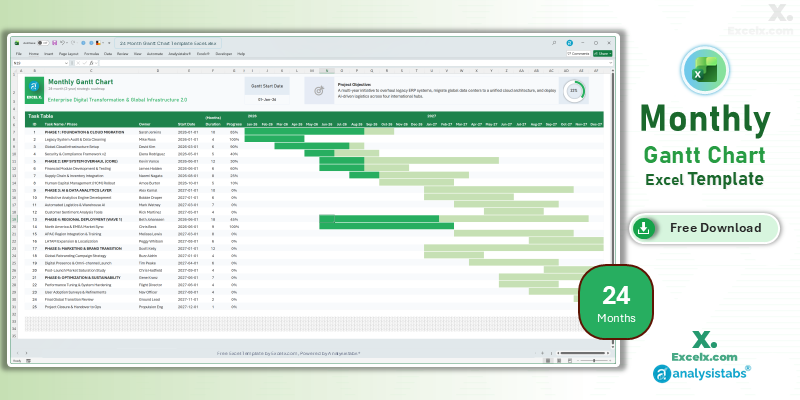
Large-scale initiatives require a vision that extends beyond the current fiscal year. Our 24 month gantt chart template excel is the specialized tool for managers overseeing multi-year digital transformations, global infrastructure rollouts, or long-term product lifecycles. By visualizing two full years on a single interface, you can effectively balance resource allocation across long-term phases and ensure that your strategic momentum remains consistent. This simple project gantt chart template is optimized for high-level US corporate reporting, providing the “macro” visibility required for executive steering committees and long-term stakeholder alignment.
Free 24-Month Strategic Gantt Chart Excel Template: Download Now
If you need a 24 month gantt chart template excel free of complicated manual cell-shading, this automated roadmap is the ideal professional choice. It converts your long-term task lists into a strategic 730-day visual schedule, allowing you to identify multi-year dependencies and resource constraints before they impact your delivery.
- Multi-Year Strategic Visibility: Map out your 2026 and 2027 objectives on a single screen without losing the big-picture perspective.
- Long-Duration Logic: Automated bars designed specifically to calculate and display dates spanning multiple years with absolute precision.
- Enterprise Progress Ring: Features a master visual indicator that aggregates completion percentages across all multi-year phases.
Looking for a different timeline? Jump to a version:
How to Customize Your Simple Project Gantt Chart Template Excel
To get the most out of your simple project gantt chart template excel xls during multi-year planning sessions, follow these configuration steps.
Step-by-Step Setup Instructions:
- Define the Initiative: Enter your major project or transformation name in cell C3 to update the strategic header.
- Clarify the Vision: State the long-term 2-year project goal in the Project Objective field to maintain multi-year alignment.
- Synchronize the Timeline: Modify the Gantt Start Date to the beginning of your multi-year phase; the 24-month headers will shift automatically.
- Phase Your Roadmap: Enter up to 25 strategic tasks, owners, and multi-year milestones into the Task Table.
- Track Completion: Input the Start Date, Duration (in months), and Progress % for each initiative to trigger the automated bars and progress ring.
- Maintain Sheet Integrity: We recommend keeping the sheets protected to avoid breaking the logic required for long-term date calculations.
Need to customize the layout or add more tasks?
How to Build a 24-Month Gantt Chart in Excel
Building a 24 month gantt chart template excel requires advanced date-handling to manage the transition between fiscal years. Here are the standards used in this template:
- Multi-Year Calendar Logic: The template utilizes dynamic headers that recognize year-on-year changes, ensuring “Jan-26” flows correctly into “Jan-27.”
- Strategic Pacing: Conditional formatting is optimized for monthly blocks, ensuring long-duration bars remain visually balanced across the 730-day timeline.
- Weighted Progress Tracking: The master dashboard ring uses weighted calculations to ensure multi-month project phases accurately reflect their impact on the total 24-month completion.
Choose More Gantt Chart Templates for Different Time Periods
Explore our other automated simple gantt chart template excel variants designed for different tracking needs across your business.
Hourly Gantt Chart Template Excel: For Precision Planning
For high-intensity 24-hour mission timelines, our hourly gantt chart template excel provides total precision. It is the best choice for shift planning or time-sensitive event launches.
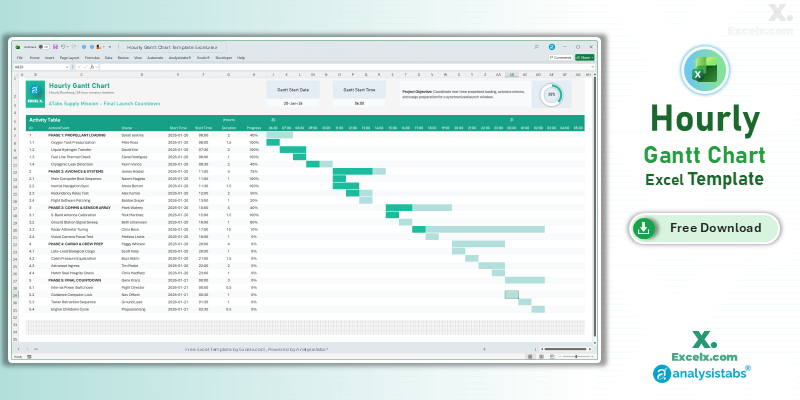
- 24-Hour Timeline: Granular tracking for time-critical project tasks.
- Shift Control: Dedicated owner assignments for high-stakes handovers.
- Real-Time Status: Includes a progress ring for immediate status checks during live operations.
Read the Full Guide: How to Plan by the Hour
Daily Project Gantt Chart Excel: Short-Term Task Tracking
The daily project gantt chart excel view is essential for 30-day execution sprints where day-by-day accountability is required.
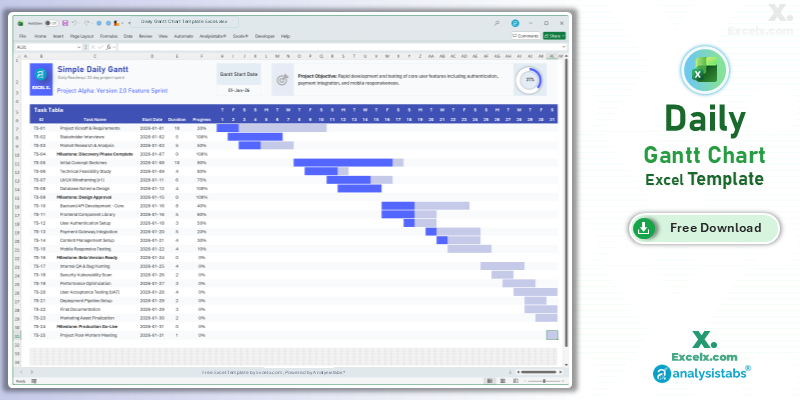
- 31-Day Precision: Track specific deadlines with day-level visibility.
- Immediate Visuals: Automated bars update the second you change a daily duration.
- Beginner Ready: High-impact visuals with zero complex setup required.
Read the Full Guide: Daily Task Management Tips
Simple Gantt Chart Template Excel Weekly: For Agile Sprints
The simple gantt chart template excel weekly version is optimized for software and marketing sprints spanning 4 to 12 weeks.
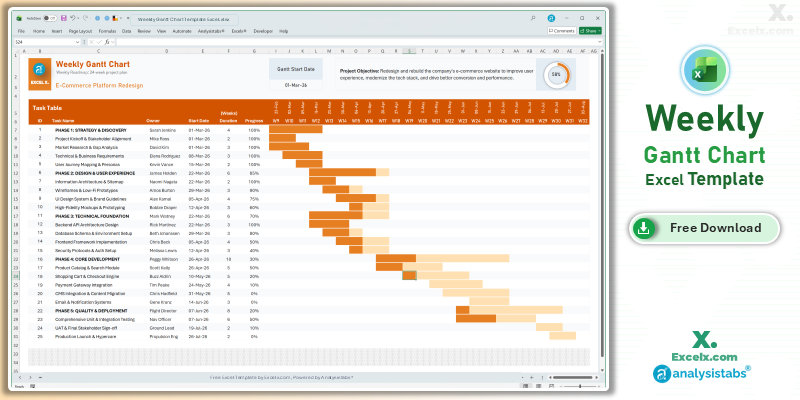
- Agile Sprint View: Perfectly balanced detail for weekly stand-up meetings.
- Owner Accountability: Dedicated columns to ensure every task has a clear leader.
- Dynamic Headers: All weekly dates update automatically based on your start date.
Read the Full Guide: Weekly Sprint Planning Guide
Simple Gantt Chart Templates
50+ Free PM Templates
100+ Free Excel Templates
150+ Premium Templates
Strategic Planning FAQ
1. Can I use this for multi-year budget planning?
Yes. The 24 month gantt chart template excel is ideal for mapping out budget phases and financial milestones alongside your project deliverables.
2. How do I add more years beyond 24 months?
For initiatives spanning longer than two years, we recommend breaking the project into phases across multiple tabs or exploring our premium dashboard solutions at Analysistabs.org.
3. Is the progress ring accurate for long-duration tasks?
Absolutely. The master ring uses a weighted completion formula that ensures long-term strategic phases are represented accurately within your total roadmap completion percentage.
Take control of your long-term vision. Download our 24 month gantt chart template excel today and lead your strategic initiatives with confidence. For advanced workload capacity and executive dashboards, visit Analysistabs.org.