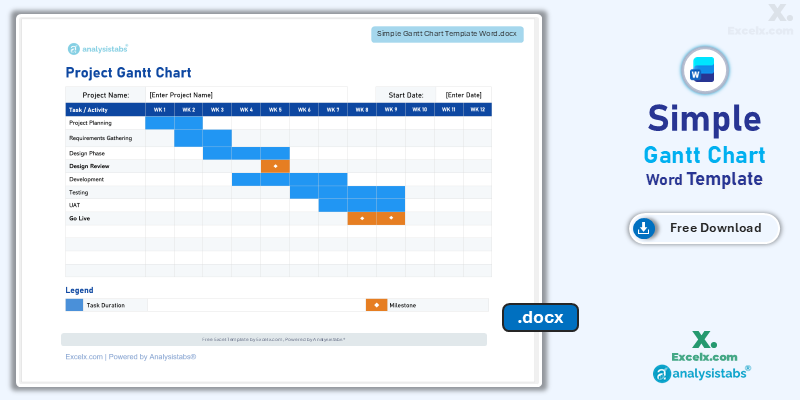
Formal project communication often requires more than just a raw spreadsheet—it requires a structured document that provides context. Our simple gantt chart template word is the essential tool for managers who need to integrate visual timelines directly into project proposals, status reports, and executive summaries. By utilizing a clean, document-ready layout, you can present your project’s 12-week trajectory alongside your written analysis. This simple project gantt chart template is optimized for the US professional market, ensuring your schedules are not only technically clear but also perfectly formatted for standard report printing and digital distribution.
Free Simple Gantt Chart Word Template: Download Now
If you are looking for a simple gantt chart template word free of complex spreadsheet logic, this document-based version is our top recommendation for formal reporting. It allows you to maintain professional project visuals within the familiar environment of Microsoft Word, making it ideal for stakeholders who prefer document-centric updates.
- Presentation-Ready Layout: Features a high-contrast, clean design specifically aligned for standard US letter report printing.
- 12-Week Visibility: Provides a balanced mid-term view of your project, allowing you to track major activities and milestones across a 3-month period.
- Manual Customization Ease: Designed for users who want to manually “fill” or adjust timeline bars without worrying about broken spreadsheet formulas.
Looking for a different platform? Jump to a version:
How to Customize Your Simple Project Gantt Chart Template Excel
To ensure your project timeline integrates seamlessly into your professional report, follow these steps to tailor the simple gantt chart template word for your specific needs.
Step-by-Step Setup Instructions:
- Personalize Your Project: Update the [Enter Project Name] field at the top of the document to brand your roadmap.
- Set the Timeline: Enter your Start Date in the header; manually update the WK 1 through WK 12 headers if you need specific date ranges.
- Populate Activities: Add your primary project actions and high-level milestones into the Task/Activity column.
- Visualize Progress: Use the “Fill” tool in Word to color-code the cells in the timeline grid, representing the duration of each task.
- Highlight Milestones: Use the orange diamond shapes from the Legend to mark critical deadlines or “Go Live” dates.
- Format for Finalization: Adjust the table properties to ensure the chart fits perfectly within your report’s margins before exporting to PDF.
Need an automated version with real-time updates?
Benefits of Using Word for Gantt Charts
While spreadsheets are ideal for calculations, using a simple gantt chart template word offers unique advantages for project managers who focus on formal communication:
- Stakeholder Familiarity: Many executives prefer receiving updates in a document format (PDF or Word) rather than navigating complex Excel workbooks.
- Document Integrity: By embedding the timeline in your report, you ensure that the data and the visual stay together, preventing version control issues between separate files.
- Print Perfection: Our Word template is specifically designed with standard margins in mind, ensuring your project roadmap never gets cut off when printed for a meeting.
Choose More Gantt Chart Templates for Different Time Periods
Explore our other automated simple gantt chart template excel variants designed for different tracking needs across your business.
Hourly Gantt Chart Template Excel: For Precision Planning
When minutes matter, our hourly gantt chart template excel provides 24-hour precision. It is the best simple project gantt chart template for high-intensity event management or shift planning.
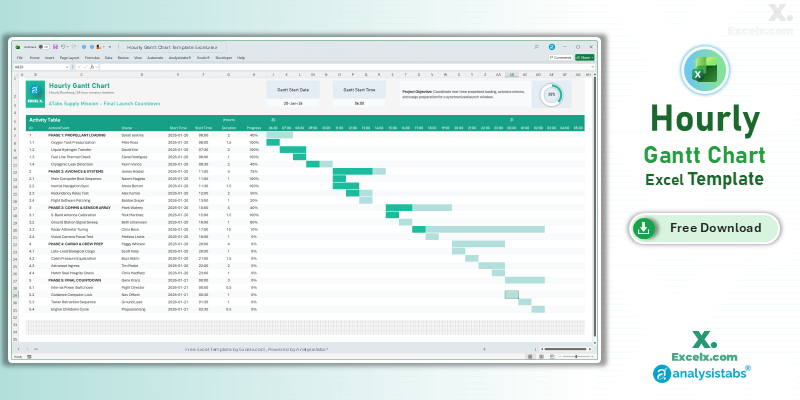
- 24-Hour Timeline: Precision tracking for time-sensitive launches.
- Shift Accountability: Dedicated columns to assign task owners.
- Live Operation View: Includes a progress ring for real-time status.
Read the Full Guide: How to Plan by the Hour
Daily Project Gantt Chart Excel: Short-Term Task Tracking
The daily project gantt chart excel view is essential for 30-day execution phases where daily progress updates are mandatory for success.
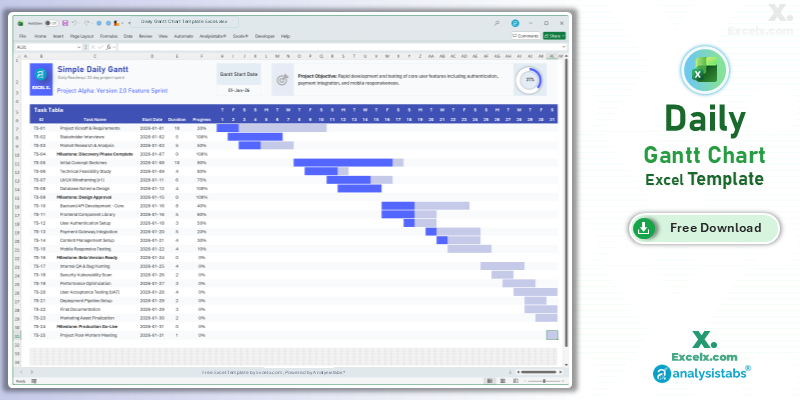
- Day-By-Day Logic: Track deadlines with absolute precision over 31 days.
- Immediate Visuals: The timeline area updates in real-time as you adjust durations.
- Beginner Friendly: No training required—just enter your start day.
Read the Full Guide: Daily Task Management Tips
Simple Gantt Chart Template Excel Weekly: For Agile Sprints
The simple gantt chart template excel weekly version is optimized for software sprints and marketing campaigns spanning 4 to 12 weeks.
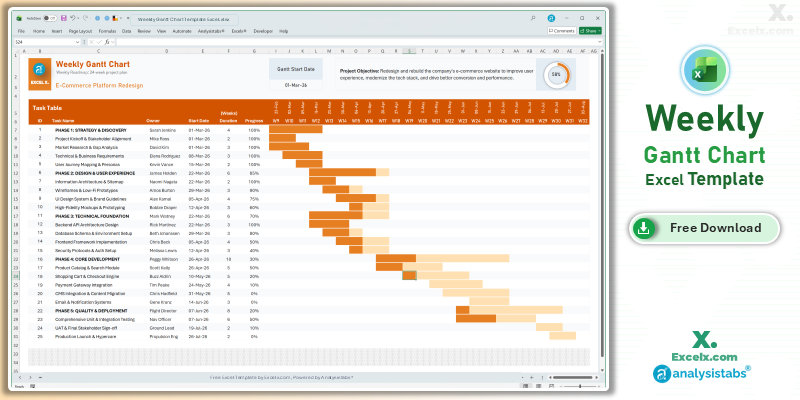
- Sprint Visibility: Clearly see task ownership across a multi-week timeline.
- Dynamic Headers: Column headers update automatically based on your start date.
- Accountability: Features an “Owner” column for team coordination.
Read the Full Guide: Weekly Sprint Planning Guide
Simple Gantt Chart Templates
50+ Free PM Templates
100+ Free Excel Templates
150+ Premium Templates
Document-Based Scheduling FAQ
1. Can I convert my Excel Gantt chart into this Word document?
While you can copy and paste an image, using this native simple gantt chart template word is better for maintaining text clarity and ensuring the chart fits your document’s specific margins.
2. Can I change the color of the bars in Word?
Yes. You can select the cells in the grid and use the “Table Design > Shading” option in Word to match your corporate branding.
3. Does this template support automated dates?
The Word version is designed for manual visual updates to ensure maximum compatibility. For fully automated date logic, we recommend our Excel or Google Sheets variants.
Stop sending messy screenshots of your schedule. Download our simple gantt chart template word today and present your project roadmap with professional document clarity. For advanced automated dashboards and resource management, visit Analysistabs.org.