
- ⬇ Free Download
- 📋 All 11 Templates
- 🔧 How to Customize
- 🧮 How Formulas Work
- 💡 Why Excel?
- 🏆 Why Our Templates
- 📚 PM Guides
- 🎯 Choose a Template
- ⭐ Simple
- 🕒 Hourly
- 📅 Daily
- 🗓️ Weekly Sprints
- ✅ Basic & WBS
- 🔢 No Dates
- 📊 12-Month
- 📈 24-Month
- 📄 Word, PPT & Sheets
- ⭐ Best Practices
- ❓ FAQs
- 💬 Comments
Managing project delivery should not require complex software setups, recurring monthly software licenses, or steep team learning curves. This hub provides 11 free, professionally engineered Gantt chart templates: 8 automated Excel spreadsheet layouts covering hourly, daily, weekly, monthly, and multi-year horizons, plus 3 cross-platform companion editions for Microsoft Word, PowerPoint, and Google Sheets.
Every Excel workbook in this collection generates its timeline automatically using native, high-performance conditional formatting. Simply enter your project tasks, start dates, and durations; the timeline bars render in real time. Macro-free, add-in-free, and engineered for maximum responsiveness across modern Microsoft 365, Excel 2010–2024, and Excel for Mac.
Template Suite Summary: 8 Excel Workbooks + 3 Cross-Platform Editions
Our spreadsheet suite includes 8 distinct Excel (.xlsx) engines tailored to specific project horizons: Simple Standard, Hourly Operations, Daily Shifts, Weekly Agile Sprints, Basic WBS Hierarchies, 31-Day Date-Free Matrices, 12-Month Annual Roadmaps, and 24-Month Strategic Portfolios. Complementary editions are included for Word (.docx), PowerPoint (.pptx), and Google Sheets. Need advanced portfolio resource leveling or multi-project rollups? Explore our Premium Project Management Suites.
Free Gantt Chart Excel Template: Download Now
This is our most widely deployed general-purpose project schedule template. Download this workbook to launch your project plan in under two minutes, or explore the specialized horizons below.
- Automated Timeline Rendering: Input start dates and durations; horizontal calendar bars shade instantly via conditional formatting logic.
- In-Place Progress Tracking: Update the “% Complete” column to see proportional progress fills directly along each timeline bar.
- Milestone Flagging: Zero-duration deliverables automatically render distinct milestone markers to highlight approval gates.
- Business Day Precision: Toggle between elapsed calendar days and standard business days using integrated
NETWORKDAYSformulas.
📑 Quick Page Navigation
📋 All 11 Template Editions
🔧 How to Customize & Add Rows
🧮 How the Underlying Formulas Work
💡 Why Choose Excel for Gantt Charts?
🏆 Why Our Templates Are the Best
📚 PM Authority Guides
🎯 Choose the Right Template
⭐ 1. Simple Gantt Chart
🕒 2. Hourly Operations
📅 3. Daily Shift Tracker
🗓️ 4. Weekly Sprint Tracker
✅ 5. Basic WBS Hierarchy
🔢 6. Very Simple (No Dates)
📊 7. 12-Month Annual Gantt
📈 8. 24-Month Strategic Gantt
📄 9–11. Word, PPT & Sheets
⭐ Gantt Charting Best Practices
❓ Frequently Asked Questions
Browse All 11 Free Gantt Chart Templates
Explore our complete catalog of project scheduling solutions. Click any template title or guide link to read its full configuration guide, or download the raw files directly:
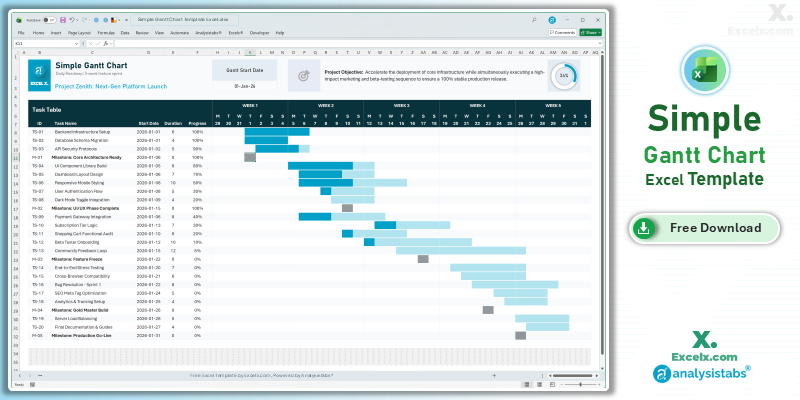
1. Simple Gantt Chart ⭐
Standard project schedule with rolling weekly headers, progress tracking, and milestone markers.
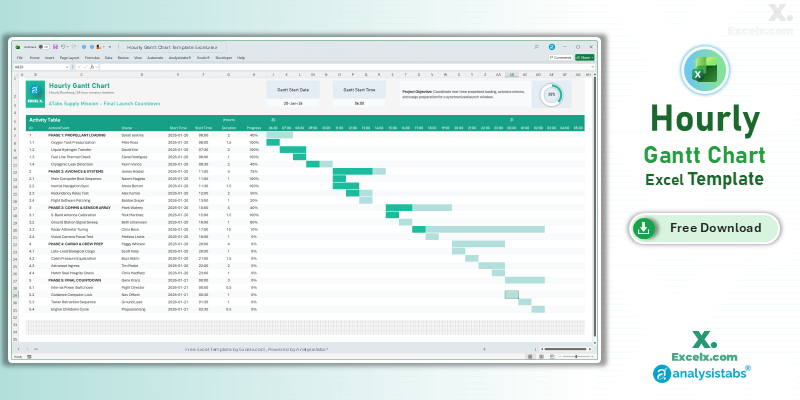
2. Hourly Gantt Chart
60-minute interval grid for event planning, IT migrations, and production shift handovers.
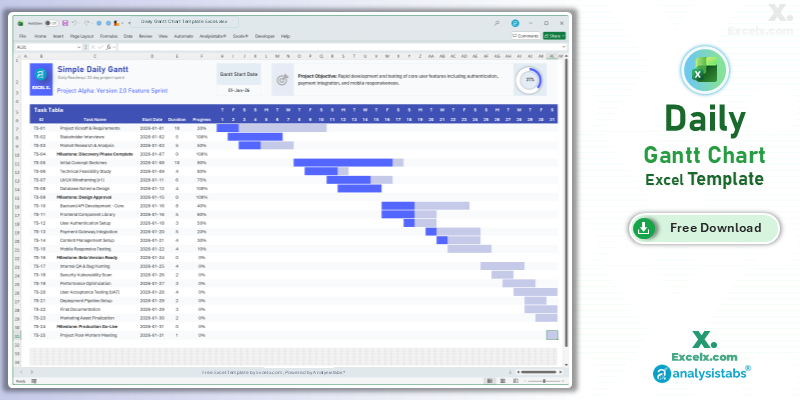
3. Daily Gantt Chart
Day-by-day task breakdown with automated weekend shading for 30-to-60 day projects.
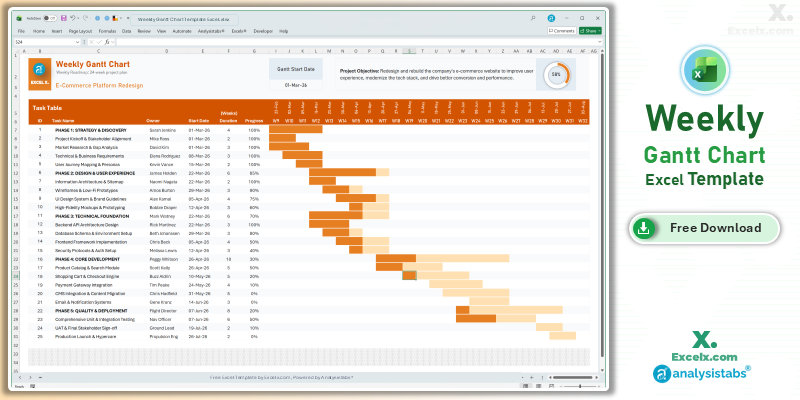
4. Weekly Gantt Chart
Dynamic week-number headers tailored for 4-to-12 week agile development cycles.
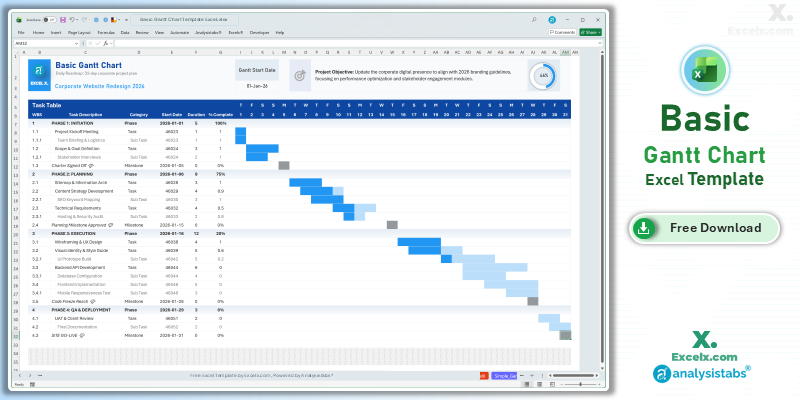
5. Basic WBS Gantt Chart
Hierarchical WBS numbering (1, 1.1, 1.1.1) with nested subtasks and phase rollups.
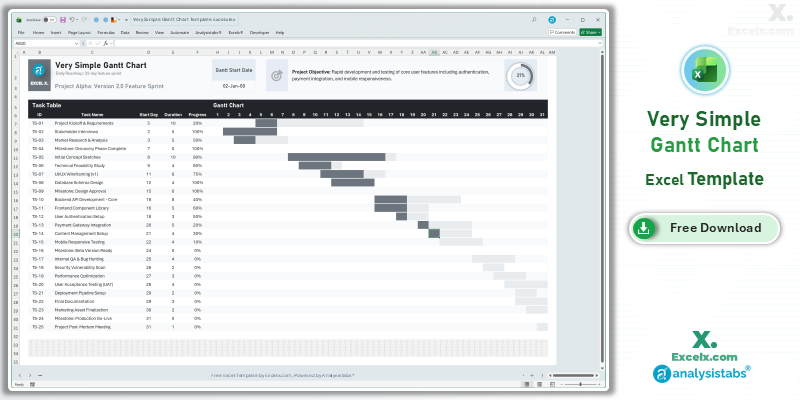
6. Very Simple (No Dates)
Sequential day-offset matrix (Day 1, Day 2) for scoping projects before dates are locked.
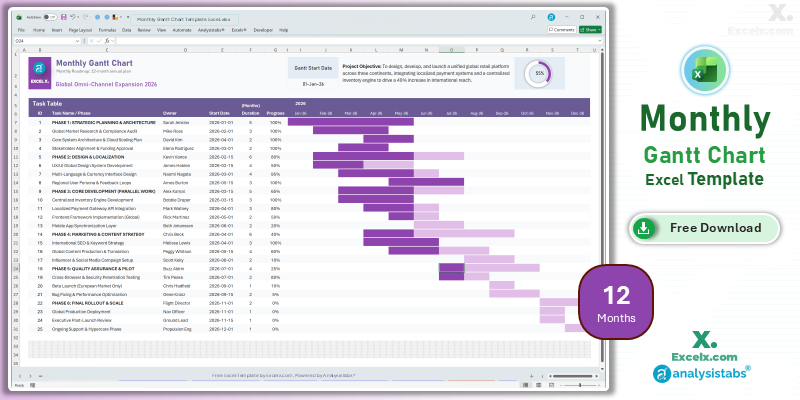
7. 12-Month Annual Gantt
Full yearly roadmap tracking corporate deliverables and quarterly goals on one screen.
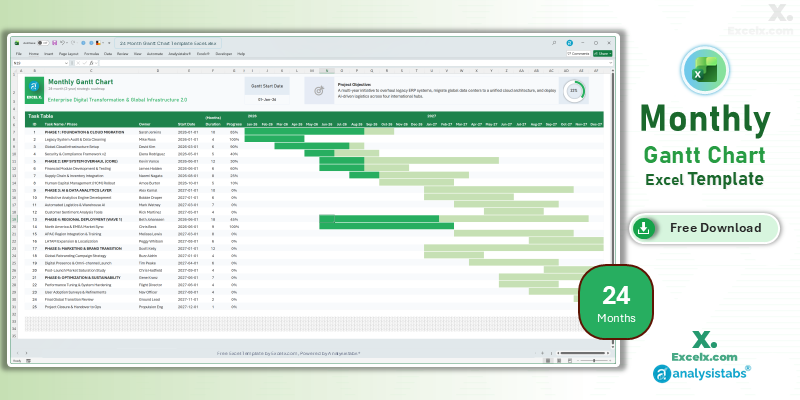
8. 24-Month Strategic Gantt
Multi-year portfolio roadmap designed for major enterprise initiatives spanning 730+ days.
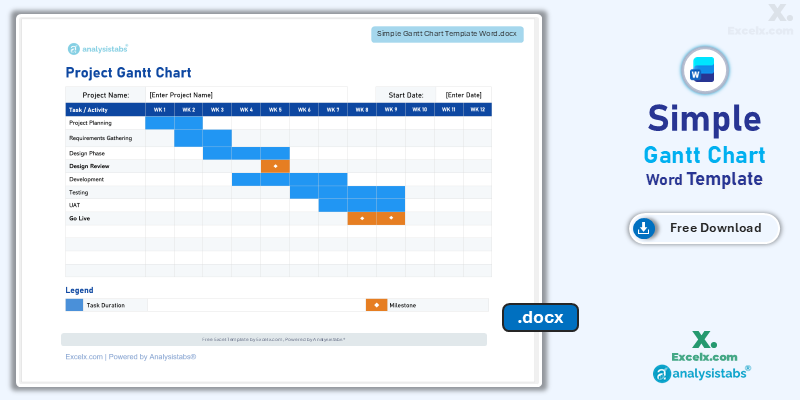
9. Word Gantt Schedule
Printable document schedule configured for contractual statements of work and charters.
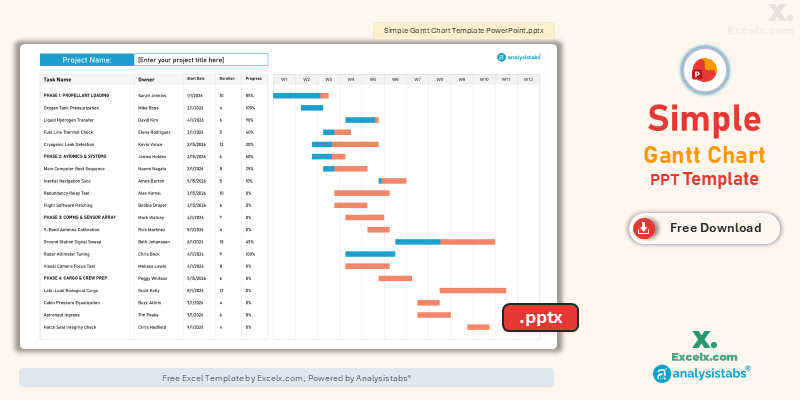
10. PowerPoint Slide
16:9 widescreen presentation slide deck ready for executive briefings and board meetings.
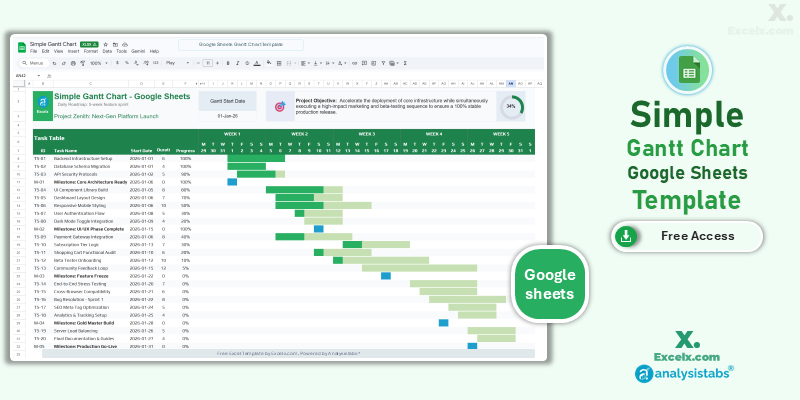
11. Google Sheets Version
Cloud-native collaborative schedule for distributed remote teams with real-time multi-user editing.
Get all free PM templates delivered to your inbox
How to Customize Your Gantt Chart Template
-
Update the Project Title & Objective: Enter your project name in cell C3 and summarize key deliverables to keep teams aligned.
-
Set Project Baseline Start Date: Modify the project start date cell; the top calendar header automatically recalculates all columns.
-
Enter Tasks & Milestones: Input task descriptions. For a milestone checkpoint, set Duration to 0 to trigger diamond markers.
-
Assign Ownership & Track Status: Record task leads and update the “% Complete” column to see visual progress bars fill in real time.
-
Adjust Working Days vs. Weekends: Toggle duration logic between pure calendar days and business days using the integrated
NETWORKDAYSformulas. -
Expand Worksheet Rows Safely: Follow the steps below to expand the task table without overwriting conditional formatting logic.
Adding More Than 25 Tasks Without Breaking Conditional Formatting
Each template arrives pre-configured for 25 task rows to keep file performance fast. To extend your project capacity:
- Go to Review > Unprotect Sheet (no password required).
- Right-click the row number of your last task row and select Insert. Inserting inside the existing range automatically copies formulas and conditional formatting downward.
- If bars do not render on appended rows, navigate to Home > Conditional Formatting > Manage Rules, set Show formatting rules for: This Worksheet, and extend the Applies to range to your new bottom row.
Need Completely Unlocked Layouts with 100+ Tasks?
For unlimited tasks, automated multi-project portfolios, and consolidated executive dashboards, explore our unlocked commercial suites.
How the Gantt Chart Formulas Work
Unlike rigid chart graphic objects, these templates draw horizontal bars directly in worksheet grid cells using conditional formatting formulas. Here is the exact calculation architecture powering the sheets:
1. Calendar Day Duration Calculation
To count calendar duration inclusively (so a task starting Monday and ending Friday counts as 5 full days), duration is calculated as:
= End_Date - Start_Date + 12. Skipping Weekends with NETWORKDAYS
To exclude Saturdays and Sundays from working schedules, duration is calculated using native business-day formulas:
= NETWORKDAYS(Start_Date, End_Date)To skip statutory public holidays as well, supply an optional holiday lookup range:
= NETWORKDAYS(Start_Date, End_Date, Holidays_List)3. The Conditional Formatting Rule That Shreads the Bars
Each calendar cell across the matrix evaluates whether its column date matches the task window. If TRUE, Excel applies the designated fill color:
= AND(Column_Date >= $Start_Date, Column_Date <= $End_Date)Visual progress tracking is managed by a secondary formula rule layered on top, comparing column dates against elapsed progress duration.
4. Linking Finish-to-Start Task Dependencies
To create dynamic links where shifting an initial phase automatically recalculates all successor activities, write:
= Predecessor_End_Date + 1For schedules operating strictly on business days, use the WORKDAY function to advance dates over weekends:
= WORKDAY(Predecessor_End_Date, 1, Holidays_List)Why Choose Excel Gantt Chart Templates Over Dedicated Software?
While enterprise project management suites like Microsoft Project, Jira, or Smartsheet offer extensive feature sets, they often introduce organizational friction that slows down fast-moving delivery teams. Here is why spreadsheets remain the preferred planning tool across thousands of organizations worldwide:
Zero Software License Barriers
Nearly every modern workplace already runs Microsoft Office. By using an Excel Gantt chart, you can distribute project roadmaps to executive sponsors, external vendors, and cross-functional teams without requiring them to purchase seats or create new software accounts.
Instant Team Adoption
Complex project management tools require training courses and configuration workshops. Because everyone understands how to type a task, pick a date, and read a spreadsheet row, your team can begin updating project status on day one.
Total Data & Formula Control
SaaS platforms lock your data into fixed interface views. In Excel, you own the layout. Add custom budgeting columns, track contractor hourly billing, integrate PivotTables, or tie project timelines directly into corporate financial forecasts.
Why Our Templates Are the Best: Built on 20+ Years of Engineering
Most free spreadsheet downloads found online are quickly drafted workbooks that break the moment you insert a new task row, adjust a date, or email the file to a client. Our templates are built to a higher standard of technical precision:
20+ Years of Data & Project Automation Experience
Our templates are architected by industry specialists with more than two decades of real-world experience designing mission-critical automation systems, database models, and executive reporting suites for multinational corporations.
Trusted Globally by Professionals Since 2012
Since 2012, our project planning spreadsheets have been downloaded and deployed across Fortune 500 enterprises, management consultancies, engineering firms, healthcare systems, and tech startups across more than 120 countries.
100% Native Formulas — Completely Macro-Free
Corporate firewalls and security policies frequently block `.xlsm` files containing VBA macros. Every file in our library relies exclusively on native Excel formulas and conditional formatting. They open safely without security prompts or broken script errors.
Updated Annually for Modern Excel Engines
We audit and refresh our template architectures every year. We continuously optimize calculation speed, refine formula syntax, and benchmark layout rendering against Microsoft 365, Excel 2024, and modern high-DPI displays to ensure maximum calculation accuracy.
Project Management Authority & Scheduling Guides
Deepen your planning capabilities with our step-by-step technical walkthroughs, formula architecture blueprints, and portfolio tracking systems:
How to Build an Excel Gantt Chart from Scratch
Learn how to turn a 2D stacked bar chart into an executive Gantt schedule. Covers category axis reversal, 5-digit date serial bounds, and split progress bars.
Mastering WORKDAY & NETWORKDAYS
How to configure project timelines that skip weekends, handle international workweeks with NETWORKDAYS.INTL, and automate statutory holiday exclusions.
Multi-Project Tracking Systems
Consolidate multiple concurrent work streams, track team member capacity across deliverables, and view high-level milestone progress in one workbook.
WBS Structures & Numbering Rules
Deconstruct complex projects into clear deliverables, work packages, and subtasks using hierarchical WBS numbering models (1.1, 1.1.1).
Which Gantt Chart Template Should You Choose?
To help you find the exact layout for your project horizon, compare our 11 free templates by planning scope, primary features, and format:
| Template Layout | Format | Best For / Ideal Project Scope | Direct Link |
|---|---|---|---|
| 1. Simple Gantt Chart ⭐ | Excel (.xlsx) | General projects, rolling weekly views, and teams needing instant progress tracking with zero setup. | View Simple |
| 2. Hourly Gantt Chart | Excel (.xlsx) | 24-hour event schedules, IT server cutovers, maintenance outages, and multi-shift work handovers. | View Hourly |
| 3. Daily Gantt Chart | Excel (.xlsx) | Short-term 30-to-60 day execution sprints requiring day-level precision and automated weekend shading. | View Daily |
| 4. Weekly Gantt Chart | Excel (.xlsx) | Agile development sprints (2–4 weeks), software releases, and teams holding weekly standup reviews. | View Weekly |
| 5. Basic WBS Gantt Chart | Excel (.xlsx) | Complex projects requiring hierarchical Work Breakdown Structure codes (1, 1.1, 1.1.1) and nested subtasks. | View Basic |
| 6. Very Simple (No Dates) | Excel (.xlsx) | Early scoping, proposal estimates, and standardized 30-day recurring onboarding programs without calendar dates. | View No Dates |
| 7. 12-Month Annual Gantt | Excel (.xlsx) | Executive annual operating plans, department roadmaps, and high-level quarterly goal tracking on one screen. | View 12-Month |
| 8. 24-Month Strategic Gantt | Excel (.xlsx) | Multi-year strategic programs, major capital expenditures, and construction phases spanning 730+ days. | View 24-Month |
| 9. Microsoft Word Gantt | Word (.docx) | Project charters, client statements of work (SOW), and contractual governance documents requiring print layouts. | View Word |
| 10. PowerPoint Gantt | PowerPoint (.pptx) | Board-level updates, steering committee briefings, and executive pitch decks in 16:9 widescreen format. | View PPT |
| 11. Google Sheets Gantt | Google Sheets | Remote teams requiring 24/7 cloud access, concurrent multi-user editing, and real-time browser collaboration. | View Sheets |
1. Simple Gantt Chart Template (Flagship Edition)
Our standard general-purpose project schedule designed for universal application across marketing initiatives, internal business deliverables, and software deployment projects. It features automated timeline bars, dual-segment progress tracking, and milestone checkpoints across rolling weekly calendar headers.
Key Capabilities:
- Automated Rolling Header: Setting the project start date recalculates all timeline columns automatically.
- In-Place Progress Bars: Updating “% Complete” shades completed duration vs. work remaining.
- Milestone Checkpoints: Setting a task duration to 0 days renders a distinct visual milestone flag.
- Working Day Support: Calculates task durations with optional weekend-skipping formulas.
2. Hourly Gantt Chart Template for Excel
Engineered for tight, time-critical operational windows where daily tracking is too broad. This layout breaks 24-hour cycles into 60-minute blocks, making it ideal for event production schedules, facility maintenance cutovers, IT server migrations, and multi-shift handoffs.
Key Capabilities:
- 60-Minute Granularity: Continuous hourly column intervals across full 24-hour operational cycles.
- Automated Time Offsets: Shading triggers automatically from time values entered in
HH:MMformat. - Zero-Macro Formula Engine: Built entirely on native Excel date-time math; safe for corporate firewalls.
- Shift Allocation: Dedicated columns to assign specific team leads or contractors to each hourly block.
3. Daily Gantt Chart Template for Excel
The preferred choice for tactical 30-to-60 day execution sprints, office relocations, and short-term operational initiatives. Provides dedicated daily columns along with automated weekend shading to ensure non-working days are respected visually.
Key Capabilities:
- Day-Level Precision: Track deliverables day-by-day across an active rolling calendar month.
- Automated Weekend Striping: Saturdays and Sundays shade automatically via
WEEKDAY()rules. - Status Highlighting: Visual cues immediately signal ongoing, completed, and overdue tasks.
- Dynamic Calendar Rescaling: Changing the project start date shifts all daily column dates in real time.
4. Weekly Gantt Chart Template for Agile Sprints
Optimized for modern software engineering teams, digital marketing agencies, and product pods operating on 2-week or 4-week sprint intervals. Week-number headers update dynamically, allowing teams to review velocity and deliverables during standup calls.
Key Capabilities:
- Agile Sprint Cadence: Purpose-built for 4-to-12 week sprint planning and retrospectives.
- Automated Week Headings: Header formulas format dates into clean sprint numbers automatically.
- Team Member Ownership: Dedicated columns to assign sprint backlogs to specific contributors.
- Progress Rollups: Visual fill indicators summarize sprint delivery status at a glance.
5. Basic Gantt Chart Template (with WBS & Subtasks)
Use this version when your plan requires nested hierarchical decomposition rather than a flat task list. Incorporates standard Project Management Institute (PMI) Work Breakdown Structure numbering to categorize work across Phases, Tasks, and Sub-Tasks.
Key Capabilities:
- WBS Numbering System: Structured codes (1, 1.1, 1.1.1) maintain clear scope decomposition.
- Row Classification: Categorize lines as Phase, Task, Sub-Task, or Milestone for clean visual grouping.
- Fractional Day Durations: Supports half-day tasks (0.5) for short sign-off and approval steps.
- Milestone Flagging: Zero-duration deliverables automatically render distinct milestone markers.
6. Very Simple Gantt Chart Template (No Calendar Dates)
The fastest layout to configure when project launch dates have not yet been approved. Instead of fixed calendar dates, tasks are plotted across an integer day-offset grid (Day 1, Day 2, Day 10) spanning a 31-day matrix.
Key Capabilities:
- Zero Calendar Dates: Plot estimated schedules using simple elapsed day numbers without date parsing errors.
- No Weekend/Holiday Logic: Counts raw work days without requiring complex holiday calendars.
- Instant 60-Second Setup: Four simple columns (Task, Start Day, Duration, Progress) build the entire timeline.
- Repeatable Templates: Ideal for standardized onboarding checklists, training plans, and recurring sprints.
7. 12-Month Annual Gantt Chart Template
Bird’s-eye annual portfolio roadmap designed for departmental leadership, resource planning, and corporate strategy presentations. Tracks quarterly goals and long-duration deliverables across a 12-month calendar without micro-task clutter.
Key Capabilities:
- Annual Strategy Mapping: Consolidate corporate deliverables across an entire 12-month timeline on one sheet.
- Executive Horizon Views: Eliminates daily clutter to focus steering committees on major strategic gates.
- Cross-Departmental Overlap: Quickly spot resource bandwidth bottlenecks across multiple simultaneous projects.
- Single-Page Print Optimization: Pre-scaled to export cleanly to landscape 11×17 or A4 PDF reports.
8. 24-Month Strategic Gantt Chart Template
Engineered for multi-year capital initiatives, infrastructure developments, and digital transformation roadmaps spanning 730+ calendar days. Configured to handle multi-year date mathematics without calculation lag or cell overflow.
Key Capabilities:
- Multi-Year Horizon: Seamlessly manages long-duration deliverables spanning multiple fiscal years.
- Strategic Milestones: Track major multi-year deliverables, funding gates, and regulatory audits.
- Stable Calculation Engine: Formatted specifically to prevent conditional formatting formula corruption across large matrices.
- Quarterly Groupings: Summarizes project progress by fiscal quarter (Q1–Q4) across two full operating years.
9–11. Gantt Chart Templates for Word, PPT & Google Sheets
When project communication occurs outside of spreadsheet workbooks, these companion editions deliver native cross-platform support:
Microsoft Word Version
Structured printable tables configured for contractual proposals, client statements of work, and project charters.
PowerPoint Version
High-contrast 16:9 widescreen slides designed for steering committee presentations, executive reviews, and stakeholder briefings.
Google Sheets Version
Cloud-native real-time collaboration. Share timelines with remote teams with 24/7 browser-based access.
Looking for All Project Management Formats in One Bundle?
For cross-platform template suites spanning PDF, Visio, Excel, and Word, visit our parent repository at Analysistabs.com/templates/gantt-chart/.
Compatibility: Excel Versions, Mac, iPad & Google Sheets
Every file is provided in native .xlsx format, built without macros, VBA, or external add-ins to ensure cross-platform stability:
- Microsoft Windows: Fully compatible with Microsoft 365, Excel 2024, 2021, 2019, 2016, 2013, and 2010. Conditional formatting rules render identically across all releases.
- Mac OS: Fully supported in Excel for Mac (v16.0 and newer). Formula logic and grid formatting transfer without visual discrepancies.
- iPad & Mobile: Files open natively in the free Excel mobile app. Users can update dates and progress percentages on site.
- Google Sheets: Files import cleanly into Google Drive, though the native Google Sheets edition above is recommended for optimal cell sizing.
- Open-Source Suites: Verified in LibreOffice Calc and Apache OpenOffice.
Printing & PDF Export Best Practices
Because multi-month schedules span wide horizontal layouts, configure your print settings to prevent chopped timelines: Go to Page Layout > Orientation > Landscape, set Width: 1 Page under Scale to Fit, and use Print Titles to repeat Columns A–C on every printed page.
Best Practices for Excel Gantt Charts
1. Standardize Serial Date Formats
Ensure all dates are entered in a consistent regional date format (e.g., YYYY-MM-DD). Text-formatted dates will fail to trigger conditional formatting rules.
2. Establish Explicit Task Ownership
Assign a single responsible lead to every task row. Multi-owner tasks create ambiguity and contribute to delivery slippage.
3. Maintain Uniform Task Detail
Avoid mixing multi-month project phases with 1-hour subtasks on the same grid. Use the Basic WBS template to nest granular deliverables under clear parent work packages.
4. Separate Baseline Data from Progress Tracking
Never overwrite initial start and end dates when tasks slip. Log variance in separate columns or track updates through the “% Complete” progress indicator.
Frequently Asked Questions About Excel Gantt Chart Templates
Are these Gantt chart Excel templates completely free?
Yes. All 11 templates (8 Excel, 1 Word, 1 PowerPoint, and 1 Google Sheets) are completely free for personal and commercial business use, with no license fees or subscriptions.
Which Gantt chart template should I choose?
For standard project management, choose the Simple Gantt Chart (#1). For shift schedules or event planning, use the Hourly (#2) or Daily (#3) editions. For software engineering, pick the Weekly Sprint (#4). For multi-level task breakdowns, select the Basic WBS (#5). For annual or portfolio roadmaps, select the 12-Month (#7) or 24-Month (#8) editions.
How do I make the Gantt chart skip weekends?
Calculate task duration using =NETWORKDAYS(Start_Date, End_Date) instead of simple subtraction. This counts Monday through Friday only. You can also exclude holidays by adding a third holiday range parameter.
How do I change the color of the timeline bars?
Open Home > Conditional Formatting > Manage Rules, select This Worksheet, choose the timeline fill rule, click Edit Rule > Format, and select your preferred fill color. Every bar updates across the sheet at once.
Can I build a chart graphic object instead of using conditional formatting?
Yes. If you need a standalone graphic object to copy into presentation decks, follow our complete guide: How to Create a Gantt Chart in Excel (Step-by-Step) to build a native stacked bar chart.
Do these templates require macros or VBA?
No. All 11 templates run purely on native spreadsheet formulas and conditional formatting. They open instantly without macro warnings or security blocks.
Related Project Management Templates
Project Plan Templates
Free templates featuring Gantt charts, work stream breakdowns, and resource allocations.
Project Schedule Template
Detailed timeline management with critical milestones and key deliverable tracking.
WBS Template
Hierarchical Work Breakdown Structure with automated numbering and phase decomposition.
Multi-Project Tracker
Consolidate and track multiple concurrent projects on a single executive dashboard.
Project Charter Template
Define project scope, business objectives, stakeholder sign-offs, and risk assumptions.
RACI Matrix Templates
Assign and clarify team roles, accountability, and responsibility across key project tasks.
Ready for Enterprise Project Management Power?
Need automated dependency linking, critical path calculation, and cross-team workload capacity planning? Discover our unlocked professional project management suites.
I like the clean timeline and clear visual progress in the Basic Gantt Chart with WBS & Subtasks. It works well for status discussions.
Hi Celina,
Thank you so much for the feedback! We designed the Basic Gantt Chart specifically to make project timelines and progress tracking clean, clear, and presentation-ready. We are delighted to hear that it is working so effectively for your status meetings and discussions. Best of luck with your projects! – PNRao