What You’ll Learn in This Post
- The official definition of a milestone in project management — PMBOK and plain English
- Why a milestone is fundamentally different from a deadline or a deliverable
- Real-world milestone examples from IT, construction, banking, and healthcare
- The four types of milestones every PM should know
- How to set milestones correctly — the mistakes most beginners make
- Why milestones are your earliest warning system for project problems
A milestone in project management is one of the most powerful — and most misused — tools available to a project manager. When set correctly, these key checkpoints give your project a clear skeleton of progress markers that everyone can see, measure, and rally around. When set poorly, however, they become meaningless calendar dates that nobody takes seriously.
In this post, we cover exactly what a project milestone is, how it differs from a deadline and a deliverable, and how to set milestones that actually drive project performance rather than simply filling up a Gantt chart.
What Is a Milestone in Project Management?
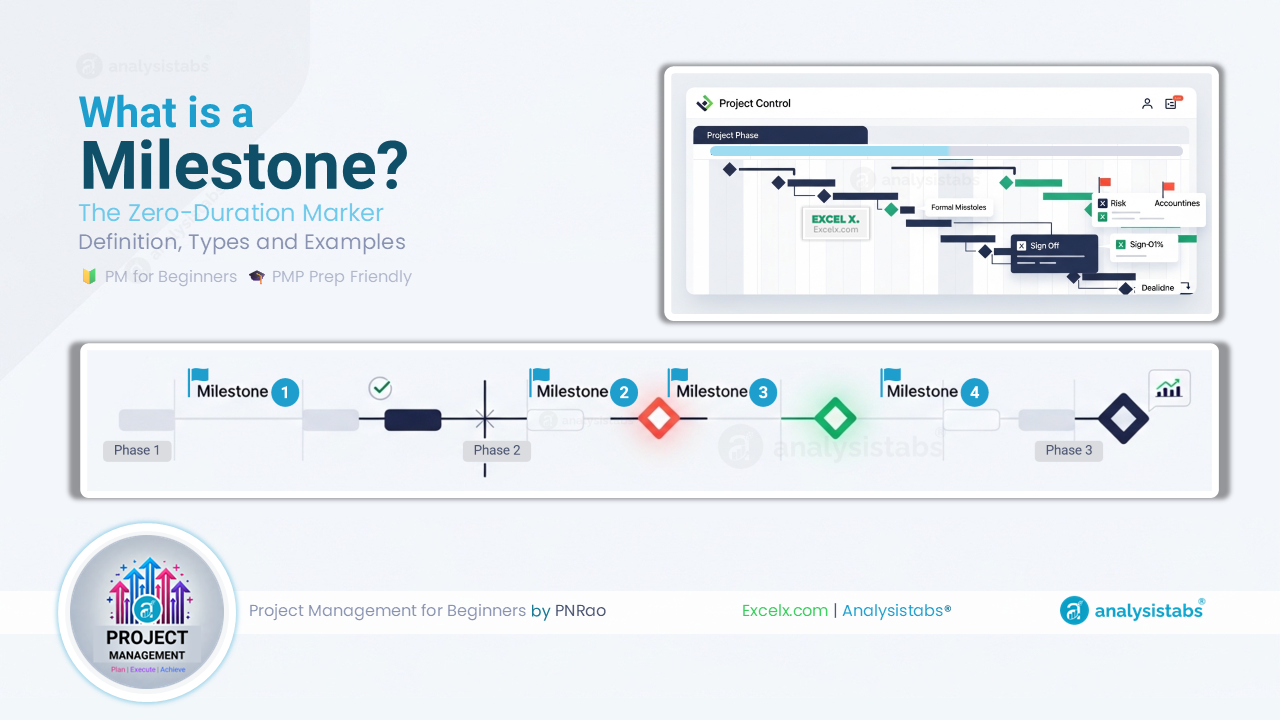
According to PMI, a milestone is a significant point or event in a project. Unlike tasks or activities, a milestone has zero duration — it marks a moment in time rather than a period of work. It is, in essence, a formal checkpoint that signals something important has been achieved.
“A milestone is a significant point or event in a project, program, or portfolio.”
— A Guide to the Project Management Body of Knowledge (PMBOK® Guide), Project Management Institute (PMI)
🧑💼 PNRao’s Plain English Version
A milestone is a named checkpoint that confirms a major stage of your project is complete. It takes zero days to “do” — it simply records that something significant has happened. Think of it as a flag planted in the ground: the work behind it is done, and the work ahead of it can now begin.
The zero-duration characteristic is what separates a milestone from every other element on a project schedule. Tasks take time to complete. This type of checkpoint, by contrast, simply confirms that a significant threshold has been crossed.
🎓 PMP Exam TipThe PMP exam tests the zero-duration nature of milestones specifically. A milestone has no duration — it is a point in time, not a period of work. If something takes time to complete, it is a task or deliverable, not a milestone. Many candidates confuse the two, so make sure the distinction is clear.
Milestone vs Deadline vs Deliverable
These three terms are often used interchangeably in casual conversation — but in project management, each has a distinct meaning. Confusing them leads to poorly structured schedules and missed dependencies.
Notice the relationship between the three: a deliverable is produced by work, a deadline is the time constraint on that work, and a progress checkpoint confirms the deliverable has been accepted. All three are related — but they are not the same thing.
PNRao’s Field TakeThe most common mistake I see on project schedules is tasks labelled as milestones. “Write the business requirements” is a task. “Business Requirements Approved by Sponsor” is a milestone. A milestone should always be phrased as a past-tense achievement — something that is either done or not done. That binary clarity is exactly what makes it useful as a progress marker.
4 Types of Project Milestones
Not all milestones serve the same purpose. In practice, project managers use four distinct types — each with a different function in the project schedule.
These mark the formal end of one project phase and the approval to begin the next. They typically require sign-off from the project sponsor or steering committee. Without a phase gate milestone, projects often drift from planning straight into execution without proper authorisation — a leading cause of scope problems later.
These confirm that a key deliverable has been reviewed and accepted. For example, “Technical Design Approved” or “User Acceptance Testing Passed.” They are particularly important because they create a clear record of what was agreed and when — invaluable if scope disputes arise later.
These mark points where the project depends on something outside the team’s direct control — a vendor delivery, a regulatory approval, or a client decision. Tracking these separately gives the PM early visibility of third-party risks before they affect the critical path.
These are milestones tied to legal, contractual, or regulatory requirements — for example, a compliance submission deadline or a payment trigger in a client contract. They carry external consequences if missed, so they typically receive the highest priority and the tightest monitoring on the project schedule.
Real-World Milestone Examples by Industry
Progress checkpoints look different depending on the industry and project type. However, the underlying principle is always the same: a named, binary point in time that marks major progress. The following examples illustrate this across five sectors.
| Industry | Project Type | Example Milestone | Why It Matters |
|---|---|---|---|
| 💻 IT | Software implementation | User Acceptance Testing Passed | Confirms system is ready for go-live; triggers deployment approval |
| 🏗️ Construction | Commercial build | Foundation Inspection Passed | Structural stage gate; no further work permitted until approved |
| 🏦 Banking | Core system migration | Parallel Run Completed | Both systems validated simultaneously; precondition for cutover |
| 🏥 Healthcare | EHR implementation | Clinical Staff Training Completed | Confirms readiness for go-live; regulatory and safety requirement |
| 🏪 Retail | New store opening | Store Fit-Out Signed Off | Physical completion confirmed; triggers stocking and staffing |
Notice that every checkpoint above is phrased as a completed achievement — not an activity or a date. “Foundation Inspection Passed” is a project milestone. “Foundation inspection scheduled for 15 May” is a deadline attached to a task, not a progress checkpoint.
How to Set Effective Project Milestones
Setting these project checkpoints well is a skill that separates experienced project managers from beginners. Most teams either set too many — diluting their significance — or place them at the wrong points, missing the natural decision gates in the project lifecycle.
The Rules for Writing Good Milestones
Common Milestone Mistakes to Avoid
- Project Charter Approved by Sponsor
- All Requirements Signed Off
- UAT Passed — Go-Live Approved
- Final Budget Reconciliation Complete
- Lessons Learned Document Published
- Requirements workshop (this is a task)
- Testing phase (this is a phase, not a point)
- Week 6 check-in (this is a meeting, not an achievement)
- Budget review (activity, not an outcome)
- Project update to steering committee (reporting event, not a milestone)
Milestones as Your Project Early Warning System
Beyond marking progress, these schedule checkpoints serve a second, equally important function: they are your earliest and most reliable indicator that something is going wrong. A slipping progress point is a signal — not just a scheduling inconvenience.
When a key checkpoint slips, it almost always means one of three things: the work feeding into it is taking longer than planned, a dependency has not been met, or scope has expanded since it was originally set. Each of these is worth investigating immediately, because the further downstream the problem is discovered, the more expensive it becomes to fix.
On a core banking migration, the milestone “Data Migration Rehearsal Completed” was originally scheduled for Week 14. By Week 12, it became clear the rehearsal would not be ready — the data cleansing work upstream was running two weeks behind. Because we tracked milestones weekly and reviewed them in every status meeting, that two-week slip was visible at Week 10 rather than Week 14.
As a result, the team had four additional weeks to either accelerate the data work or adjust the downstream schedule — rather than discovering the problem on the day the milestone was due. That early visibility, consequently, prevented a full go-live delay that would have cost the programme approximately £400,000 in extended infrastructure costs.
💡 Milestone Trend AnalysisOne of the most powerful tools for early warning is Milestone Trend Analysis (MTA) — a simple chart that plots the forecast date of each milestone over time. If the forecast date keeps moving right with each status update, the project is drifting. If it stays stable, the project is under control. MTA turns milestone data into a visual trend that even non-technical stakeholders can read instantly.
Milestones in Project Schedules and Tools
In practice, milestones appear on project schedules as diamond shapes — a widely recognised convention across tools including Microsoft Project, Excel Gantt charts, Smartsheet, and Jira. The diamond symbol visually distinguishes a milestone from tasks (bars) and reinforces its zero-duration nature.
| Tool | How Milestones Appear | How to Create One |
|---|---|---|
| Microsoft Project | Diamond ◆ on the Gantt chart timeline | Set task duration to 0 days — auto-converts to milestone symbol |
| Excel Gantt Chart | Diamond shape or distinct colour marker on the timeline bar | Use a separate milestone row with a point marker chart type |
| Jira | Milestone marker on the roadmap timeline | Create as a milestone issue type in the roadmap view |
| Smartsheet | Diamond ◆ on Gantt view | Check “Mark as milestone” in the row settings panel |
| Asana | Diamond ◆ on timeline view | Convert any task to a milestone via task settings |
Regardless of the tool you use, the principle is identical: a milestone is a point, not a bar. According to the PMI PMBOK Guide, milestones are represented in the project schedule as activities with zero duration — this is a universal standard across all project management frameworks.
📌 Excel TipYou can build a professional milestone tracker in Excel using a simple table with conditional formatting — no complex Gantt chart required. The tracker shows milestone name, planned date, forecast date, actual date, and RAG status. We build this exact template later in this series.
🎯 Key Takeaways — The 90-Second Summary