
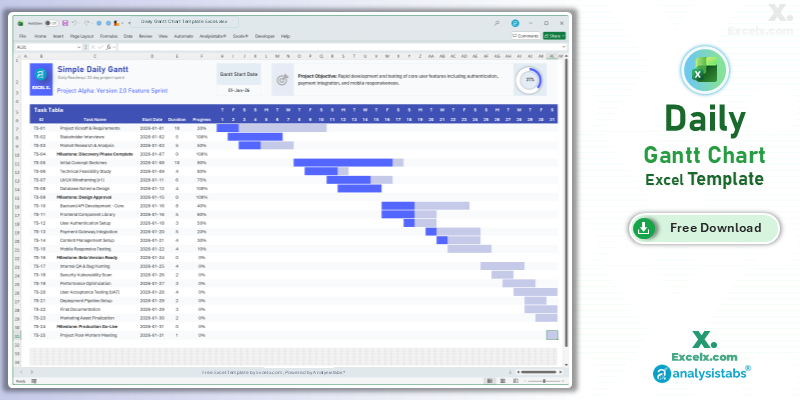
When your project enters a critical execution phase, high-level summaries aren’t enough—you need to see exactly what is happening every 24 hours. Our daily gantt chart template excel is engineered for these high-stakes periods. Whether you are managing a 30-day product launch, a construction site sprint, or a critical system migration, this simple project gantt chart template provides the granular visibility required to prevent delays before they happen. Optimized for US professional standards, it offers a crisp, day-by-day roadmap that keeps your team accountable and your stakeholders informed.
Free Daily Gantt Chart Excel Template: Download Now
If you are searching for a daily gantt chart template excel free of complex manual entry, this automated tool is our top recommendation for short-term execution. It streamlines your daily tracking by turning raw dates into a professional 31-day visual schedule instantly.
- Day-Level Precision: A dedicated 31-day view that eliminates guesswork, showing task start and end points with absolute clarity.
- Visual Progress Dashboard: Includes a master progress ring that aggregates task completion, giving you an instant health check of your 30-day phase.
- Automated Milestone Markers: Built-in logic highlights key deadlines (Milestones) within your task table to ensure critical dates are never missed.
Looking for a different timeline? Jump to a version:
How to Customize Your Simple Project Gantt Chart Template Excel
To maximize the effectiveness of your simple project gantt chart template excel xls, follow these targeted steps to configure the 31-day timeline for your specific project environment.
Step-by-Step Setup Instructions:
- Update Project Identity: Enter your project name in cell C3 to customize the report header.
- Define Success: Use the Project Objective field to clearly state what must be achieved by the end of this 30-day period.
- Set Your Timeline: Change the Gantt Start Date (C11) to your first day of work; all daily headers will shift automatically.
- Detail Your Tasks: Add up to 25 tasks or high-priority milestones into the Task Table.
- Update Visuals: Input the Start Date, Duration (in days), and Progress % for each task to trigger the automated Gantt bars and progress ring.
- Observe Protected Areas: We recommend keeping the sheets protected to maintain the integrity of the 31-day automation logic.
Need to customize the layout or add more tasks?
How to Build a Daily Gantt Chart in Excel
Developing a daily gantt chart template excel requires specific date-logic to handle day-by-day shifts accurately. Here are the professional standards used in this template:
- Sequence Automation: We use simple date addition (
=C11+1) across the header row to ensure the 31-day window moves as a single unit when you change the start date. - Dynamic Formatting: The Gantt bars are powered by conditional formatting that compares the task’s start and end dates against the timeline header, ensuring pixel-perfect accuracy.
- KPI Integration: The master progress ring at the top uses a weighted average of your task completions, providing an executive-level view of your daily momentum.
Choose More Gantt Chart Templates for Different Time Periods
Explore our other automated simple gantt chart template excel variants designed for different tracking needs across your business.
Hourly Gantt Chart Template Excel: For Precision Planning
When minutes count, our hourly gantt chart template excel provides 24-hour precision. It is the best simple project gantt chart template for event management or high-intensity shift planning.
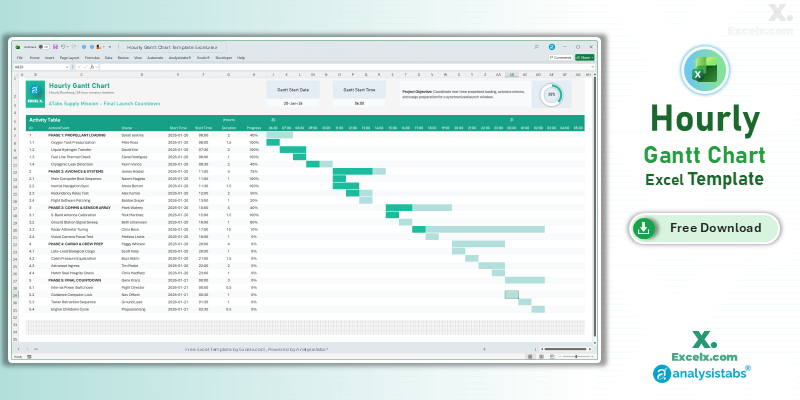
- 24-Hour Timeline: Precision tracking for time-sensitive launches and events.
- Shift Accountability: Dedicated columns to assign task owners and manage handovers.
- Mission Control View: Includes a progress ring for real-time status during live operations.
Read the Full Guide: How to Plan by the Hour
Simple Gantt Chart Template Excel Weekly: For Agile Sprints
The simple gantt chart template excel weekly version is optimized for software sprints and marketing campaigns spanning 4 to 12 weeks.
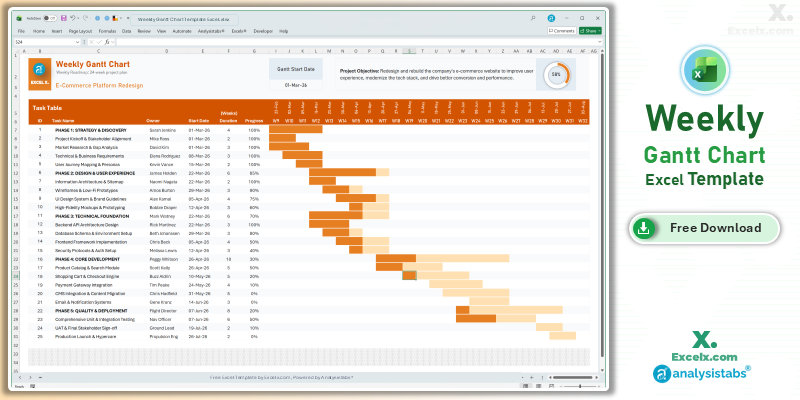
- Sprint Visibility: Clearly see task ownership and progress across a multi-week timeline.
- Balanced Detail: Provides enough granularity for weekly stand-ups without daily clutter.
- Accountability: Features an “Owner” column to streamline team coordination.
Read the Full Guide: Weekly Sprint Planning Guide
12-Month Annual Gantt Chart Template: Yearly Strategy
Strategic roadmapping requires a bird’s-eye view. The 12 month gantt chart template excel allows you to map out yearly objectives and quarterly goals on a single sheet.
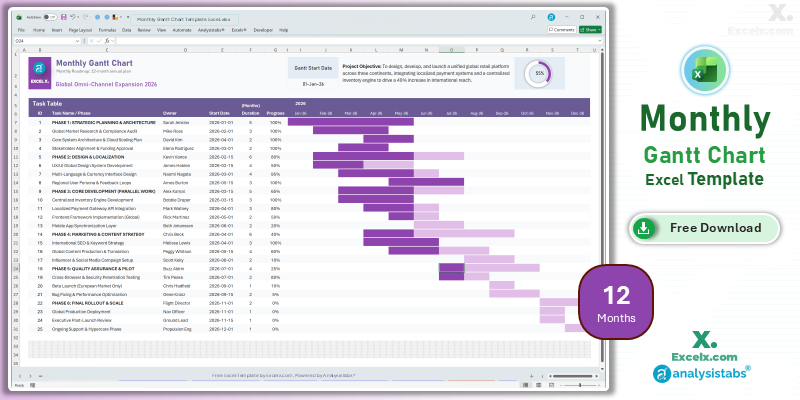
- Yearly Pacing: Visualize major deliverables and seasonal peaks for 2026.
- Strategic Alignment: Perfect for departmental heads coordinating long-term resources.
- Executive Ready: Clean, high-level visuals designed for boardroom presentations.
Read the Full Guide: Strategic Planning with Annual Gantt Charts
Simple Gantt Chart Templates
50+ Free PM Templates
100+ Free Excel Templates
Premium Gantt Chart Templates
150+ Premium Templates
Daily Scheduling FAQ
1. Can I track weekends in the daily view?
This template displays a continuous 31-day timeline. If your project includes weekend work, the bars will show progress on those days; if not, the daily gantt chart template excel remains a visual guide for the total elapsed time.
2. How do I change the color of the Gantt bars?
You can unprotect the sheet and use Excel’s Conditional Formatting manager to select a new fill color for the rule that generates the timeline bars.
3. Is this template optimized for 2026 projects?
Yes. All dates and automated logic are designed to handle current and future project years seamlessly.
Stop losing days to manual scheduling. Download our daily gantt chart template excel today and execute your project phases with precision. For advanced resource management and complex dashboards, visit Analysistabs.org.