
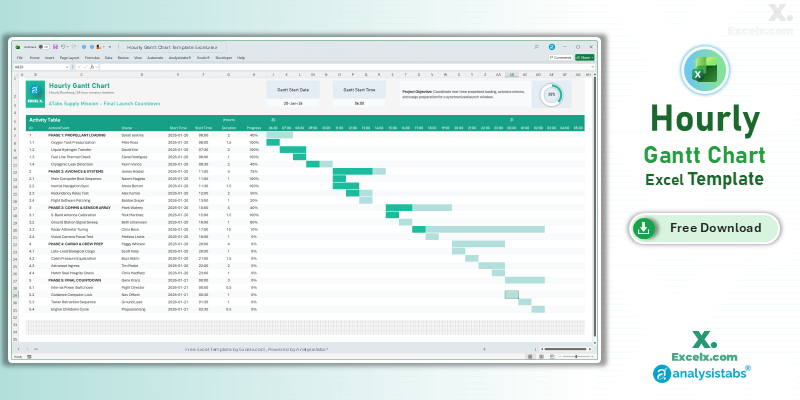
When every minute counts, a standard daily planner isn’t enough. Our hourly gantt chart template excel is specifically designed for high-precision projects. Whether you are managing a 24-hour production shift, a complex wedding timeline, or a corporate tech summit, this simple project gantt chart template provides the granular control you need to succeed in the US market.
Free Hourly Gantt Chart Excel Template: Download Now
If you are looking for the best hourly gantt chart template excel free of charge, this automated gantt chart excel template is our primary recommendation for granular tracking. It balances professional 24-hour automation with a clean design, ensuring your event or shift roadmap stays on track without the need for expensive software.
- Automated Progress Ring: Features a visual circular progress indicator for an instant high-level status overview.
- Phase-Based Organization: Group your 24-hour tasks into distinct project phases for better structural hierarchy.
- Shift & Owner Accountability: Dedicated columns to assign specific owners to time-sensitive tasks and manage shift handovers.
Looking for a different timeline? Jump to a version:
How to Customize Your Simple Project Gantt Chart Template Excel
To get the most out of your simple project gantt chart template excel xls, follow these quick steps to tailor it to your specific project needs. Understanding how to adjust your automated gantt chart excel template will save you hours of manual formatting.
Step-by-Step Setup Instructions:
- Update Project Title: Enter your specific project name in cell C3 to customize the header of the chart.
- Define Project Objective: Clearly state your project goals in the Project Objective field to keep your team aligned.
- Set Gantt Start Date & Time: Modify the Gantt Start Date and Start Time cells to automatically shift the timeline and precision columns.
- Input Your Tasks: You can add and track up to 25 individual tasks or milestones within the Activity Table.
- Manage Task Details: For each row, specify the Task Name, Start Time, Duration, and Progress percentage to update the visual bars and progress ring.
- Observe Protected Areas: We recommend keeping the sheets protected to avoid breaking the automated logic, but you can always unprotect them for deeper customization.
Need to customize the layout or add more tasks?
How to Build an Hourly Gantt Chart in Excel
If you are creating your own automated gantt chart excel logic, follow these professional tips used to build our templates:
- The Logic Formula: Use a formula to determine if a time slot column falls within the task range. Example:
=AND(Time_Header >= Start_Time, Time_Header < End_Time). - Time Math: Excel treats time as a fraction of 24. To create hour headers, add
1/24to each preceding cell. - Formatting: Use the “h:mm AM/PM” custom format to ensure the timeline is readable for US stakeholders.
Choose More Gantt Chart Templates for Different Time Periods
Explore our other automated simple gantt chart template excel variants designed for different tracking needs across your business.
Daily Project Gantt Chart Excel: Short-Term Task Tracking
For short-term tasks that require a day-by-day breakdown, the daily project gantt chart excel view is essential. This version helps you keep a tight grip on deadlines during high-stakes project phases.
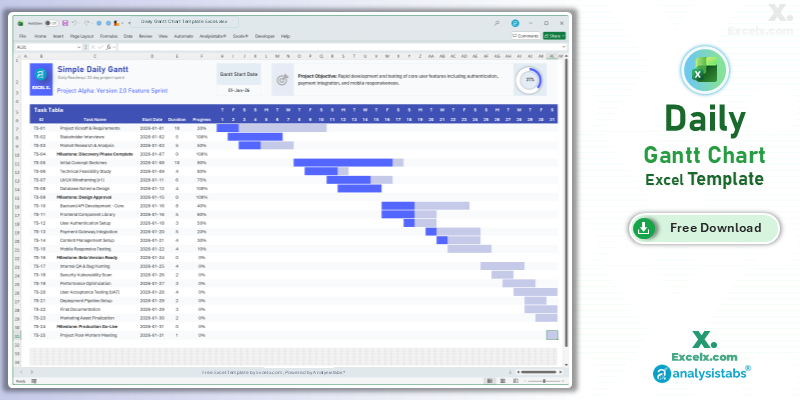
- Day-Level Granularity: See exactly what is happening every single day of the work week.
- Weekend Handling: Formulas are set up to include or skip weekends based on your project needs.
- Immediate Visuals: The timeline area updates in real-time as you adjust daily task durations.
Read the Full Guide: Daily Task Management Tips
Simple Gantt Chart Template Excel Weekly: For Agile Sprints
The simple gantt chart template excel weekly version is the standard for agile workflows, allowing you to review sprint progress at a glance.
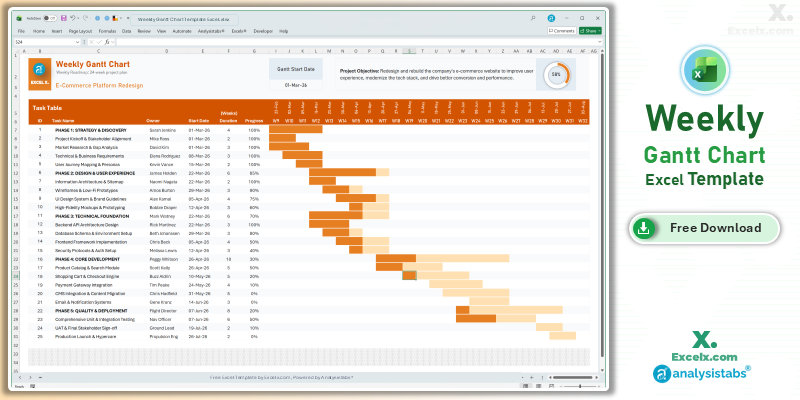
- Agile Sprint Tracking: Optimized for weekly stand-ups and sprint reviews.
- Dynamic Week Headings: Change your start date and all weekly column headers update automatically.
- Task Ownership: Dedicated columns to assign weekly responsibilities to specific team members.
Read the Full Guide: Weekly Sprint Planning Guide
12-Month Annual Gantt Chart Template: Yearly Strategy
For annual business cycles and 2026 marketing calendars, the 12 month gantt chart template excel is unmatched. It allows you to visualize your entire yearly plan on a single screen for board-level reporting.
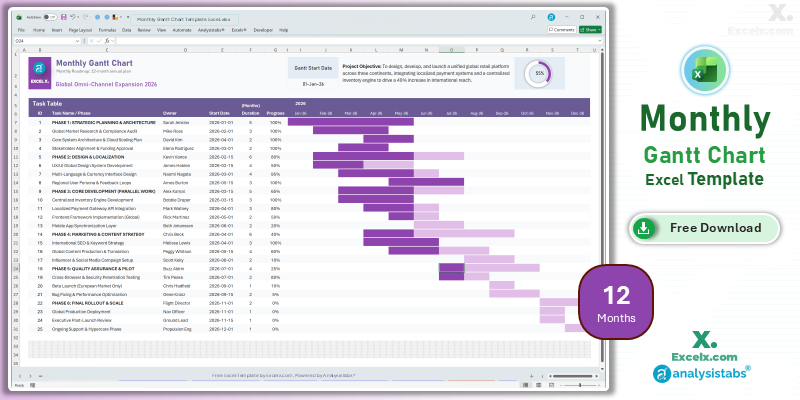
- Annual Strategy Mapping: Set and track major quarterly goals across a full 12-month period.
- High-Level Roadmaps: Perfect for tracking long-term deliverables without clutter.
- Resource Allocation: Identify “busy months” where multiple project phases overlap.
Read the Full Guide: Strategic Planning with Annual Gantt Charts
Simple Gantt Chart Templates
50+ Free PM Templates
100+ Free Excel Templates
Premium Gantt Chart Templates
150+ Premium Templates
Hourly Scheduling FAQ
1. Can I track multiple days on an hourly chart?
While this template is optimized as a high-intensity 24-hour mission timeline, you can track multiple days by using a separate tab for each 24-hour period to maintain maximum clarity.
2. How do I change the time to 15-minute or 30-minute increments?
Simply change the addition value in your header formula. For 30 minutes, use +(0.5/24). For 15 minutes, use +(0.25/24).
3. Is this template compatible with Google Sheets?
Absolutely. Simply upload the .xlsx file to your Drive. The automated gantt chart excel template logic remains fully functional in the cloud.
Stop wasting time with complex project management tools. Download our hourly gantt chart template excel today and take control of your schedule. For more advanced dashboards, visit Analysistabs.org.